Inside database data files (4/3+1): SQLite
SQLite data files read byte by byte on a real database: header, b-tree pages, records, free space, WAL and VACUUM, measured on Rocky Linux 10.2.
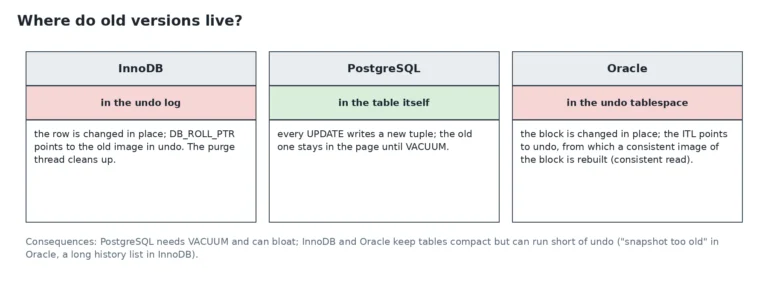
SQLite is the odd one out in this series: no server, no data directory, no background process. The SQLite data files fit in one ordinary file that you can read with a hex dump. This article extends the first three parts, InnoDB, PostgreSQL and Oracle with the three side by side. The table at the end replaces nothing: it adds a fourth column to the comparison.
I met SQLite inside other tools, for example ProxySQL, which keeps its configuration in a SQLite database. So I wanted to see the bytes. Everything below comes from a lab database: Tested on Rocky Linux 10.2, SQLite 3.46.1, WSL2. Also, I plan a deeper seven-part series, “SQLite from the inside”, for 2027. This one stays short and follows the same plan as the other three.
One file, up to three siblings
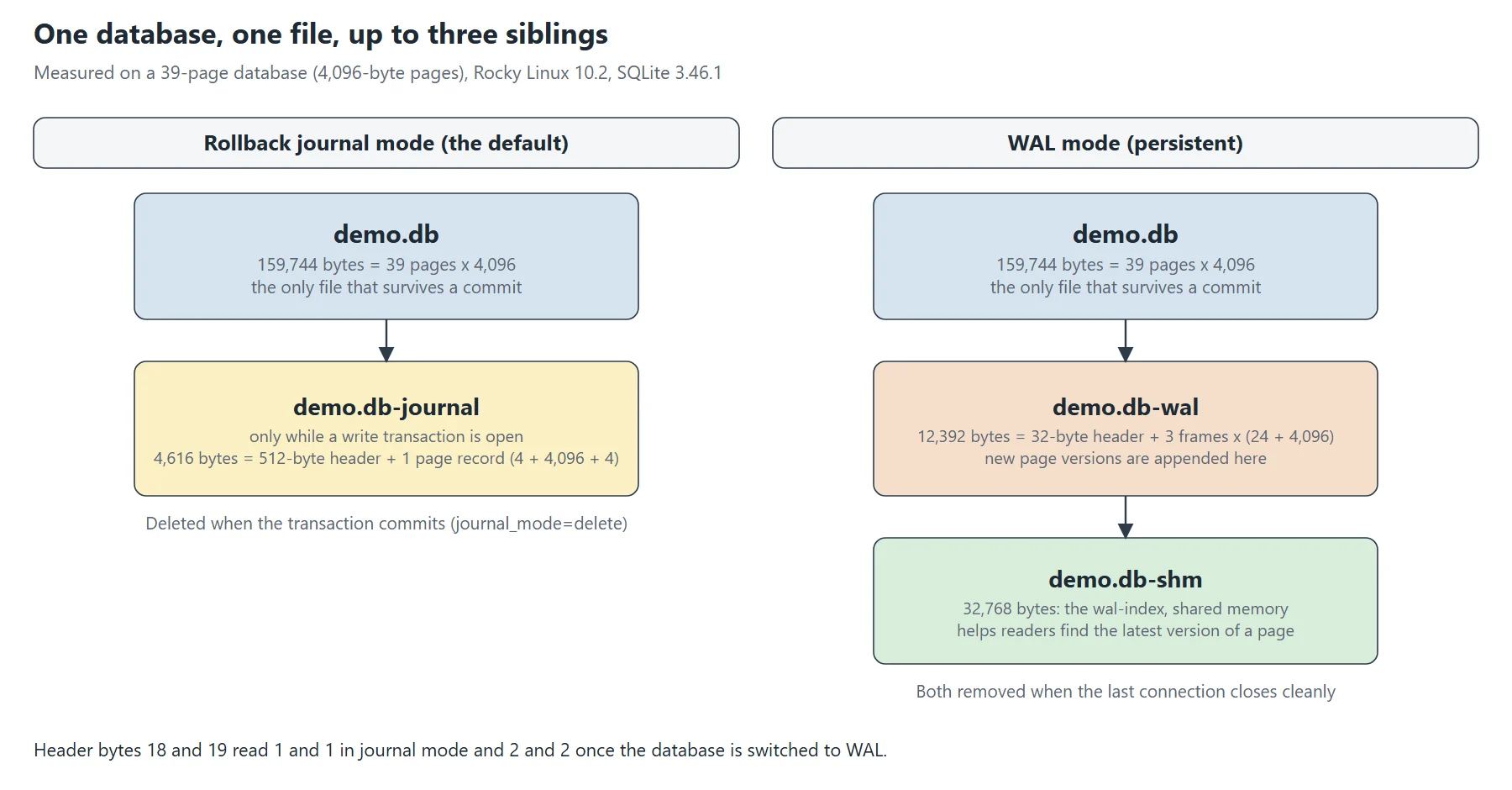
A SQLite database is a single file, and a program opens it directly. In the default mode, a second file appears only during a write transaction. It is the rollback journal, and it holds the original version of every page that the transaction changes.
-rw-r--r--. 1 root root 8192 Nov  2 21:21 demo.db
-rw-r--r--. 1 root root 4616 Nov  2 21:21 demo.db-journal
The journal is 4,616 bytes, so I checked its header. It says why: a 512-byte sector, then one page record of 4 + 4,096 + 4 bytes (page number, page, checksum). At COMMIT the journal disappeared. During the transaction, its first eight bytes, where the magic string belongs, still read zero. I did not test why, so I only report what I saw.
In WAL mode, two other files appear: the -wal file, where SQLite appends new page versions, and the -shm file, a 32 KiB index in shared memory. Unlike the other journal modes, WAL mode lives in the database header, so it survives a restart. Both files go away when the last connection closes cleanly, as the documentation says.
The 100-byte header
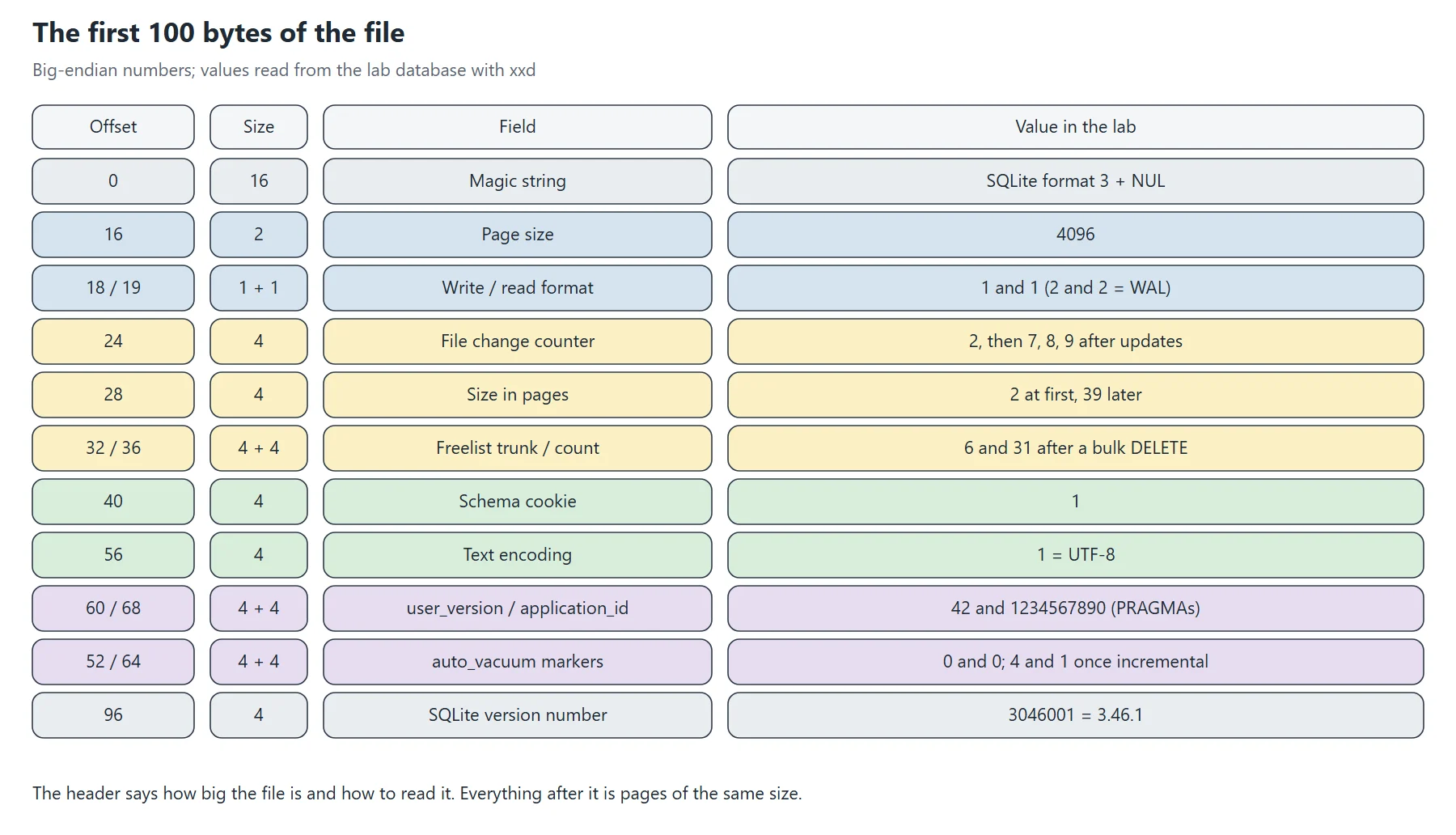
Every SQLite database file starts with a 100-byte header. The first 16 bytes are the text SQLite format 3 and a zero byte. Then come the page size, the file change counter, the size in pages, the freelist, the schema cookie, the text encoding and the version of the library that wrote the file. All numbers are big-endian.
$ xxd -l 32 demo.db
00000000: 5351 4c69 7465 2066 6f72 6d61 7420 3300  SQLite format 3.
00000010: 1000 0101 0040 2020 0000 0002 0000 0002  .....@  ........
Then I decoded the fields with a few lines of Python, and the command-line client agrees with them.
$ sqlite3 demo.db ".dbinfo"
database page size:  4096
file change counter: 2
database page count: 2
freelist page count: 0
schema cookie:       1
text encoding:       1 (utf8)
[...]
software version:    3046001
Two fields are free for you. PRAGMA user_version and PRAGMA application_id write directly into bytes 60 to 71: after I set 42 and 1234567890, the bytes read 0000 002a and 4996 02d2. Also, many tools use them to tag the format of a file.
Pages and b-trees in the SQLite data files
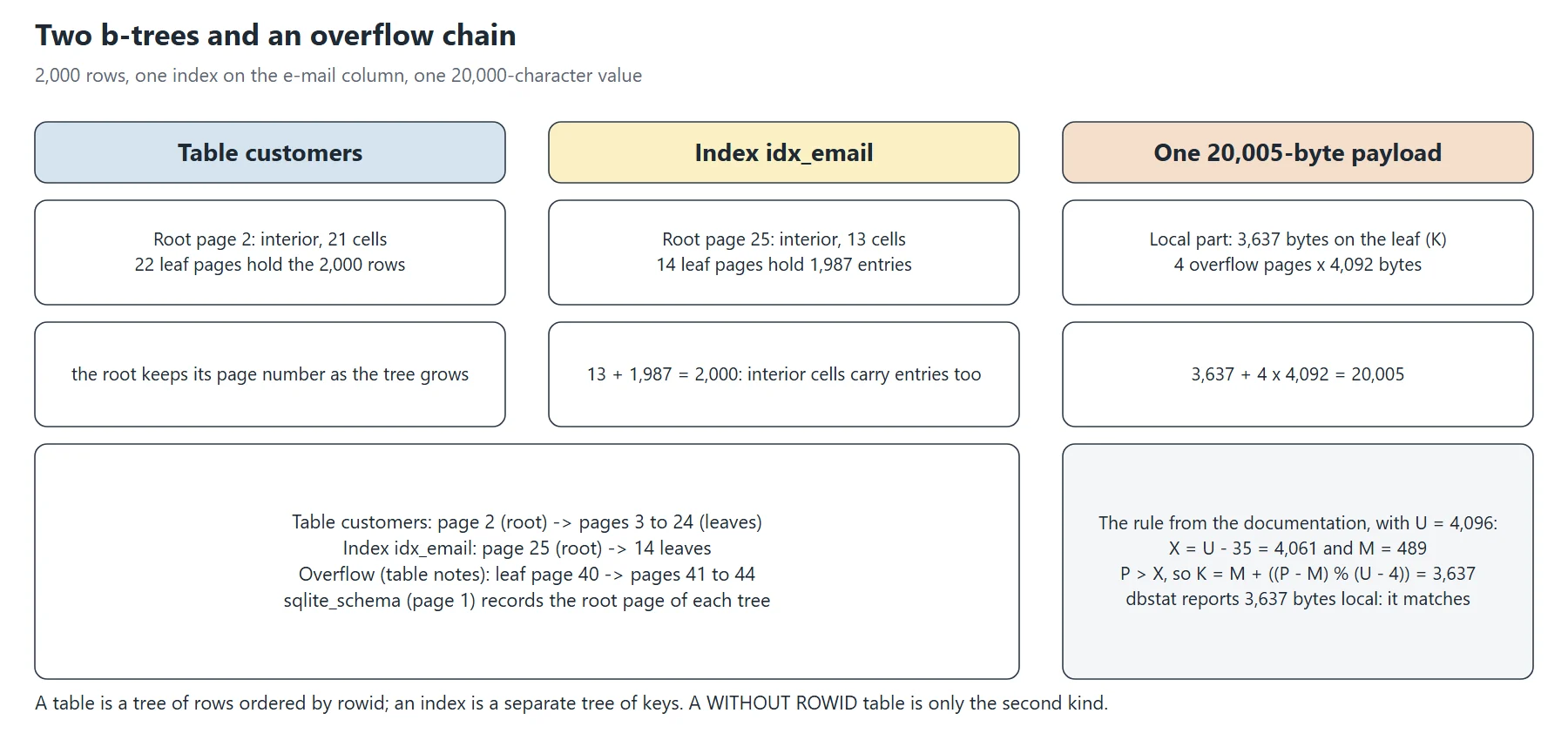
After the header, the file is a list of pages of the same size, here 4,096 bytes. Page 1 holds the header and the schema table, sqlite_schema. Every table is a b-tree keyed by its rowid, and every index is another b-tree. Each tree has a root page, whose number sits in sqlite_schema. That number never changed in my tests, even while the tree grew. The dbstat virtual table, compiled into the Rocky package, counts the pages of each tree.
name|pagetype|pages|cells|payload|unused
customers|internal|1|21|0|3917
customers|leaf|22|2000|77781|2282
idx_email|internal|1|13|316|3677
idx_email|leaf|14|1987|48449|2822
sqlite_schema|leaf|1|2|186|3794
With 2,000 rows, the table needed one interior page and 22 leaves. The index is a separate tree with one interior page and 14 leaves. In an index, the interior cells carry entries as well: 13 + 1,987 gives the 2,000 keys. However, a table interior page only carries keys and child pointers.
A table declared WITHOUT ROWID uses one tree, ordered by its primary key. A normal table with a text key needs two trees, the table and an automatic index.
type|name|tbl_name|rootpage
table|kv|kv|45                      -- WITHOUT ROWID: one tree
table|kv2|kv2|46                    -- rowid table with a TEXT primary key: the table...
index|sqlite_autoindex_kv2_1|kv2|47 -- ...and a second tree for the key
Finally, large values leave the page. With a 20,000-character value, the leaf kept 3,637 bytes and four overflow pages carried the rest, 4,092 bytes each. The documentation gives the rule, with U = 4,096 and a payload P = 20,005: X = U – 35 = 4,061 and M = 489. Because P is larger than X, the local part is K = M + ((P – M) % (U – 4)) = 3,637. That is exactly what dbstat reports.
name|pageno|pagetype|ncell|payload|unused|mx_payload
notes|40|leaf|1|3637|441|20005
notes|41|overflow|0|4092|0|0
notes|42|overflow|0|4092|0|0
notes|43|overflow|0|4092|0|0
notes|44|overflow|0|4092|0|0
Anatomy of a page
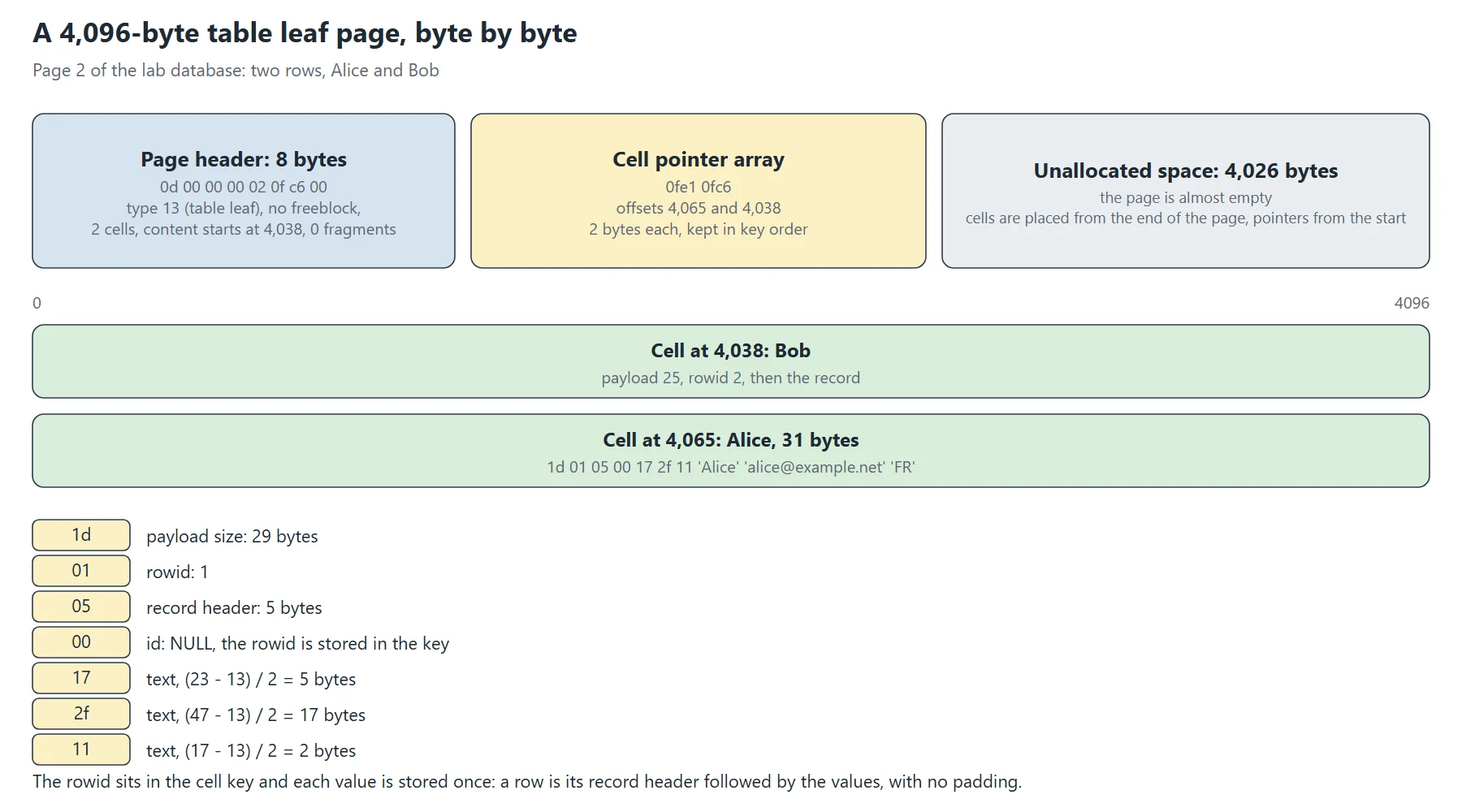
A b-tree page has an 8-byte header on a leaf (12 on an interior page), then an array of 2-byte pointers to the cells. SQLite writes the cells themselves from the end of the page, so the free space sits in the middle. On page 2 of the lab, the first byte is 0d (a table leaf), there are 2 cells, and the content starts at offset 4,038.
$ xxd -s 4096 -l 16 demo.db
00001000: 0d00 0000 020f c600 0fe1 0fc6 0000 0000  ................
$ xxd -s 8128 -l 64 demo.db        # the end of page 2, where the cells live
00001fc0: 0000 0000 0000 1902 0500 132b 1142 6f62  ...........+.Bob
00001fd0: 626f 6240 6578 616d 706c 652e 6e65 7444  bob@example.netD
00001fe0: 451d 0105 0017 2f11 416c 6963 6561 6c69  E...../.Aliceali
00001ff0: 6365 4065 7861 6d70 6c65 2e6e 6574 4652  ce@example.netFR
Freed space inside the content area becomes a freeblock, a small linked list in the page. Also, gaps of 1 to 3 bytes count only as fragmented bytes in the header.
A record, byte by byte
A cell holds a payload size, a rowid and a record. Sizes and rowids are varints: 1 to 9 bytes, 7 bits at a time, and the high bit means that another byte follows. The record starts with its header size, then one serial type per column. A type of 13 or more and odd means text, and the length is (type – 13) / 2. Type 0 means NULL. Here the id column is the rowid, so SQLite stores NULL and keeps the value in the cell key.
1d 01 05 00 17 2f 11 41 6c 69 63 65 61 6c 69 63 65 40 65 78 61 6d 70 6c 65 2e 6e 65 74 46 52
|  |  |  |  |  |  '----- 'Alice' 'alice@example.net' 'FR' (5 + 17 + 2 bytes)
|  |  |  |  |  '-- serial type 17: text of 2 bytes
|  |  |  |  '----- serial type 47: text of 17 bytes
|  |  |  '-------- serial type 23: text of 5 bytes
|  |  '----------- serial type 0: NULL (id is the rowid)
|  '-------------- record header: 5 bytes
'----------------- rowid 1, payload of 29 bytes (1d is the payload size, 01 the rowid)
SELECT rowid, id, name, email, country FROM customers returns 1|1|Alice|alice@example.net|FR, so the decoding is right.
UPDATE and DELETE on disk
Nothing in the SQLite data files works like an undo store. SQLite changes the page itself, and it keeps the old version in the journal or the WAL. Each committed change bumps the file change counter in the header. A same-size UPDATE rewrote the value in place, with the same cell count and the same free space, but the counter went from 7 to 8.
-- page 3 is the first leaf of customers
before          change counter 7   page 3: ncell 102, payload 3655, unused 25    page_count 39
same-size UPDATE        counter 8   page 3: ncell 102, payload 3655, unused 25
larger UPDATE           counter 9   page 3: ncell  89, payload 3242, unused 490   page_count 40
The larger UPDATE did more. The page was nearly full, so it had to split: page 3 went from 102 to 89 cells, the file grew by one page, and the root gained a pointer. So a row that grows can cost a page.
A DELETE frees the cell and turns its space into a freeblock. The Rocky package ships with SECURE_DELETE compiled in, so PRAGMA secure_delete returns 1 and the freed bytes are zeroed. With the pragma off, two matches for the e-mail address stayed in the file.
$ sqlite3 del.db "PRAGMA secure_delete;"
1
-- page 3 header after DELETE FROM customers WHERE id=5:
cells 101 | first freeblock offset 3921 | fragmented bytes 0
freeblock at 3921: next 0, size 36 bytes
its bytes: 00 00 00 24 00 00 00 00 00 00 00 00 [...] 00 00 00 00     <- zeroed
$ grep -a -c "user5@example.net" del.db       # secure_delete on
0
$ sqlite3 del2.db "PRAGMA secure_delete=OFF; DELETE FROM customers WHERE id=5;"
$ grep -a -c "user5@example.net" del2.db      # secure_delete off
2
Why the SQLite data files do not shrink
When a whole page empties, it joins the freelist, which header bytes 32 to 39 describe. The file keeps its size. After a DELETE of 1,800 rows, 31 pages out of 39 were free, and the file was still 159,744 bytes. VACUUM rebuilt it in 32,768 bytes.
before DELETE         page_count 39   freelist_count 0    size 159744
DELETE ... id > 200   page_count 39   freelist_count 31   size 159744   (header bytes 32-39: 0000 0006 0000 001f)
after VACUUM          page_count 8    freelist_count 0    size 32768
With auto_vacuum set to incremental, you can give pages back in steps. Header byte 52 then holds the largest root page, and byte 64 turns to 1. Page 2 becomes a pointer map, made of 5-byte entries: a type and a parent page. dbstat skips that page.
PRAGMA auto_vacuum=INCREMENTAL; VACUUM;    -> header byte 52 = 4, byte 64 = 1
DELETE ... id > 200                         page_count 40  freelist_count 31  size 163840
PRAGMA incremental_vacuum(5);               page_count 35  freelist_count 26  size 143360
PRAGMA incremental_vacuum;                  page_count  9  freelist_count  0  size  36864
page 2 (pointer map) starts: 01 00000000 | 01 00000000 | 05 00000003 | 05 00000003 | ...
One page type is in the documentation but not in my tests: the lock-byte page, which exists only when a file exceeds 1 GiB.
The WAL
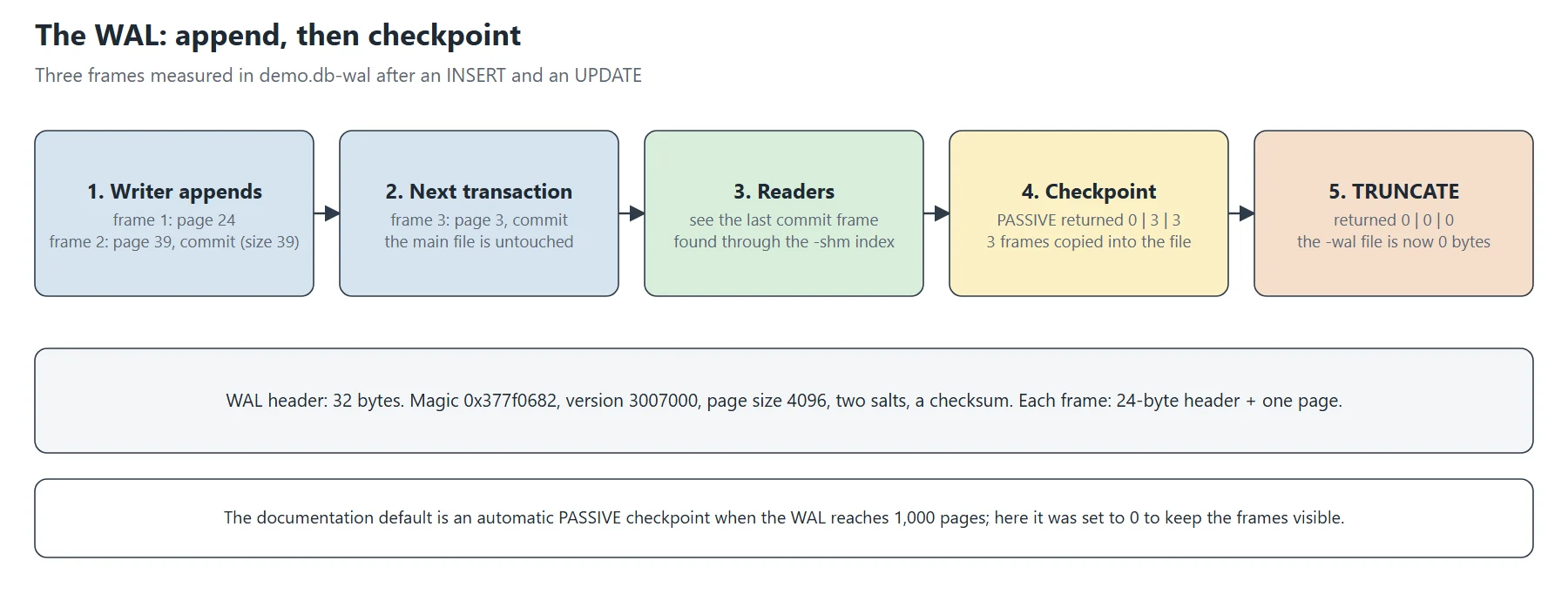
In WAL mode, the SQLite data files change in a different order: a writer appends frames to the -wal file first. Each frame is a 24-byte header followed by one page. A frame with a non-zero size field is a commit. Then readers use the last commit and the shm index to find the right version of each page.
-rw-r--r--. 1 root root 159744 Nov  2 21:23 wal.db
-rw-r--r--. 1 root root  32768 Nov  2 21:23 wal.db-shm
-rw-r--r--. 1 root root  12392 Nov  2 21:23 wal.db-wal
WAL magic       : 0x377f0682
format version  : 3007000
page size       : 4096
checkpoint seq  : 0
file size       : 12392 bytes = 32 + 3 frames x (24 + 4096)
  frame 1: page 24, commit-size-after 0 (not a commit frame)
  frame 2: page 39, commit-size-after 39
  frame 3: page 3, commit-size-after 39
A checkpoint copies the frames into the main file. A PASSIVE checkpoint did it without touching the WAL file, while TRUNCATE emptied it. I disabled the automatic checkpoint to keep the frames visible; the default triggers one at 1,000 pages.
PRAGMA wal_checkpoint(PASSIVE);     -> 0|3|3     (busy, frames in the WAL, frames copied)  -wal still 12392 bytes
PRAGMA wal_checkpoint(TRUNCATE);    -> 0|0|0                                              -wal now 0 bytes
last connection closes              -> demo.db-wal and demo.db-shm are gone
The four engines side by side
Here is how the SQLite data files compare with the first three parts, using defaults.
| InnoDB | PostgreSQL | Oracle | SQLite | |
|---|---|---|---|---|
| Where the data lives | tablespace files, one per table by default | one file per table or index, in segments | datafiles inside tablespaces | one file for everything |
| Unit of I/O | 16 KB page | 8 KB page | block, 8 KB by default | page, 4,096 bytes here |
| Row layout | clustered index: the table is the primary key tree | heap, indexes point to it | block with a row directory and a ROWID | b-tree keyed by rowid, or by key for WITHOUT ROWID |
| Old versions | undo logs, separate | inside the table, cleaned by VACUUM | undo tablespace | none: the journal or the WAL keeps them until commit |
| Crash safety | redo log and doublewrite buffer | WAL and full-page writes | redo logs | rollback journal or WAL |
| Reclaiming space | rebuild the table | VACUUM, VACUUM FULL | shrink, move | VACUUM, incremental_vacuum |
The closest cousin of SQLite here is PostgreSQL for the WAL, and InnoDB for the tree. However, the big difference is that no server process stands between your program and the file, so the file format and the operating system’s file locks carry the guarantees.
Sources
SQLite documentation: database file format
SQLite documentation: write-ahead logging
SQLite documentation: PRAGMA statements
SQLite documentation: the dbstat virtual table
The recorded outputs come from my own lab: Rocky Linux 10.2, SQLite 3.46.1, WSL2.
This post is part of a series of sysadmin notes (tag “sysadmin notebook”).
Series “Inside database data files”, part 4/3+1. · ← Previous post
Related articles
Inside database data files (1/3): InnoDB, from MySQL to MariaDB
Inside database data files (2/3): PostgreSQL
Inside database data files (3/3): Oracle, and all three side by side