Inside database data files (3/3): Oracle, and all three side by side
Last part of the series: Oracle. I don’t run Oracle at home: this post draws on my work as a DBA and on Oracle’s documentation, not on my servers. Oracle is the oldest of the three engines, and the most explicit about its structure: it carefully separates the logical view (tablespaces, segments, extents, blocks) from the physical files, and exposes almost everything through dictionary views.
Logical structure and physical files
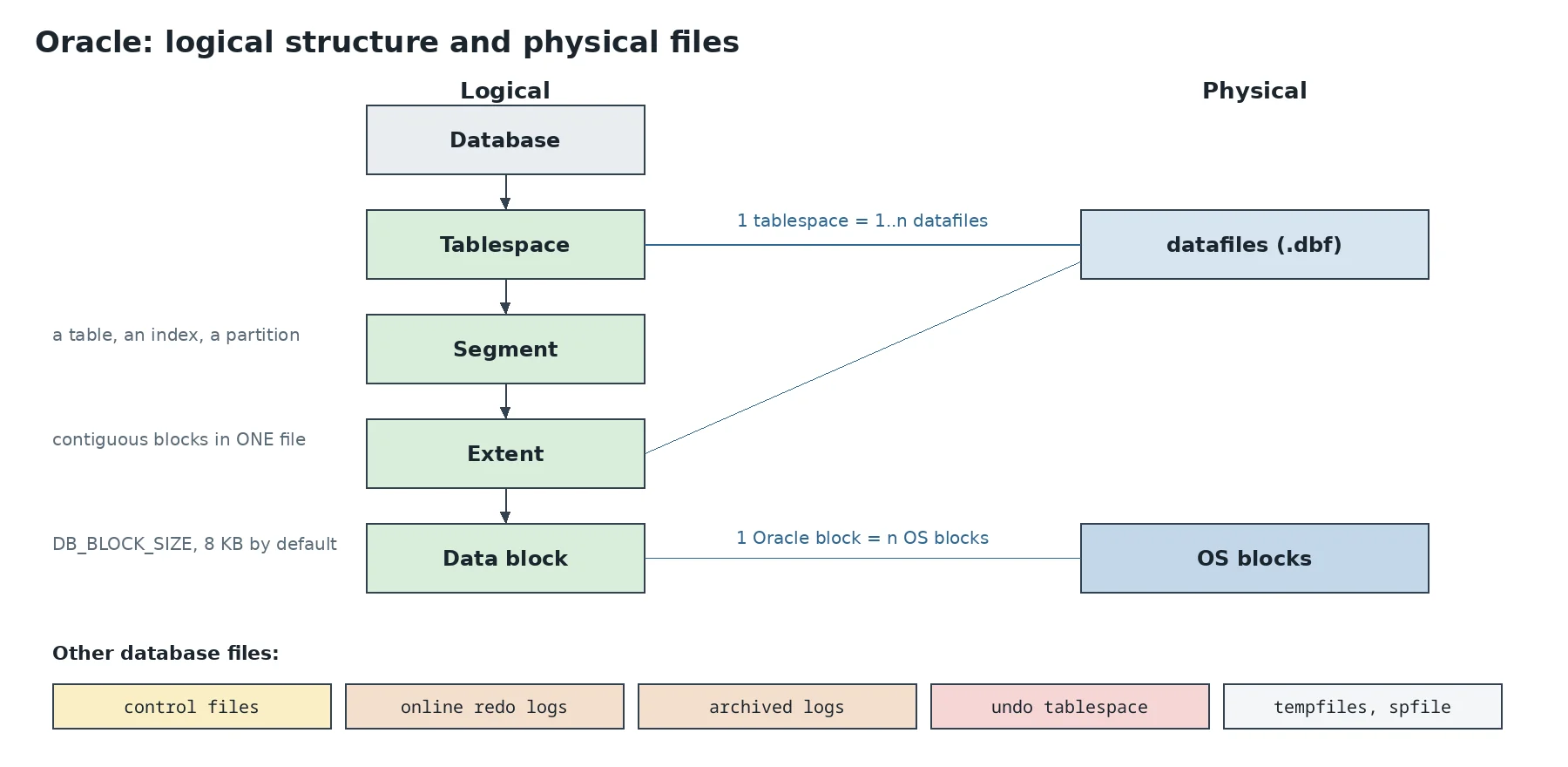
An Oracle database is made of several families of files:
- datafiles hold the data. A tablespace groups one or more datafiles, and a datafile belongs to a single tablespace;
- control files are the database’s map: the list of datafiles and logs, the SCN (the database’s global version number) of the last checkpoint, the RMAN backup history. They’re multiplexed across several disks, since without them the database won’t start;
- online redo logs form a circular log, organised in groups of identical files (members). When a group is full, Oracle moves on to the next (log switch). In
ARCHIVELOGmode, each full group is copied to an archived log before reuse: that’s what enables point-in-time recovery; - the undo tablespace keeps before-images of modified data;
- tempfiles serve sorts and joins that don’t fit in memory; they’re neither logged nor backed up;
- the spfile holds the instance parameters, and the password file allows remote administrator connections.
SELECT tablespace_name, file_name, bytes/1024/1024 AS mb, autoextensible FROM dba_data_files;
SELECT group#, members, bytes/1024/1024 AS mb, status FROM v$log;
SELECT name FROM v$controlfile;
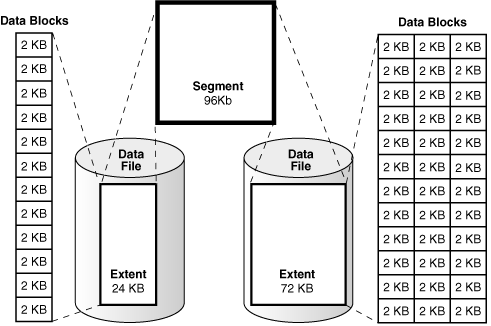
On the logical side, a segment is an object that takes up space: a table, an index, a partition, a LOB. A segment is made of extents, each formed of contiguous blocks in a single datafile. A segment can therefore spread across several files, extent by extent. Finally, the block is the I/O unit, 8 KB by default (DB_BLOCK_SIZE, set when the database is created).
SELECT segment_name, segment_type, extents, blocks FROM dba_segments WHERE owner = 'SHOP';
SELECT extent_id, file_id, block_id, blocks FROM dba_extents
WHERE owner = 'SHOP' AND segment_name = 'ORDERS' ORDER BY extent_id;
Inside a datafile
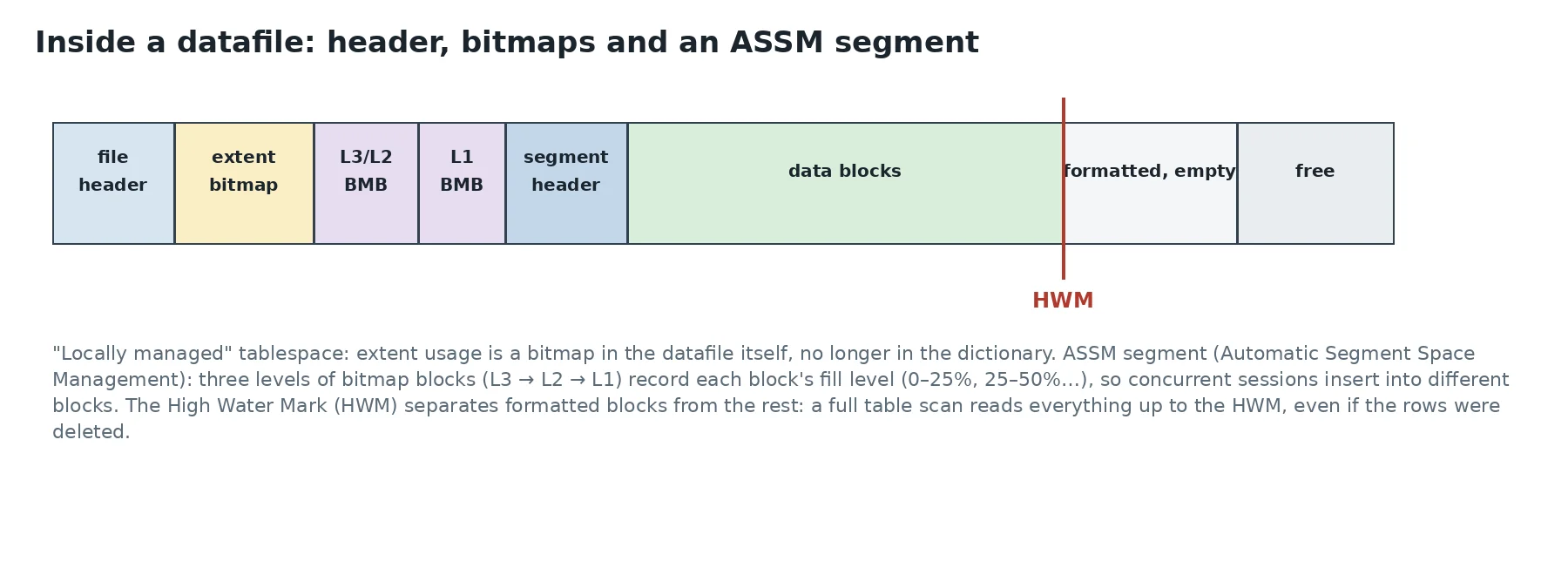
Each datafile starts with its header (file identity, last checkpoint SCN, backup state), then, in a locally managed tablespace (the normal case today), a bitmap recording which extents are used. Previously that information lived in dictionary tables, which caused contention on allocation. There are two allocation policies: UNIFORM (every extent the same size) and AUTOALLOCATE, where Oracle picks larger and larger extents as the segment grows (64 KB, then 1 MB, then 8 MB…).
In an ASSM segment (Automatic Segment Space Management, the default), three levels of bitmap blocks describe each data block’s fill level, in 25% bands. A session inserting looks for a block with enough room in those bitmaps, and different sessions are steered to different blocks, so they don’t fight over the same one. The segment header keeps the extent map and the High Water Mark (HWM), the boundary of formatted blocks. A full table scan reads every block up to the HWM, even empty ones: after a big DELETE, ALTER TABLE orders SHRINK SPACE (or MOVE) brings the HWM back down.
Anatomy of a block
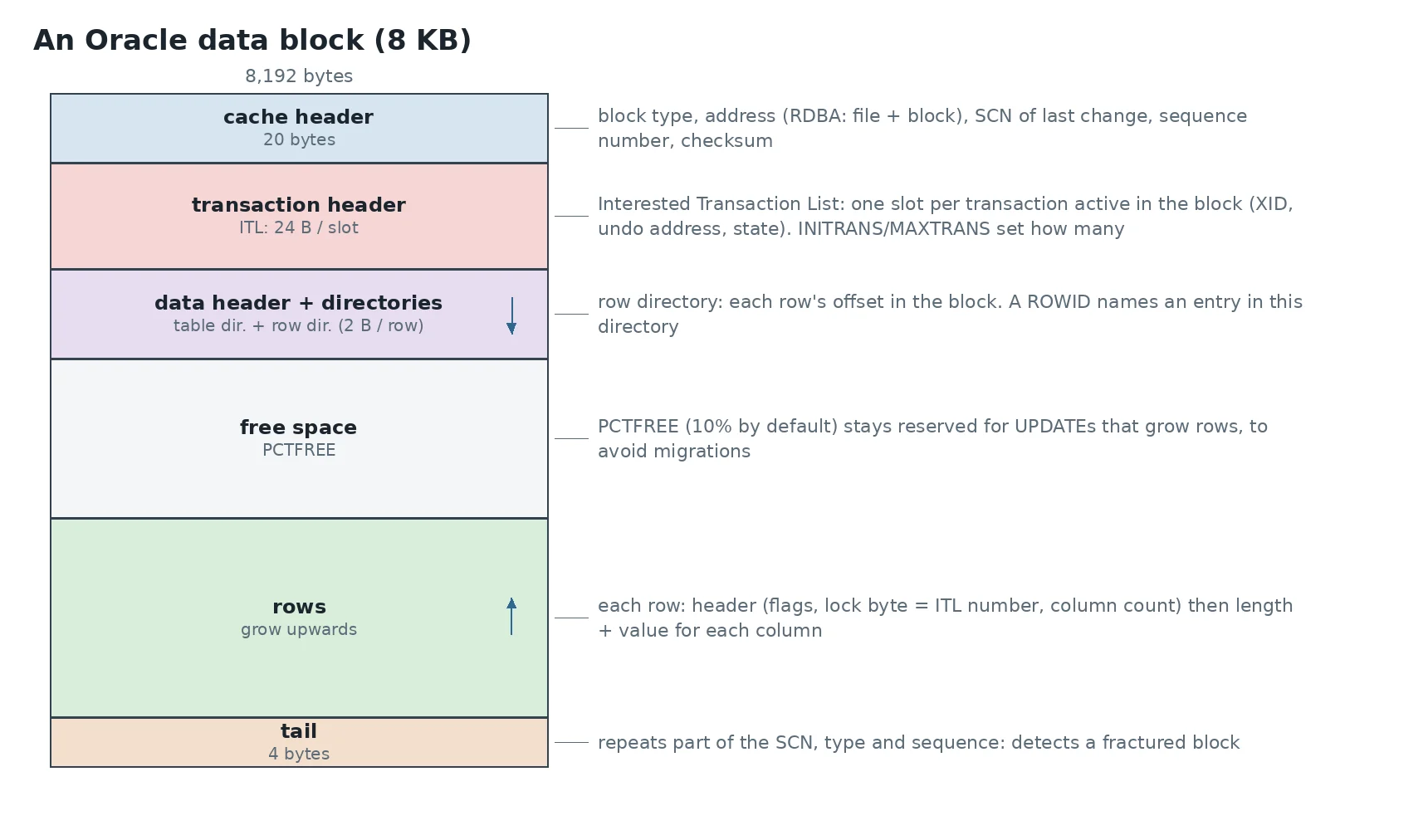
- The cache header (20 bytes) identifies the block: type, address (the RDBA, file and block number), SCN of the last change, checksum. With
DB_BLOCK_CHECKSUM=TYPICAL, the checksum is verified on every read from disk; - the ITL (Interested Transaction List) is specific to Oracle: one 24-byte slot per transaction modifying the block, with its ID (XID), its undo address and its state.
INITRANSsets how many slots are reserved when the block is created. If all are taken and the block has no room to add one, a new transaction waits: that’s theenq: TX - allocate ITL entrywait, fixed by raisingINITRANSon highly concurrent tables; - the row directory gives each row’s offset in the block, two bytes per row. A ROWID names an entry in this directory, which, as in PostgreSQL, lets a row move within the block without changing its address;
- PCTFREE (10% by default) reserves free space for
UPDATEs that lengthen rows. Without it, a growing row no longer fits its block and has to migrate: it moves to another block and leaves a pointer behind. Every ROWID read then costs two blocks. A row too big for any block is chained across several. Thetable fetch continued rowstatistic measures both; - the tail (4 bytes) repeats part of the header’s SCN, type and sequence: a block whose head and tail don’t match was half written (a fractured block). Oracle has no doublewrite: the case is detected on read, and the block is repaired from an RMAN backup and the logs (
RECOVER ... BLOCK). During a manual hot backup (BEGIN BACKUP), Oracle writes full block images into redo on first change, like PostgreSQL’sfull_page_writes.
A row and its ROWID
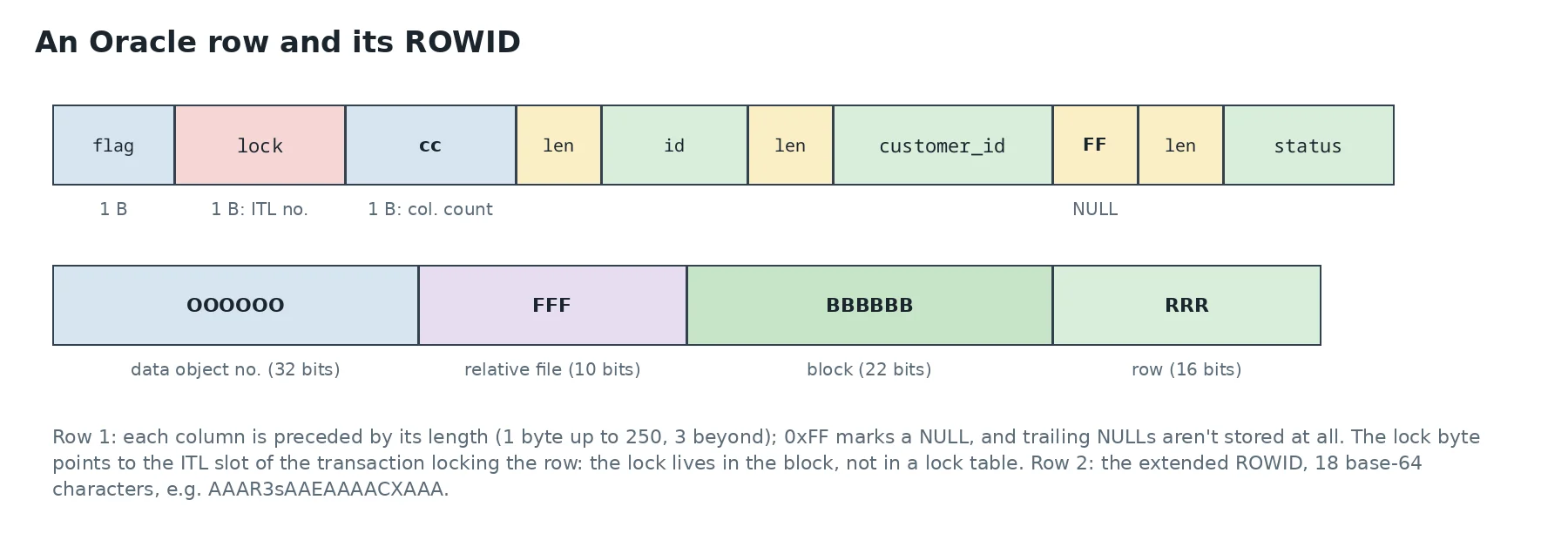
A row starts with three bytes: flags, the lock byte and the column count. Then, for each column, its length and its value. NULLs in the middle of a row cost one byte (0xFF), and trailing NULLs aren’t stored at all. Putting often-null columns last therefore saves space.
The lock byte is the most elegant detail of the format: when a transaction modifies a row, it writes the number of its slot in the block’s ITL there. The row lock is thus stored in the block itself, with no in-memory lock table: locking a million rows costs no more memory than locking one. Another transaction wanting the same row reads the ITL, finds the owning transaction and waits for it to finish.
The ROWID is a row’s physical address: object number, file number relative to the tablespace, block number, row number in the directory. It’s the fastest access path there is, and it’s what B-tree indexes contain. The DBMS_ROWID package decodes it:
SELECT rowid,
       dbms_rowid.rowid_object(rowid)       AS obj,
       dbms_rowid.rowid_relative_fno(rowid) AS file#,
       dbms_rowid.rowid_block_number(rowid) AS block#,
       dbms_rowid.rowid_row_number(rowid)   AS row#
FROM shop.orders WHERE id = 7;
To see a block’s raw contents, ALTER SYSTEM DUMP DATAFILE 4 BLOCK 151; writes its full description (headers, ITL, every row in hex) to the session’s trace file. Keep it for a test database: it’s very instructive, but it’s not a production tool.
Consistent reads: undo
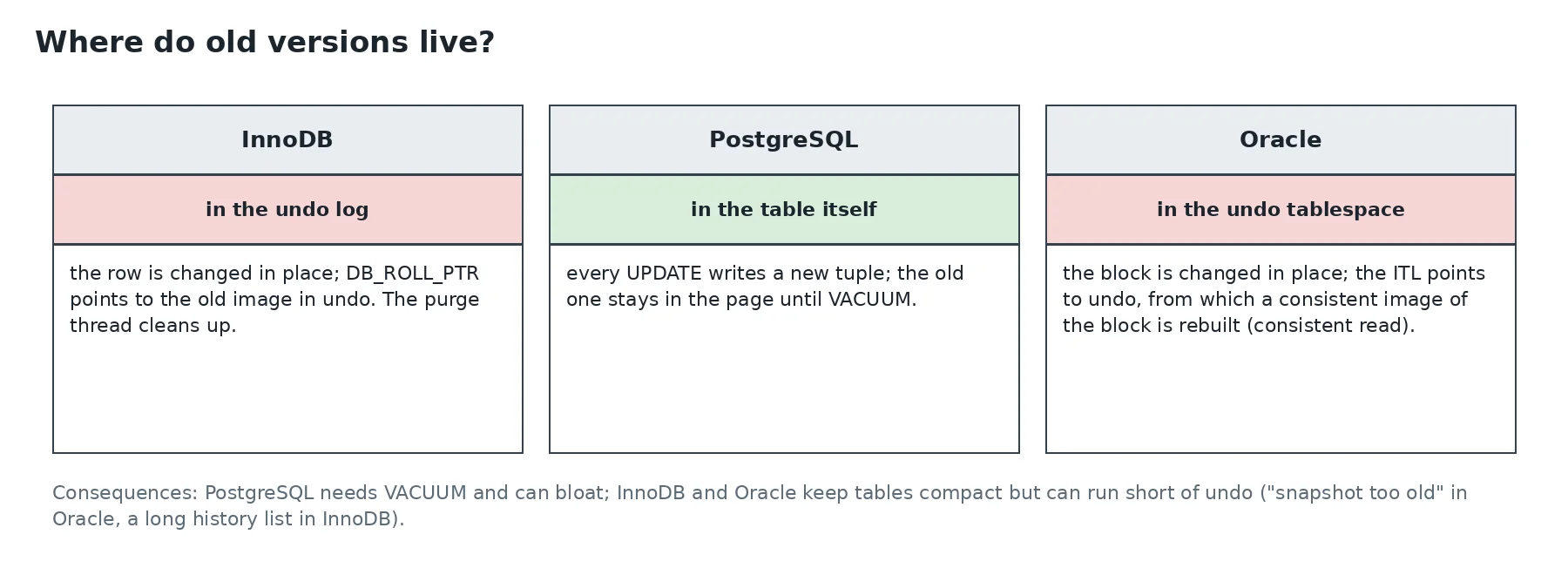
Like InnoDB, Oracle changes blocks in place and keeps the before-image in undo. When a query starts, it notes the current SCN. If it hits a block changed after that SCN, it makes a copy in memory and applies, backwards, the undo records the ITL points to, until it gets the block as it was at its starting SCN: that’s a consistent read. Readers never block writers, nor the reverse.
The downside: if the needed undo has already been overwritten by newer transactions, the query fails with ORA-01555: snapshot too old. UNDO_RETENTION says how long Oracle should try to keep undo, provided the undo tablespace is big enough. Another phenomenon, a cousin of PostgreSQL’s hint bits: delayed block cleanout. After a big COMMIT, Oracle doesn’t revisit every modified block, and the next SELECT cleans up the ITL entries… and generates redo, to everyone’s surprise.
The three engines side by side
| InnoDB | PostgreSQL | Oracle | |
|---|---|---|---|
| Page size | 16 KB | 8 KB | 8 KB (2 to 32 KB) |
| Table organisation | primary key B+tree | heap | heap by default, IOT optional |
| Row address in an index | primary key | ctid (page, slot) | ROWID (object, file, block, row) |
| Old versions | undo log | in the table | undo tablespace |
| Cleanup | purge thread | VACUUM | undo reuse |
| Torn pages | doublewrite buffer | full_page_writes (WAL) | block check + RMAN recovery |
| Row locks | in memory (lock system) | xmax in the tuple | lock byte → block ITL |
None of these choices is better in absolute terms. InnoDB’s clustered index makes primary key lookups unbeatable but penalises random keys. PostgreSQL’s heap makes updates simple and rollbacks instant, at the cost of VACUUM. Oracle’s and InnoDB’s separate undo keeps tables compact, but means sizing the undo. Knowing how data is laid out on disk means knowing which of these trade-offs you’re paying, and when.
This post is part of a series of sysadmin notes (tag “sysadmin notebook”).
Series “Inside database data files”, part 3/3. · ← Previous post · Version française