LanceDB cleanup: 13.4 GiB to 5.8 GiB, and the versions it costs
LanceDB cleanup tested on a copy of a real table: 13.43 GiB down to 5.78 GiB in two calls, and the old versions you can no longer open.
I ran the cleanup on a copy of my own LanceDB table, and an AI assistant (Claude, from Anthropic) helped me write the test script and draft this article. The numbers below are the real output of that run, with LanceDB 0.41.0, on a copy of the table from the previous article. The original table was never touched.
Quick answer
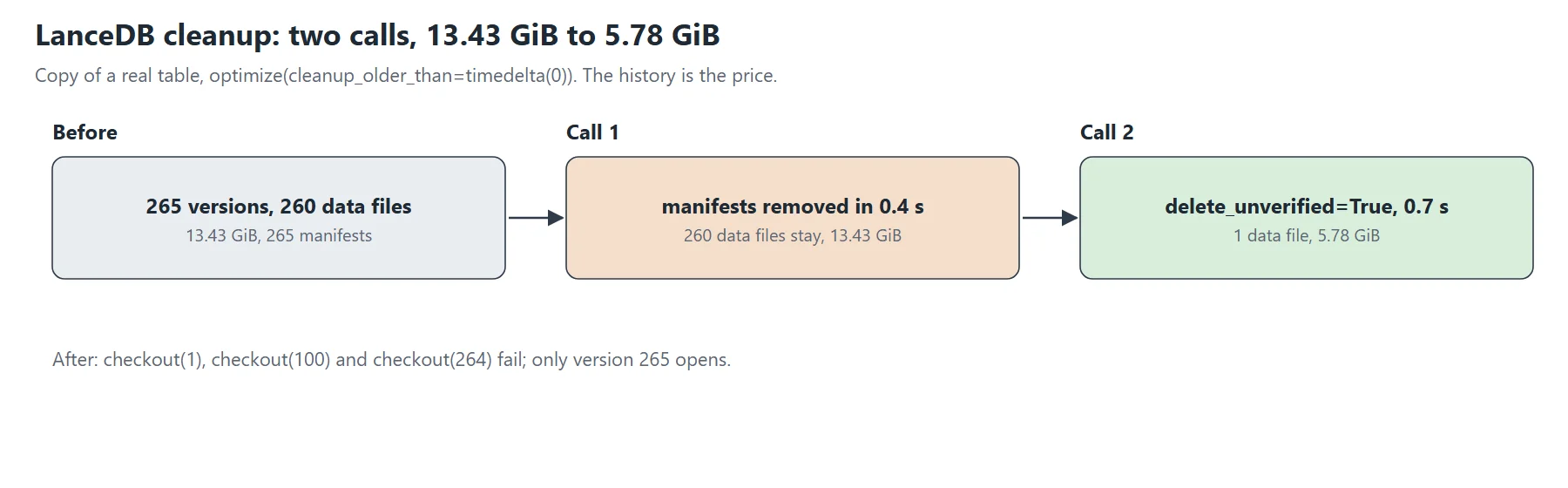
A LanceDB cleanup takes two calls. The first one, optimize(cleanup_older_than=timedelta(0)), removes the manifests of the 264 old versions in 0.4 seconds, but it leaves all 259 old data files on disk, and the directory stays at 13.43 GiB. A second call with delete_unverified=True removes those files in 0.7 seconds and the directory falls to 5.78 GiB, which is the size of the current version. The price is the history: before the cleanup I could open version 1 (2,697 rows), version 100 (371,946 rows) and version 264 (1,130,595 rows), and afterwards only version 265 opens. The 265 transaction files stay where they are.
The LanceDB cleanup test
I copied the whole table directory, 13.43 GiB in 260 data files, 265 manifests and 265 transaction files, to a separate folder and opened the copy with the Python API. The script measures the directory, opens a few old versions with checkout, calls optimize, measures again, and tries the same old versions. The LanceDB project documents optimize, and the Python docstring of optimize describes the two parameters I used.
First call: the manifests go, the data stays
I called table.optimize(cleanup_older_than=timedelta(0)). Python printed a warning that this value removes every version except the latest and that a reader or writer still using an older version will fail. The call returned None after 0.4 seconds. Then I measured again:
before   versions listed 265   data files 260   data 13.43 GiB   _versions 2.39 MiB   _transactions 265 files
after    versions listed   1   data files 260   data 13.43 GiB   _versions 0.02 MiB   _transactions 265 files
The history is gone, and this LanceDB cleanup has not given the space back. The docstring of delete_unverified explains why: files left by a failed transaction can look like an in-progress write, so they are not deleted unless they are at least 7 days old. My data files date from 3 November, three days before the test. That matches what I saw, but I did not test it with older files, so it remains my reading of the documentation.
Second call: the data files go
I then called table.optimize(cleanup_older_than=timedelta(0), delete_unverified=True), which took 0.7 seconds:
after versions listed 1 data files 1 data 5.78 GiB _versions 0.02 MiB _transactions 265 files
The directory went from 13.43 GiB to 5.78 GiB, and the row count of version 265 is still 1,130,595. The docstring warns that this setting must only be used when no other process works on the table, otherwise the table could end up corrupted. I did not test a concurrent reader or writer.
What a LanceDB cleanup costs: time travel
Before the cleanup, checkout(1) gave 2,697 rows, checkout(100) gave 371,946 rows and checkout(264) gave 1,130,595 rows. After it, each of these calls fails with ValueError: Version N no longer exists. Was it cleaned up?, and only checkout(265) works. Keep that in mind before you schedule a cleanup with a zero delay on a table where you rely on old versions to go back after a bad write. The function takes a delay, so a longer cleanup_older_than keeps the recent versions, and I did not test that value.
What stays behind
The _transactions/ directory still holds its 265 files, about 57 KiB, and the table version number is still 265, because the cleanup does not create a version. The _versions/ directory holds the manifest of version 265 and the 15-byte hint file.
What I did not test
I tested one table, once, on a local disk. I did not test a delay longer than zero, a table on object storage, a concurrent reader, or the compaction options of optimize. The files in the copy were three days old, so the 7-day behavior comes from the documentation and from one observation, not from a controlled comparison.
Official documentation
The Lance versioning page and the Lance table layout describe versions and directories, and the LanceDB project documents the Python API.