How-to: install CrowdSec, block at the firewall and never ban yourself
Install CrowdSec, choose collections, set what it reads, allowlist your own addresses and enforce bans in the firewall, simulating before you ban.
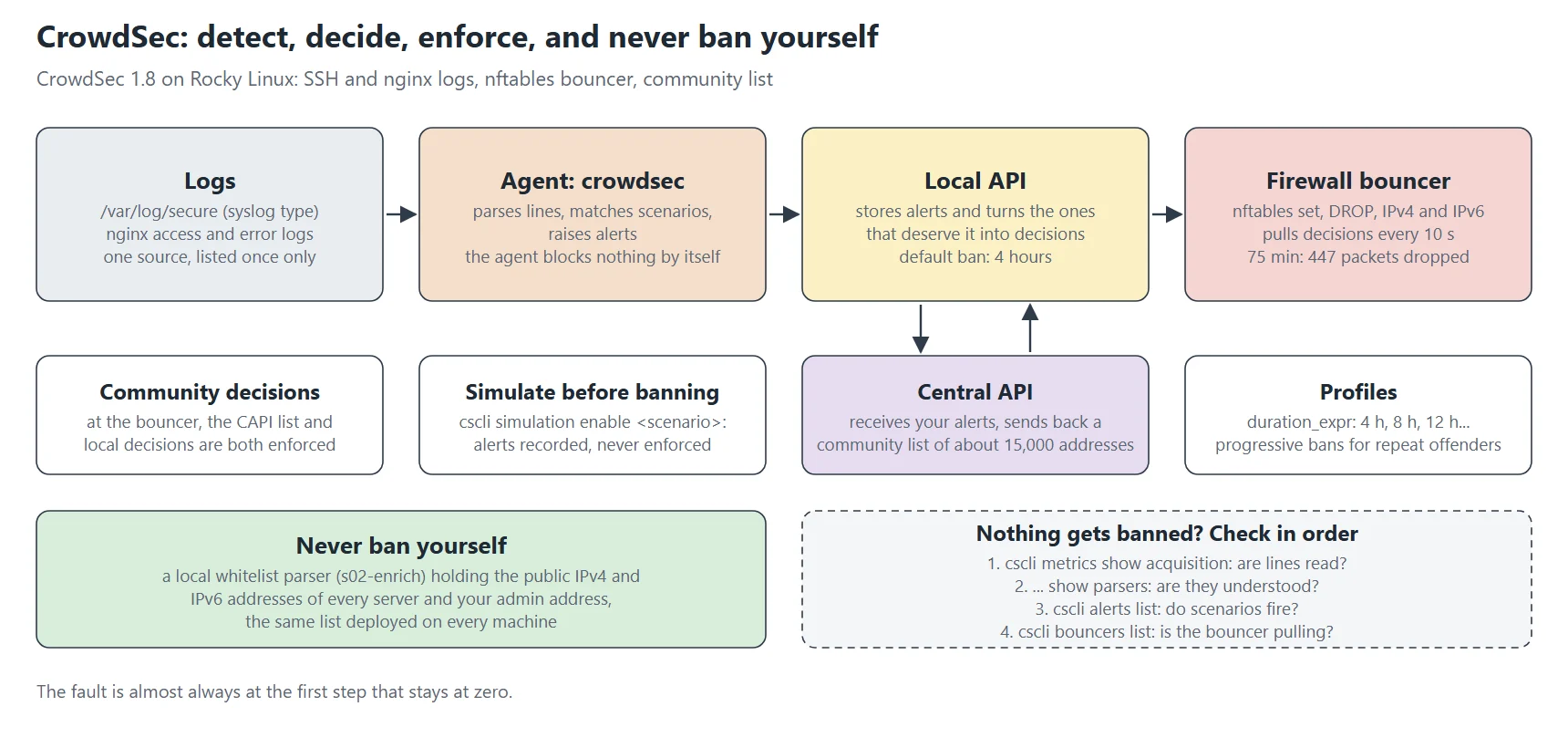
CrowdSec detects and decides but blocks nothing by itself: without a bouncer, nobody enforces its decisions. This tutorial installs CrowdSec 1.8 on Rocky Linux, plugs it into SSH and nginx, adds firewall blocking with the nftables bouncer, and shows how not to ban yourself, which happens faster than you’d think.
People often describe CrowdSec as "a modern fail2ban". That’s partly true: it too reads logs and bans aggressive addresses. But it adds richer scenarios that recognise a web path scan, a distributed dictionary attack or a known vulnerability exploit, instead of just counting lines, and collective intelligence: every installation reports the attacks it sees, and gets back a list of addresses already spotted elsewhere, blocked before they even reach you.
The pieces of the puzzle
| Piece | Role |
|---|---|
the agent (crowdsec) | reads logs, parses them, matches them against scenarios, raises alerts |
| the local API (LAPI) | stores alerts and turns those that deserve it into decisions (ban this address for so long) |
| bouncers | enforce decisions: firewall (nftables), web server, application |
| the central API (CAPI) | receives your reports and sends back a community blocklist |
| the Hub | the catalogue of collections, parsers and scenarios, installed with cscli |
Important point: the agent blocks nothing. Without a bouncer, CrowdSec detects and decides, but nobody enforces it. It’s the most common mistake on a first install.
Step 1: install
CrowdSec publishes its packages in a packagecloud repository. Declare it in /etc/yum.repos.d/ with its GPG key, then:
dnf install crowdsec crowdsec-firewall-bouncer-nftables
systemctl enable --now crowdsec
cscli version
At install time, the package detects the services present (sshd, nginx…) and installs the matching collections. Check what it chose rather than trust it: cscli collections list.
A precaution on Debian: if you install CrowdSec and the bouncer in the same command on a fresh machine, the bouncer’s post-install script can run before the local API is ready and fail to register. Install the agent, wait for it to start, then the bouncer. The full story is in my CrowdSec 1.8 on Debian article, which also covers leaving the distro package.
Step 2: collections
cscli collections install crowdsecurity/linux crowdsecurity/sshd crowdsecurity/nginx
cscli collections list
systemctl reload crowdsec
A collection bundles parsers (which can read a log format) and scenarios (which recognise a behaviour). crowdsecurity/nginx thus brings the nginx log parser and about ten scenarios: path scans, probes for sensitive files, admin page hunting, aggressive crawlers. Collections are updated with cscli hub update && cscli hub upgrade, to be scheduled daily.
Step 3: telling CrowdSec what to read
The acquisition configuration lists sources and their type, which decides the parser used:
# /etc/crowdsec/acquis.yaml
filenames:
  - /var/log/secure
labels:
  type: syslog
---
filenames:
  - /var/log/messages
labels:
  type: syslog
---
# /etc/crowdsec/acquis.d/nginx.yaml
filenames:
  - /var/log/nginx/*.log
labels:
  type: nginx
labels.type: syslog for system logs (sshd writes there on Rocky Linux), nginx for access and error logs;
one source, once only: the classic trap is to list the nginx logs both in acquis.yaml and in acquis.d/nginx.yaml. The agent then reads each line twice, every counter doubles, and bans fall twice as fast. Same with a journalctl source added on top of a file that already holds the same lines;
wildcards (*.log) follow new sites automatically.
To check that CrowdSec actually reads and understands the lines:
cscli metrics show acquisition parsers
# "Lines read" grows, "Lines parsed" too; lots of "unparsed" = wrong type
Step 4: never ban yourself
This is the part not to skip. CrowdSec has no reason to trust your own addresses: a monitoring script that gets a run of 403s, failed SSH test logins, a server querying its own public names… and it’s your own server the firewall drops. I’ve had both: a server that banned itself for “HTTP probing”, and another that banned my admin workstation’s address while I was checking SSH keys.
The answer is a local whitelist, as an enrichment parser:
# /etc/crowdsec/parsers/s02-enrich/local-whitelist.yaml
name: local/whitelists
description: "Trusted addresses, never banned"
whitelist:
  reason: "my servers and my admin address"
  ip:
    - "203.0.113.25"
    - "203.0.113.40"
    - "2001:db8::25"
    - "198.51.100.10"
Put in it the public addresses of each of your servers (IPv4 and IPv6) and your admin access address, and deploy the same list on every machine: a personal infrastructure where each server can ban the others always ends up doing it. A whitelist applies before the scenarios, so CrowdSec raises no alert. It doesn’t remove a decision already made: cscli decisions delete --ip … does that.
Step 5: enforcing decisions in the firewall
cscli bouncers add firewall-bouncer # prints a key to copy into the bouncer's configuration
# /etc/crowdsec/bouncers/crowdsec-firewall-bouncer.yaml (excerpt)
mode: nftables
update_frequency: 10s
api_url: http://127.0.0.1:8081/
api_key: <key generated by cscli bouncers add>
disable_ipv6: false
deny_action: DROP
supported_decisions_types:
  - ban
nftables:
  ipv4:
    enabled: true
    table: crowdsec
  ipv6:
    enabled: true
    table: crowdsec6
mode: nftables: the bouncer creates its own nftables tables and sets, independent of firewalld. Banned addresses live in a set, which stays fast even with tens of thousands of entries;
update_frequency: every 10 seconds, the bouncer fetches new decisions;
deny_action: DROP: the packet is dropped without an answer, the attacker learns nothing;
IPv6: enable it explicitly; an attacker with both address families will otherwise go through the unfiltered one.
systemctl enable --now crowdsec-firewall-bouncer
cscli bouncers list                    # recent "Last API pull"
nft list set ip crowdsec crowdsec-blacklists-cscli | head
Step 6: the community list
cscli capi register
cscli console enroll <console key>      # optional: web dashboard
cscli capi status
systemctl restart crowdsec
Once registered, the agent sends its scenarios’ alerts (address and scenario, never log contents) and receives a blocklist of about fifteen thousand addresses, refreshed regularly. That’s what makes the biggest everyday difference: most bots sweeping the Internet are blocked from their first packet. cscli decisions list --origin CAPI | wc -l gives the size of the list received.
Simulate before banning
A new scenario, or a new server, can be put in simulation: alerts and decisions are recorded but flagged “simulated”, and no bouncer enforces them. It’s the way to see what CrowdSec would have blocked over a week, before handing it the door.
cscli simulation enable crowdsecurity/http-crawl-non_statics
cscli simulation status
cscli alerts list --since 24h
Day-to-day operation
cscli alerts list --since 24h           # what was detected
cscli decisions list                    # who is banned, for how long
cscli decisions delete --ip 192.0.2.66   # lift a ban
cscli decisions add --ip 192.0.2.99 --duration 72h --reason 'manual'
cscli metrics                           # sources, parsers, scenarios, bouncers
The default ban lasts four hours; a profile (profiles.yaml) can lengthen it for repeat offenders or ban a whole range rather than one address.
One hour of a real server
These are my web server’s numbers on 2 November 2026, 75 minutes after a reboot (CrowdSec 1.8.2, nftables bouncer 0.0.36). First, what the agent read:
# cscli metrics show acquisition          (excerpt)
| Source                                      | Lines read | Lines parsed | Lines unparsed | Poured to bucket | Whitelisted |
| appsec:appsec                               | 136        | 136          | -              | 136              | -           |
| file:/var/log/messages                      | 1.31k      | -            | 1.31k          | -                | -           |
| file:/var/log/nginx/access.blog...log       | 716        | 716          | -              | 42               | 528         |
| file:/var/log/nginx/access.log              | 8.03k      | 8.03k        | -              | 4.29k            | 1.76k       |
Lines parsed equal to Lines read on the web logs: the nginx parser understands every line. If a log shows everything under unparsed, the collection is missing or the log format was customised.
/var/log/messages: 1.31k unparsed: expected. Most syslog lines aren’t security events and no parser claims them. SSH and authentication events live in /var/log/secure, acquired by its own entry: 3 020 lines read, 39 parsed, which is exactly the point, since only failed logins and similar events concern CrowdSec.
Whitelisted: requests from my own addresses and from the monitoring probes, ignored on purpose (step 4).
Poured to bucket: lines that fed a scenario. Most never become an alert; a bucket only overflows when the behaviour repeats.
Then the enforcement side, which is the only proof that protection is real:
# cscli bouncers list
 crowdsec-firewall-bouncer  127.0.0.1  ✔️  2026-11-02T10:21:35+01:00  v0.0.36
 openresty-appsec           127.0.0.1  ✔️  2026-11-02T10:21:37+01:00  v1.2.3

# nft list set ip crowdsec crowdsec-blacklists-CAPI      → 14 752 IPv4 addresses
# nft list set ip6 crowdsec6 crowdsec6-blacklists-CAPI   → 475 IPv6 addresses
# nft list set ip crowdsec crowdsec-blacklists-crowdsec  → 8 local decisions

# nft list counters table ip crowdsec
counter processed                     packets 1286809
counter crowdsec-blacklists-CAPI      packets 387   → dropped
counter crowdsec-blacklists-crowdsec  packets 60    → dropped
In 75 minutes, 447 packets were dropped before reaching any service: 387 from addresses on the community list, which had never touched this server, and 60 from the 8 addresses my own server had banned. The Last API pull column, a few seconds old for both bouncers, is the first thing to look at when bans seem to have no effect: a bouncer that stopped pulling keeps enforcing a frozen list.
Lengthening bans: profiles.yaml
The profile decides what an alert turns into. The default one bans the address for four hours. You can make it progressive, as with fail2ban, based on the number of decisions already made against that address:
# /etc/crowdsec/profiles.yaml
name: default_ip_remediation
filters:
  - Alert.Remediation == true && Alert.GetScope() == "Ip"
decisions:
  - type: ban
    duration: 4h
duration_expr: Sprintf('%dh', (GetDecisionsCount(Alert.GetValue()) + 1) * 4)
on_success: break
filters: the profile only applies to alerts that call for a remediation and target an IP address;
duration_expr: 4 hours the first time, 8 the second, 12 the third… The computation uses the local API’s history, so it survives restarts;
on_success: break: following profiles aren’t evaluated. The order of profiles in the file matters.
Common failures
Nothing ever gets banned
Check in order: cscli metrics show acquisition (are lines read?), cscli metrics show parsers (are they understood?), cscli alerts list (do scenarios fire?), cscli bouncers list (does the bouncer fetch decisions?). The fault is almost always at the first step that stays at zero.
The bouncer won’t start, “unauthorized”
The bouncer’s key matches no key in the local API, typically after a reinstall that wiped the database. Delete the entry (cscli bouncers delete), recreate it and copy the key again.
The local API listens on a port already taken
By default, the local API listens on 8080, a very popular port. Change it in config.yaml (api.server.listen_uri) and in local_api_credentials.yaml, then in every bouncer’s configuration. Forgetting one of the three gives an agent that starts but whose tools no longer talk to anyone.
Parsers don’t understand SSH logs
Recent OpenSSH versions log under the name sshd-session instead of sshd. If the parsers don’t keep up, authentication failures stop being recognised altogether. A cscli hub upgrade usually settles it; check with cscli explain --file /var/log/secure --type syslog, which shows line by line which parser accepted or rejected it.
Upgrading without surprises
upgrade the agent, then check cscli metrics and the bouncer list before touching the bouncers;
read the release notes: version 1.8, for example, changed how some fields are exposed to scenarios;
after a hub update, a cscli hub upgrade can replace a scenario you edited by hand. Local changes go into your own files, never the hub’s.
What about fail2ban?
The two coexist fine, and that’s what I do: fail2ban reacts fast to my own logs with progressive bans, CrowdSec adds web scenarios and the community list. The only drawback: when an address stays blocked, you must look on both sides (fail2ban-client status and cscli decisions list).
Going further
CrowdSec can also inspect HTTP request contents with its AppSec engine and block attacks right in the web server. That’s the subject of an upcoming tutorial in this series, with OpenResty.
This post is part of a series of sysadmin tutorials (tag “how-to”).
Series “How-to”, tutorial 9/77. · ← Previous tutorial · Next tutorial → (coming 9 Nov) · Version française
Official documentation
CrowdSec, project site
CrowdSec documentation, installation, collections, bouncers
Firewall bouncer, the component that enforces the decisions
fail2ban, the project the comparison in this tutorial refers to