CrowdSec 1.8 on Debian: leaving the distro package, the postinst trap and a protection checklist
Moving a Raspberry Pi from Debian’s CrowdSec 1.4.6 to the official 1.8.1: backup, purge, the postinst wizard trap, and a seven-point check that it really protects.
CrowdSec protects all my servers: it reads logs, detects hostile behaviour (SSH brute force, web scans…) and has offending addresses blocked by a “bouncer” at the firewall. Five Rocky Linux machines were already on 1.8.1, installed from CrowdSec’s official repository. That left the Raspberry Pi doing DNS and DHCP, on Debian 12, with 1.4.6 from the Debian repositories. This article covers the whole move to the official packages: why and how to reinstall, the postinst trap that duplicated my log sources, and the checklist that tells you the machine is really protected.
At a glance
| Problem | Cause | Fix |
|---|---|---|
| Debian ships 1.4.6, years behind 1.8.1 | Distro package, not the official repository | Reinstall from the official repository |
apt upgrade can’t switch packages | crowdsec-firewall-bouncer and crowdsec-firewall-bouncer-nftables ship the same files | Back up, purge, reinstall |
| Fresh install fails with “no datasource enabled” | CROWDSEC_SETUP_UNATTENDED_DISABLE=true leaves CrowdSec with no log source | Seed acquis.yaml before the first install |
| Duplicate log sources, useless collections | A half-configured package re-runs the wizard without the variable | dpkg --configure -a and clean the leftovers |
| Services “active” but is it protecting? | Running does not mean reading the right logs or blocking | A seven-point checklist |
Leaving the distro package
Why not keep the Debian version
- 1.4.6 is years behind: scenarios, parsers and the community list have moved on a lot since;
- a uniform fleet: one Ansible role, one version, one behaviour to know;
- the Debian bouncer (0.0.25) needed workarounds (systemd service type, a stray config file) that the official version no longer requires.
Why reinstall rather than upgrade
You can’t just add the CrowdSec repo and run apt upgrade. The Debian bouncer is called crowdsec-firewall-bouncer, and the official repo’s is crowdsec-firewall-bouncer-nftables: two different packages shipping the same files, so they conflict. And with state: present, Ansible wouldn’t replace an installed version. The clean way is to uninstall, then reinstall from the official repository.
Step 1: back up
systemctl stop crowdsec-firewall-bouncer crowdsec
tar czf /root/backup/crowdsec-pre18.tgz /etc/crowdsec
sqlite3 /var/lib/crowdsec/data/crowdsec.db ".backup /root/backup/crowdsec-pre18.db"
sqlite3 /root/backup/crowdsec-pre18.db "PRAGMA integrity_check;"     # must answer ok
The SQLite database holds local decisions and alert history. .backup uses SQLite’s backup API, which gives a consistent copy even if a process still has it open. The integrity_check confirms the copy is sound before going further.
Step 2: purge, keeping a way back
DEBIAN_FRONTEND=noninteractive apt-get purge -y crowdsec crowdsec-firewall-bouncer
for d in /etc/crowdsec /etc/systemd/system/crowdsec-firewall-bouncer.service.d; do
  [ -e "$d" ] && mv "$d" "$d.old-deb"
done
systemctl daemon-reload
Two notes. purge also deletes the package’s config files, unlike remove: you start from a clean base. And the purge deletes /var/lib/crowdsec itself, hence the importance of backing up the database in step 1.
During this window, the Pi has no CrowdSec protection. DNS keeps working: it doesn’t depend on CrowdSec. It’s a matter of minutes, the time for the next step, with an unexpected trap.
The postinst trap
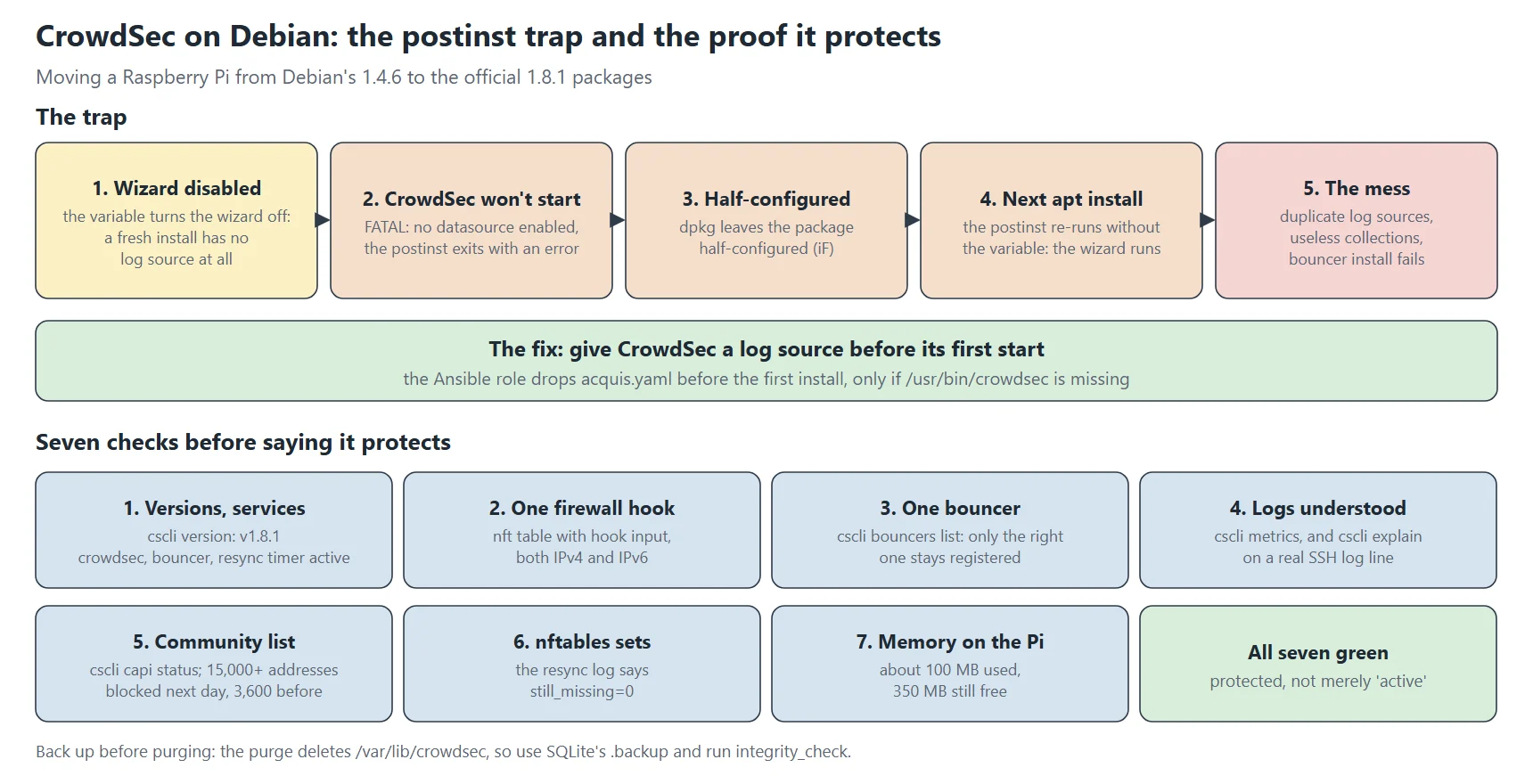
The official repository’s crowdsec package runs a wizard at install time: cscli setup unattended. It detects the services present (sshd, nginx, postfix…), creates log sources by itself in /etc/crowdsec/acquis.d/setup.*.yaml, then installs the matching collections. Handy on a hand-managed machine, but a nuisance when Ansible already manages all that: you end up with two sources for the same logs, so events counted twice.
The variable meant for this… and its side effect
CROWDSEC_SETUP_UNATTENDED_DISABLE=true apt-get install -y crowdsecThis variable turns the wizard off. On a machine where CrowdSec already has a config, that’s perfect. But on a fresh install, with no wizard, CrowdSec has no log source at all. And it refuses to start without at least one:
FATAL crowdsec init: while loading acquisition config: no datasource enabledWhat follows is a chain reaction:
- the package’s postinst tries to start the service, which fails, so the postinst exits with an error;
- dpkg leaves the package “half-configured” (
iFindpkg -l); - on the next
apt-get install(the bouncer, say), dpkg tries to finish the pending configuration and re-runs crowdsec’s postinst. This time the variable is no longer in the environment, and the wizard runs.
Result: exactly what we wanted to avoid. setup.*.yaml files get created, useless collections installed (auditd, a “good bots” allowlist…), and on top of that the bouncer fails to install, since CrowdSec’s local API wasn’t running yet when it configured itself.
The fix
CrowdSec just needs to find a log source on its very first start. So the Ansible role drops its own config before installing the package, only if CrowdSec isn’t there yet:
- name: Check whether CrowdSec is already installed
  ansible.builtin.stat:
    path: /usr/bin/crowdsec
  register: _crowdsec_binary

- name: Seed acquisition config before the first install
  when: not _crowdsec_binary.stat.exists
  ansible.builtin.template:
    src: acquis.yaml.j2              # auth.log + syslog on Debian
    dest: /etc/crowdsec/acquis.yaml
With an acquis.yaml already in place, the first start succeeds, the postinst completes normally, and the wizard stays off.
Cleaning up if it already happened
dpkg --configure -a                                  # finish pending configurations
mkdir -p /root/backup/setup-leftovers
mv /etc/crowdsec/acquis.d/setup.*.yaml /root/backup/setup-leftovers/
cscli collections remove crowdsecurity/auditd crowdsecurity/whitelist-good-actors
systemctl restart crowdsec crowdsec-firewall-bouncer
One last trap, on the Ansible side: if a run fails partway, the handlers already notified (“restart crowdsec”) don’t run. The next run sees files already up to date and notifies nothing. The services then run with the old configuration. After a fix, restart them yourself.
Checking it actually protects
Two “active” services don’t prove much. CrowdSec can run without reading the right log, and the bouncer can run without blocking anything. Here’s the checklist I apply after every install or upgrade, with what each check demonstrates.
1. Versions and services
cscli version | head -1                              # version: v1.8.1…
systemctl is-active crowdsec crowdsec-firewall-bouncer crowdsec-nft-resync.timer
2. The firewall: one hook, in the right place
nft list ruleset | grep -E "^table|hook"
# table ip crowdsec
#     type filter hook input priority filter; policy accept;
# table ip6 crowdsec6
#     type filter hook input priority filter; policy accept;
The bouncer must filter inbound traffic (hook input) over both IPv4 and IPv6. An extra forward or output chain would be a leftover from an old config. Forgetting IPv6 leaves a door wide open.
3. One registered bouncer, the right one
cscli bouncers list
# crowdsec-firewall-bouncer   127.0.0.1   ✔️   …
The bouncer package registers itself under a random name (cs-firewall-bouncer-<timestamp>), and the Ansible install adds its own. Only one should remain, or you no longer know which one is really in use.
4. Logs are read and understood
cscli metrics show acquisition       # auth.log and syslog with lines read
cscli explain --type syslog \
  --log "Oct 23 10:00:00 pi sshd[1]: Invalid user admin from 203.0.113.9 port 4242"
cscli explain runs a log line through the whole parsing chain, and shows which parsers recognise it and which scenarios it feeds. If no ssh scenario shows up, SSH brute-force detection will never work, whatever the services’ state.
5. The community list
cscli capi status                    # "You can successfully interact with Central API"
cscli decisions list -a -o raw | tail -n +2 | wc -l
Right after a fresh install the list is empty: a newly registered machine can take up to two hours to receive its first community block list. By the next day, the Pi was blocking more than 15,000 addresses, against 3,600 with the old version.
6. nftables sets match the decisions
The firewall bouncer long had a bug that could let nftables sets drift out of sync with the decisions. A small resync timer compares the two and adds what’s missing. Its log should say still_missing=0:
journalctl -u crowdsec-nft-resync --since -1h | grep still_missing | tail -2
# ipv4: active=15301 set=15301 … still_missing=0
7. Memory, on a small Pi
On a Raspberry Pi that also does DNS, I check CrowdSec isn’t starving everything else: free -m, each process’s resident memory and swap usage. After a day, CrowdSec used about 100 MB, with 350 MB still free. If it got tight, disabling RE2 grok support in feature.yaml noticeably cuts its footprint.
Once those seven points are green, you can say the machine is protected, not merely that services are running.
What I take away
- Back up before purging, and check the backup. The purge deletes
/var/lib/crowdsecitself, so use SQLite’s.backupand runintegrity_check; - Reinstall rather than upgrade when two packages ship the same files;
- Give CrowdSec a log source before its first start. An environment variable that disables the wizard also leaves a fresh install with no datasource;
- A failed package postinst comes back. dpkg re-runs it on the next install, without your environment variable;
- After a failed Ansible run, restart the services yourself. Handlers already notified do not run on the next pass;
- “Active” does not mean protecting. Check the hook, IPv6, the single bouncer, the parsed logs, the community list, the nftables sets and memory.