The server that never came back (1/3): the symptom

One Tuesday evening, a routine update on the home server: dnf update -y, about a hundred packages including a new kernel and new firmware, then reboot. Normally the machine is back in under a minute. This time, nothing. No ping, no SSH, and above all no ARP reply on the local network: as far as the switch could tell, the network card no longer existed.

That last detail matters. A machine that boots but has a crashed service still answers ARP, because the kernel answers it, not an application. No ARP means the kernel isn’t running or the network card isn’t initialised. So the problem is low-level: kernel boot, initramfs, motherboard firmware, or the machine simply being off.

What you can check remotely

Before going down to the machine, I gathered what the rest of the network could see:

arping -c 3 -I eth0 192.168.10.17     # no reply: the network card is silent
ip neigh show 192.168.10.17           # FAILED entry in the neighbour's ARP table
  • The SIEM (Wazuh) had received one last event from the machine’s agent: “Wazuh agent stopped”, at the exact time of the reboot. That’s a sign of a clean shutdown, not a crash. A crash would have left no message at all.
  • The other machines on the network worked normally: the problem was neither the switch nor the router.
  • The virtual machine hosted on this server had gone down with it, consistent with a powered-off host.

What to look for on the screen

With no remote management card (no IPMI on a consumer motherboard), the only way to know is to look at the screen. Here’s the list I prepared, from most to least likely cause, so as not to improvise at the console:

  • Stuck in GRUB? Pick the previous kernel in the menu. If it boots, the new kernel or its initramfs is at fault. Then pin it with grubby --set-default.
  • Emergency shell (dracut, emergency mode)? journalctl -xb -p err shows why: LVM volume not found, invalid fstab entry, module missing from the initramfs.
  • SELinux relabel or fsck in progress? That’s slow on a big disk. Wait, and above all don’t cut the power.
  • Booted but no network? ip -br a and nmcli dev: a renamed or “unmanaged” card after an update happens more often than you’d think.
  • Black screen, fans spinning, nothing happening? The most puzzling case. It was mine.

The machine eventually came back after half an hour, with a long press on the power button. The system booted normally on the new kernel, without a single error. What remained was to understand what had happened, while the system journal only kept the current boot. That’s the subject of the next post.


This post is part of a series of sysadmin notes (tag “sysadmin notebook”).
Series “The server that never came back”, part 1/3. · Next post → · Version française

Issue with ssh key and selinux

When selinux was enabled I had a strange issue, my ssh key wasn’t working. When checking the sshd logs by putting DEBUG instead of INFO in LogLevel in /etc/ssh/sshd_config I saw that the ssh key was forbid to read by the system.

By doing ls -Zal I saw that the /home was unlabeled:

drwxr-xr-x. 3 system_u:object_r:unlabeled_t:s0 root root 20 Apr 12 17:14 home

running chcon -R -t user_home_t home solved the issue

MySQL export without –lock-tables

One of the difficulties with mysqldump is to deal with lock tables.

But there is an option in mysqldump we can use to change how to dump safely without locking all tables:

--single-transaction

This option sets the transaction isolation mode to REPEATABLE READ and sends a START TRANSACTION SQL statement to the server before dumping data. It is useful only with transactional tables such as InnoDB, because then it dumps the consistent state of the database at the time when START TRANSACTION was issued without blocking any applications.

When using this option, you should keep in mind that only InnoDB tables are dumped in a consistent state. For example, any MyISAM or MEMORY tables dumped while using this option may still change state.

While a --single-transaction dump is in process, to ensure a valid dump file (correct table contents and binary log coordinates), no other connection should use the following statements: ALTER TABLE, CREATE TABLE, DROP TABLE, RENAME TABLE, TRUNCATE TABLE. A consistent read is not isolated from those statements, so use of them on a table to be dumped can cause the SELECT that is performed by mysqldump to retrieve the table contents to obtain incorrect contents or fail.

The --single-transaction option and the --lock-tables option are mutually exclusive because LOCK TABLES causes any pending transactions to be committed implicitly.

To dump large tables, combine the --single-transaction option with the --quick option.

oracle block map

Script for oracle block map

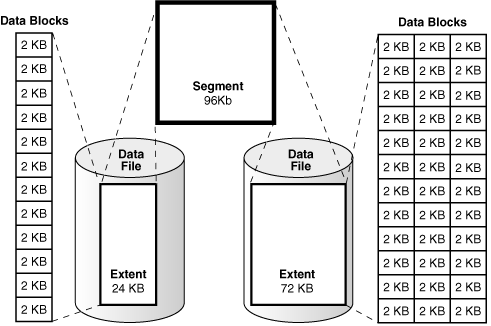
Sometimes, in order to see fragmented tables in Oracle database, you need to check the block map in datafiles.

Here, I’m sharing with you a script for checking that 🙂

col segment_name format a30
col owner format a30
col segment_type format a30
col partition_name format a45
col segment_type format a30
select  file_id,
        block_id,
        block_id + blocks - 1   end_block,
        blocks,
        owner,
        segment_name,
        partition_name,
        segment_type
from dba_extents
where
        tablespace_name = 'SYSAUX'
union all
select  file_id,
        block_id,
        block_id + blocks - 1   end_block,
        blocks,
        'free'                  owner,
        'free'                  segment_name,
        null                    partition_name,
        null                    segment_type
from dba_free_space 
where tablespace_name = 'SYSAUX'
order by 1,2;

Ssmtp & Let’s Encrypt

The issue I had was related to sending emails from my mid to my back server (mail & database) since I configured SMTP with Let’s Encrypt certificate.

With debug the error is:
SSL not working: certificate verify failed (20)

When I checked the certificate, I had :

openssl s_client -connect smtp.xxx.fr:587 -starttls smtp -servername smtp.xxx.fr
CONNECTED(00000003)
depth=0 CN = smtp.xxx.fr
verify error:num=20:unable to get local issuer certificate
verify return:1
depth=0 CN = smtp.xxx.fr
verify error:num=21:unable to verify the first certificate
verify return:1

The solution I found is

copy into /etc/pki/ca-trust/source/anchors the Let’s Encrypt fullchain certificate (chain.pem)
And do an update-ca-trust extract

Error solved !

SQL Certification passed !

Title1Z0-007 Introduction to Oracle9i: SQL
Started8/28/2008 8:42:24 AM (GMT+0:00)
Ended8/28/2008 9:42:31 AM (GMT+0:00)
Passing Score70%
Your ScorePass – 78.85% (41 earned out of 52 possible)
CommentsCongratulations! Ready for what’s next? Oracle University can get you to your next target proficiency level with additional Oracle classes and certification offerings. Visit Oracle University at http://www.oracle.com/education.