How-to: back up PostgreSQL with pgBackRest and restore to the second
Back up PostgreSQL with pgBackRest: install, configure WAL archiving, schedule backups, copy them off the server and restore to the exact second.
pgBackRest combines physical copies of the PostgreSQL files with continuous archiving of the WAL, so you can restore the instance to any second between the oldest backup kept and now. This tutorial sets it up on PostgreSQL 18 (PGDG repository, Rocky Linux), schedules it, then walks through a real point-in-time restore.
A nightly pg_dump is better than nothing, but it has two serious flaws: it can lose up to twenty-four hours of data, and it can’t take you back to "just before the DELETE without WHERE at 2:59 pm". On a large database it’s also slow to produce and very slow to reload, indexes included.
The principle in two sentences
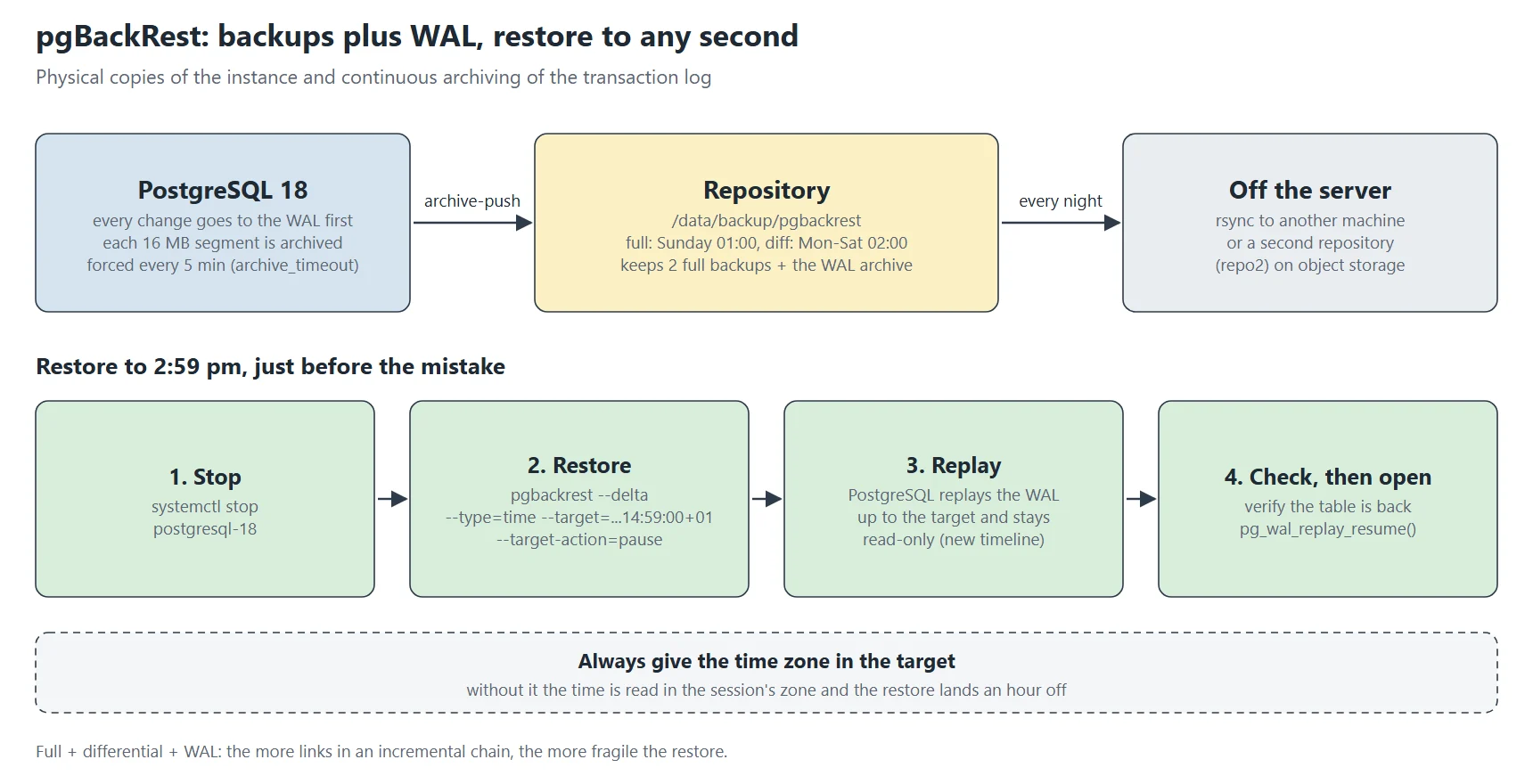
PostgreSQL writes every change to the WAL before applying it to the data files. If you have a copy of the files taken at time T and all the WAL produced since, you can replay that WAL onto the copy and stop wherever you like.
| Type | Contents | To restore you need |
|---|---|---|
| full | every file of the instance | this backup + WAL |
| differential (diff) | files changed since the last full | the full + this diff + WAL |
| incremental (incr) | files changed since the last backup of any kind | the full + the whole chain + WAL |
Incrementals are smaller but make the chain fragile: losing one link makes all the following ones unusable. A full a week and a differential a day is a good balance for a database of a few tens of gigabytes.
Step 1: install
dnf install pgbackrest            # from the PGDG repository, like PostgreSQL
pgbackrest version
install -d -o postgres -g postgres -m 750 /data/backup/pgbackrest /var/log/pgbackrest
pgBackRest runs as the postgres user: the repository and log directory must belong to it. Under SELinux, if the repository is outside the usual paths, check that PostgreSQL (the postgresql_t domain) may write there during archiving: a SELinux denial blocks archiving with no other symptom than a growing pg_wal.
Step 2: pgBackRest’s configuration
# /etc/pgbackrest/pgbackrest.conf
[global]
repo1-path=/data/backup/pgbackrest
repo1-retention-full=2
repo1-retention-diff=14
compress-type=lz4
compress-level=6
log-level-console=warn
log-level-file=info
log-path=/var/log/pgbackrest
start-fast=y
delta=y

[main]
pg1-path=/data/postgresql/18/data
pg1-port=5432
The [global] section
repo1-path: the repository, here on a local disk. pgBackRest can also write straight to S3, Azure, GCS or another server over SFTP; to start, a local disk copied elsewhere every night will do;
repo1-retention-full=2: keep two full backups. When a third one completes successfully, the oldest is removed, with its differentials and the WAL only it needed. The restore window is therefore one to two weeks;
repo1-retention-diff=14: the number of differentials kept; it must cover at least the interval between two fulls;
compress-type=lz4: lz4 compresses a little less than zstd but much faster, which shortens both backup and restore;
log-level-console / log-level-file: little noise on screen, details in /var/log/pgbackrest;
start-fast=y: triggers an immediate checkpoint at the start of the backup instead of waiting for the next one, which may be minutes away;
delta=y: on restore, pgBackRest compares the files present with the backup’s (by checksum) and only copies those that differ. On a large instance, that’s the difference between an hour and a few minutes.
The [main] section
That’s the stanza: one PostgreSQL instance to back up, under a name of your choice. pg1-path is its data directory, pg1-port its port. Several instances on the same machine make several stanzas.
Step 3: wiring in WAL archiving
# postgresql.conf
wal_level        = replica
archive_mode     = on
archive_command  = 'pgbackrest --stanza=main archive-push %p'
archive_timeout  = 300
max_wal_senders  = 3
wal_level = replica: the WAL holds enough information to rebuild the instance (the default in recent versions);
archive_mode = on: turns archiving on. This setting needs a restart;
archive_command: the command run for each completed WAL segment (16 MB). %p is the segment’s path;
archive_timeout = 300: forces a segment switch every five minutes even if the segment isn’t full. On a quiet database, without it, the last transactions can sit for hours in an unarchived segment: that much data lost if the server disappears.
If archiving fails, PostgreSQL loses nothing: it keeps the segment and retries. But pg_wal/ then grows until it fills the disk, and the instance stops. That’s the failure to watch first, for example with the pg_stat_archiver view:
SELECT archived_count, last_archived_time, failed_count, last_failed_time, last_failed_wal
FROM pg_stat_archiver;
An alert on a too-old last_archived_time (over ten minutes with archive_timeout = 300) or a growing failed_count warns you long before the disk is full.
Step 4: create the stanza and check
systemctl restart postgresql-18
sudo -u postgres pgbackrest --stanza=main stanza-create
sudo -u postgres pgbackrest --stanza=main check
sudo -u postgres pgbackrest --stanza=main --type=full backup
sudo -u postgres pgbackrest info
check forces a segment switch and waits to see it land in the repository: it’s the end-to-end archiving test. info shows the backups, their size and the available WAL range:
stanza: main
    status: ok
    wal archive min/max (18): 000000010000002A00000031/000000010000002C0000009E

    full backup: 20261101-010002F
        timestamp start/stop: 2026-11-01 01:00:02+01 / 2026-11-01 01:12:47+01
        database size: 41.2GB, database backup size: 41.2GB
        repo1: backup size: 9.8GB
A real repository, two months in
The repository of my web server’s PostgreSQL 18 on 2 November 2026, summarised from pgbackrest info --output=json (the text output lists every backup, oldest first):
status ok | wal 000000010000010C00000079 -> 000000010000010F000000DF
label                               type  start        took  db size  changed   stored
20261025-010001F_20261030-020003D   diff  10-30 02:00  128 s  6.6 GB   36.8 MB   12.4 MB
20261025-010001F_20261031-020002D   diff  10-31 02:00  136 s  6.6 GB   39.0 MB   12.9 MB
20261101-010006F                    full  11-01 01:00  370 s  6.6 GB  6710.8 MB  455.5 MB
20261101-010006F_20261102-020003D   diff  11-02 02:00  131 s  6.6 GB   32.0 MB   11.6 MB
backups in repo: 11

# time sudo -u postgres pgbackrest --stanza=main check
real	0m0.500s
6.6 GB of database, 455 MB in the repository for a full backup: compression divides the size by about fifteen here; PostgreSQL data files, full of page headers and partly empty pages, compress very well.
Differential backups of 32–39 MB, stored as 12 MB: only the files changed since the last full are copied. Each diff depends on one full only, never on another diff, so losing one diff costs nothing else.
The label tells the lineage: 20261101-010006F_20261102-020003D is a diff (D) taken on 2 November, based on the full (F) of 1 November.
The WAL range goes back to the oldest backup kept: any point between 25 October and now can be restored, to the second.
check in half a second, silent, exit code 0: the archive command works and the repository answers. Put it in monitoring, not just in the installation notes.
Step 5: schedule
# /etc/systemd/system/pgbackrest-full.service
[Unit]
Description=pgBackRest full backup
After=postgresql-18.service
[Service]
Type=oneshot
User=postgres
ExecStart=/usr/bin/pgbackrest --stanza=main --type=full backup

# /etc/systemd/system/pgbackrest-full.timer
[Timer]
OnCalendar=Sun *-*-* 01:00:00
Persistent=true
[Install]
WantedBy=timers.target

# pgbackrest-diff.service / .timer : identical with --type=diff
# and OnCalendar=Mon..Sat *-*-* 02:00:00
Persistent=true catches up a missed backup if the server was off at the scheduled time. Add a failure notification (OnFailure= pointing to a unit that sends a message): a backup that fails silently for three weeks is an unpleasant discovery on the day you need it.
Step 6: getting the repository off the server
A repository on the same server protects against human and software mistakes, not against losing the server. Copy it elsewhere every night, after the backup: an rsync to another machine, or a second pgBackRest repository (repo2-…) on object storage. The second repository is more elegant: pgBackRest archives WAL to it in parallel and handles retention itself.
Step 7: restoring to just before the mistake
Scenario: at 3:00 pm, someone notices that a query run at 2:59 and a few seconds emptied a table. We want to go back to 2:59 sharp.
systemctl stop postgresql-18
sudo -u postgres pgbackrest --stanza=main --delta \
    --type=time "--target=2026-11-12 14:59:00+01" \
    --target-action=pause restore
systemctl start postgresql-18
sudo -u postgres psql -c "SELECT pg_is_in_recovery(), now()"
# check the data, then:
sudo -u postgres psql -c "SELECT pg_wal_replay_resume()"
–type=time and –target: the restore target. Always give the time zone: without it, the time is read in the session’s zone, and a one- or two-hour shift either replays the mistake or loses the morning’s work;
–target-action=pause: PostgreSQL stops at the target, read-only. You can calmly check that the table is back and nothing legitimate is missing, then open the instance with pg_wal_replay_resume(). promote opens it straight away, without that check;
–delta: only copies changed files, so the restore is much faster;
pgBackRest picks the starting backup itself (the latest one before the target); PostgreSQL then replays WAL up to the target, and starts a new timeline: WAL produced after the mistake stays in the repository but will never be replayed on this new branch.
Other possible targets: --type=xid (a transaction number), --type=lsn (an exact WAL position), --type=name (a named point created before a risky operation with SELECT pg_create_restore_point('before_migration')). Get into the habit of creating a named point before every schema migration: restoring becomes trivial.
Recovering a single database, or a single table
pgBackRest restores a whole instance. To recover a single database without touching production, restore onto another machine, or into another directory on another port (--pg1-path=/srv/restore and port = 5499 in its postgresql.conf), at the desired time. Then extract the database or table with pg_dump -t and load it into production. It takes longer, but production is never stopped.
Common failures
“archive-push” failing: repository permissions, full disk, or a SELinux denial. pg_stat_archiver and /var/log/pgbackrest/main-archive-push-async.log tell you;
“WAL segment … not found” on restore: a hole in the archive, often because archiving was disabled for a while. Only the latest full backup taken after the hole is safe; run one immediately;
restore that doesn’t stop at the right time: the time zone, again. Compare with SHOW timezone;
“stanza-upgrade” after a PostgreSQL major upgrade: pgBackRest refuses to go on until told about the new version. Run stanza-upgrade, then a full backup immediately.
And above all: test restores regularly, automatically if possible. That’s the subject of the next tutorial in the series. A backup that has never been restored is only a hypothesis.
This post is part of a series of sysadmin tutorials (tag “how-to”).
Series “How-to”, tutorial 12/77. · ← Previous tutorial · Next tutorial → (coming 18 Nov) · Version française
Official documentation
pgBackRest, project site
pgBackRest user guide for RHEL, install, backup and restore
pgBackRest configuration reference, every option
Continuous archiving and point-in-time recovery, PostgreSQL 18 documentation
Related articles
PostgreSQL data files, from the inside