OpenBao without auto-unseal: why I chose Shamir, and the post-reboot checklist
Why my OpenBao uses Shamir shares instead of auto-unseal, what it costs after every reboot, and the five-step checklist to bring it back.
All my Ansible playbooks read their secrets (database passwords, API keys, tokens) from OpenBao, the open-source fork of HashiCorp Vault. So secrets are written neither in the Git repo nor in encrypted files passed around: Ansible asks for them at deploy time, with an AppRole identity that only has read access. This article explains why I deliberately chose not to auto-unseal it, what that costs after every reboot, and the five-minute checklist I follow to bring it back.
At a glance
| Question | My answer |
|---|---|
| Unseal method | Shamir, 5 shares, all 5 required (t = n = 5) |
| Where the shares live | Not on the server: a separate place, plus copies on two other physical media |
| Auto-unseal (KMS, HSM) | No: it would tie the whole fleet to a cloud account |
| Cost | After any reboot OpenBao is sealed and no deployment works until someone unseals it |
| Mitigation | A five-step checklist, and an alert on the seal state (next on my list) |
Sealed, unsealed: what it means
OpenBao encrypts everything it stores with a master key. At startup it doesn’t know that key: it’s sealed. It runs and answers requests, but refuses to read or write any secret. To unseal it, the key has to be reconstructed. There are two broad approaches:
- Shamir: at initialisation, the key is split into n shares, t of which are enough to rebuild it. At startup, those shares are entered by hand (
bao operator unseal); - auto-unseal: the key is entrusted to an external service (a cloud KMS, an HSM, another Vault). OpenBao fetches it by itself at startup.
My choice: Shamir, no auto-unseal
bao operator init -key-shares=5 -key-threshold=5
# Unseal Key 1: …   (×5)
# Initial Root Token: …
Here all five shares are needed (t = n = 5), and none is stored on the server. They’re kept in a separate place, with copies on two other physical media. The choice has specific reasons:
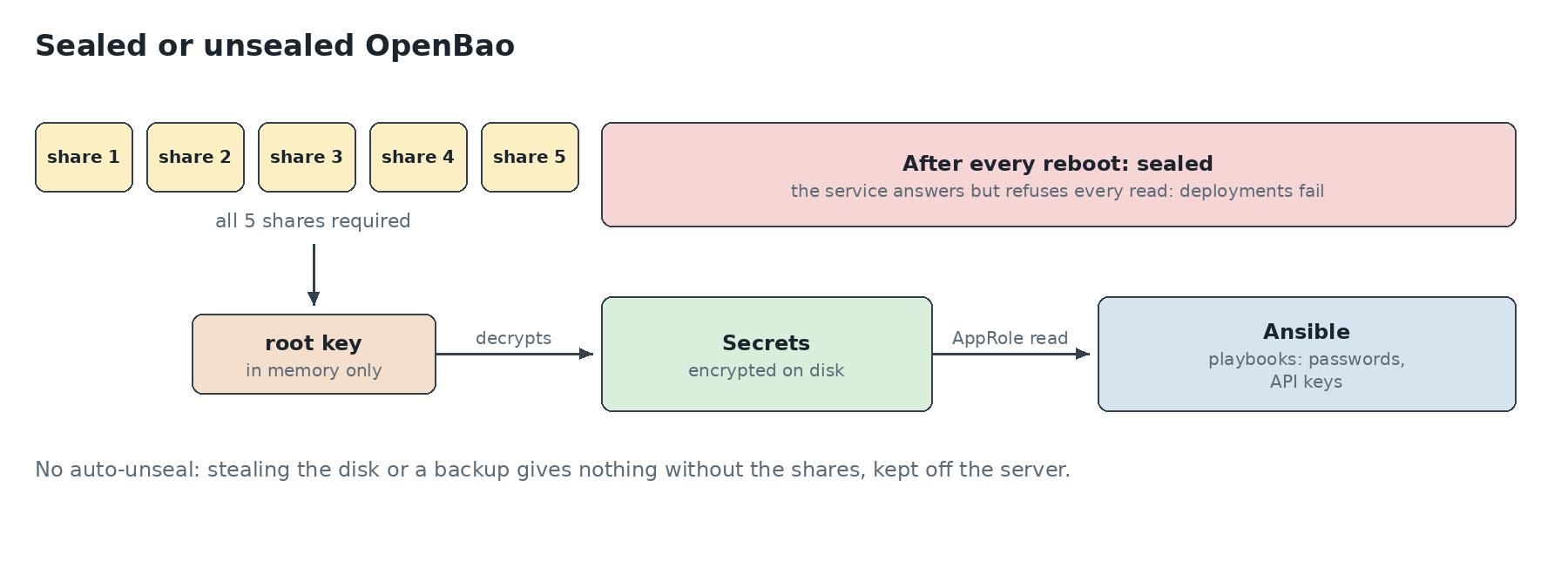
- stealing the disk or a backup yields nothing: without the shares, OpenBao’s data is just an encrypted blob;
- no dependency on a cloud provider: KMS auto-unseal would make the whole fleet depend on a cloud account and its availability;
- a single server: auto-unseal mostly makes sense for clusters that restart often, which isn’t my case.
The price: sealed after every reboot
After any reboot (kernel update, power cut, crash), OpenBao comes back sealed. And since every playbook reads its secrets from it, no deployment is possible on any machine until someone enters the shares. Ansible’s symptom is explicit:
fatal: … Vault is sealedIt’s a deliberate trade-off: a little human intervention after a reboot, in exchange for a vault that never opens by itself. You just mustn’t forget it, hence the checklist below.
The post-reboot checklist
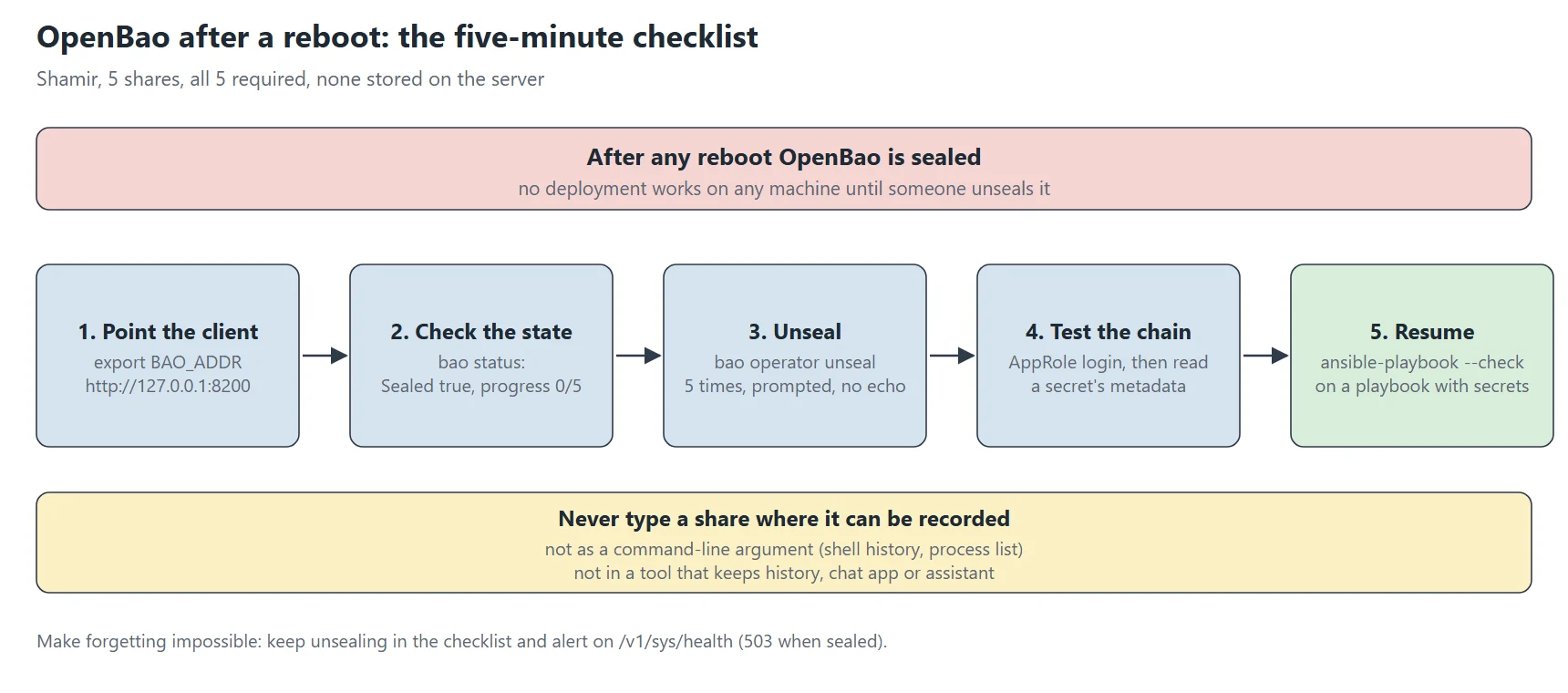
After each reboot of the server hosting OpenBao, here’s the procedure I follow, in order. It takes five minutes.
1. Point the client at the right server
My OpenBao listens over HTTP on 127.0.0.1, with OpenResty doing TLS in front. The bao client tries HTTPS by default, hence this misleading error:
bao status
# Error checking seal status: … http: server gave HTTP response to HTTPS client
export BAO_ADDR=http://127.0.0.1:8200      # locally, on the server
# or: export BAO_ADDR=https://secrets.example.org   (through OpenResty)
I put that export in root’s .bashrc on that server, so I don’t have to think about it.
2. Check the state
bao status
# Sealed          true
# Total Shares    5
# Threshold       5
# Unseal Progress 0/5
Sealed true confirms it needs unsealing. Unseal Progress shows how many shares have been entered: entry can be spread over several goes, even by several people.
3. Unseal
bao operator unseal # repeated 5 times; each share is prompted for without echoWith no argument, the command prompts for the share interactively and doesn’t display it. Never pass a share as a command-line argument: it would end up in shell history and the process list. And never paste it into a tool that keeps history, whether a chat app or an assistant.
4. Check the whole chain
An unsealed vault isn’t enough: deployments must actually be able to read their secrets. So I test from the Ansible control node, with the same AppRole identity as the playbooks:
# AppRole login, then read a secret's metadata (not its value)
bao write -field=token auth/approle/login role_id=… secret_id=… > /tmp/t
BAO_TOKEN=$(cat /tmp/t) bao kv metadata get -mount=ansible postgresql | head -3
shred -u /tmp/t
Reading metadata (version, dates) proves authentication and permissions work, without the secret’s value travelling anywhere.
5. Resume deployments
An ansible-playbook … --check on any playbook that reads a secret confirms everything is back to normal.
Don’t forget it
The biggest risk is forgetting: an overnight reboot, and nobody notices deployments are blocked until they’re needed. A Prometheus alert on the seal state would warn you as soon as it happens: the /v1/sys/health endpoint returns 503 when the vault is sealed, and a blackbox probe is enough to watch it. It’s next on my list. After every reboot of the home server, unsealing is now part of my checklist, alongside checking the services.
What I take away
- Choose the unseal method for your threat model. Shamir with all shares off the server means a stolen disk or backup yields nothing, and no cloud account becomes a dependency;
- Accept the trade-off in the open. After any reboot, no deployment works until someone unseals: a little human intervention in exchange for a vault that never opens by itself;
- Never type a share where it can be recorded: no command-line argument, no tool that keeps history;
- Test the whole chain, not just the seal state. Reading a secret’s metadata through AppRole proves authentication and permissions without exposing the value;
- Make forgetting impossible. Put unsealing in the post-reboot checklist, and alert on the seal state through the
/v1/sys/healthendpoint.