The server that never came back after a reboot: reading the traces of a clean shutdown
A Linux server hung after a routine reboot. How to prove from wtmp, XFS mounts and logs that the shutdown was clean, and why the motherboard reset failed.
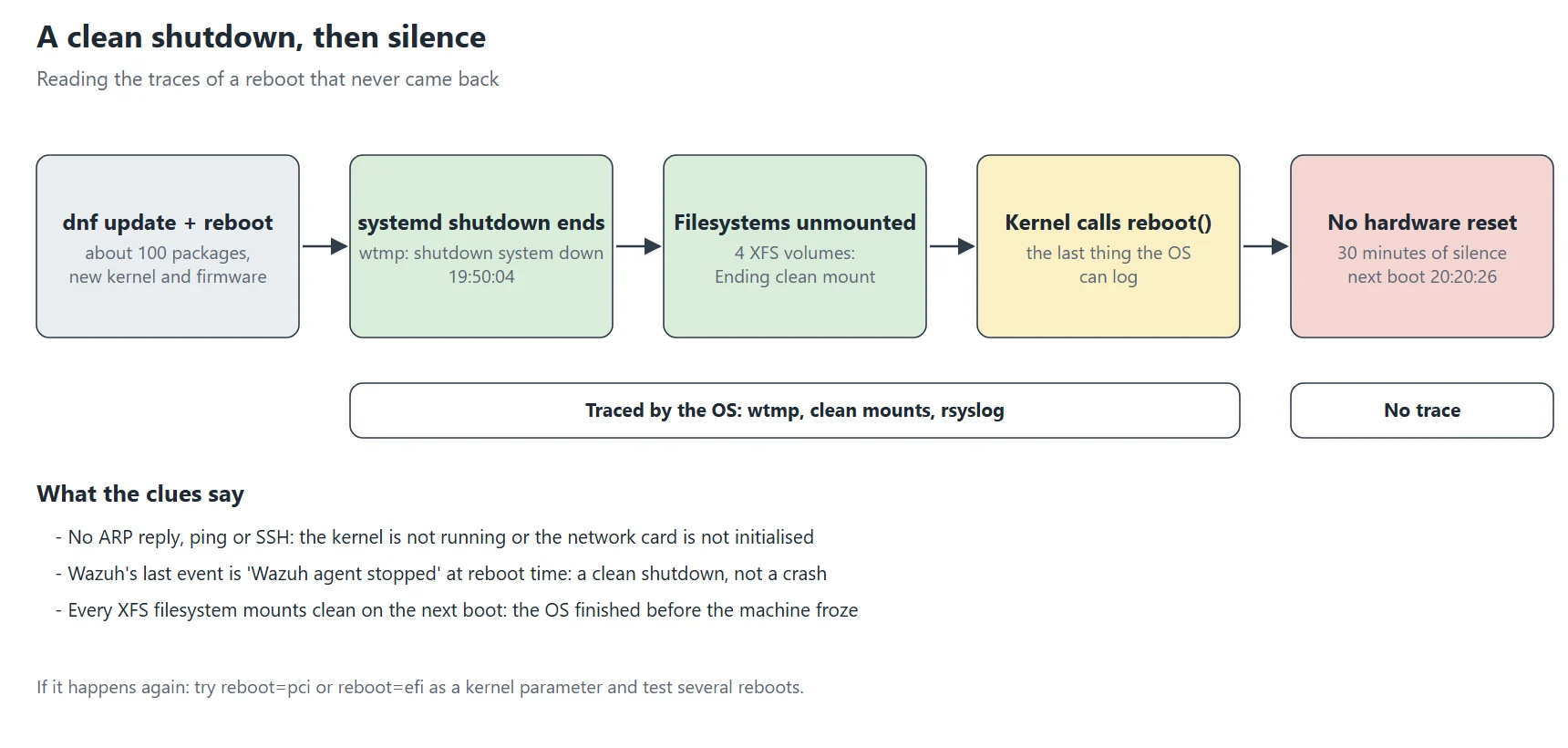
One Wednesday evening, a routine update on the home server: dnf update -y, about a hundred packages including a new kernel and new firmware, then reboot. Normally the machine is back in under a minute. This time, nothing. No ping, no SSH, and above all no ARP reply on the local network: as far as the switch could tell, the network card no longer existed.
That last detail matters. A machine that boots but has a crashed service still answers ARP, because the kernel answers it, not an application. No ARP means the kernel isn’t running or the network card isn’t initialised. So the problem is low-level: kernel boot, initramfs, motherboard firmware, or the machine simply being off. This article follows the whole investigation: what I could check remotely, what to look for at the screen, how to read the traces of a shutdown after the fact, and what finally explained it.
The clues at a glance
| Clue | What it shows |
|---|---|
| No ARP reply, no ping, no SSH | The kernel isn’t running or the network card isn’t initialised: a low-level problem |
| Wazuh’s last event: “Wazuh agent stopped”, at the reboot time | A clean shutdown, not a crash |
shutdown system down entry in wtmp | systemd went all the way through the shutdown sequence |
| “Ending clean mount” on all four XFS filesystems | Every filesystem was unmounted properly |
| Thirty minutes of silence before the next boot | The hang is between the kernel’s reboot call and the BIOS |
What you can check remotely
Before going down to the machine, I gathered what the rest of the network could see:
arping -c 3 -I eth0 192.168.10.17     # no reply: the network card is silent
ip neigh show 192.168.10.17 # FAILED entry in the neighbour's ARP table- The SIEM (Wazuh) had received one last event from the machine’s agent: “Wazuh agent stopped”, at the exact time of the reboot. That’s a sign of a clean shutdown, not a crash. A crash would have left no message at all.
- The other machines on the network worked normally: the problem was neither the switch nor the router.
- The virtual machine hosted on this server had gone down with it, consistent with a powered-off host.
What to look for on the screen
With no remote management card (no IPMI on a consumer motherboard), the only way to know is to look at the screen. Here’s the list I prepared, from most to least likely cause, so as not to improvise at the console:
- Stuck in GRUB? Pick the previous kernel in the menu. If it boots, the new kernel or its initramfs is at fault. Then pin it with
grubby --set-default. - Emergency shell (dracut, emergency mode)?
journalctl -xb -p errshows why: LVM volume not found, invalidfstabentry, module missing from the initramfs. - SELinux relabel or fsck in progress? That’s slow on a big disk. Wait, and above all don’t cut the power.
- Booted but no network?
ip -br aandnmcli dev: a renamed or “unmanaged” card after an update happens more often than you’d think. - Black screen, fans spinning, nothing happening? The most puzzling case. It was mine.
The machine eventually came back after half an hour, with a long press on the power button. The system booted normally on the new kernel, without a single error. What remained was to understand what had happened, while the system journal only kept the current boot.
Reading the traces of a shutdown
The machine was back, but journalctl only shows the current boot. On this server the journal isn’t persistent (Storage=auto with no /var/log/journal directory). So the previous boot’s traces are gone from there. Fortunately, other sources survive a reboot.
Source 1: rsyslog and /var/log/messages
grep -E "System is rebooting|Command line:" /var/log/messages | tail -4
# 19:49:42 systemd-logind: System is rebooting.
# 20:20:22 kernel: Command line: BOOT_IMAGE=(hd0,gpt2)/vmlinuz-6.12.0-211.67.1…
The log stops dead at “System is rebooting”, then resumes thirty minutes later with the new kernel’s command line. That silence isn’t suspicious: rsyslog is among the first services stopped during a reboot, so it never writes the end of the shutdown sequence. You have to look elsewhere for the rest.
Source 2: wtmp, the login and shutdown register
last -x -F | head -6
# reboot   system boot  6.12.0-211.67.1  Wed Oct 21 20:20:26 2026   still running
# shutdown system down  6.12.0-211.54.1  Wed Oct 21 19:50:04 2026 - 20:20:26 (00:30)
last -x also shows system entries, not just logins. The shutdown system down line is written by systemd-update-utmp at the very end of the shutdown sequence, when almost every service has already stopped. Its presence proves systemd went all the way. It’s stamped 19:50:04, 22 seconds after the reboot began. The “(00:30)” column is the time until the next boot: thirty minutes during which the machine did nothing.
Source 3: how the filesystems mounted on the next boot
grep -E "XFS .*(Mounting|recovery|clean mount)" /var/log/messages | grep "20:20"
# XFS (dm-0): Mounting V5 Filesystem …
# XFS (dm-0): Ending clean mount
When an XFS filesystem wasn’t unmounted cleanly, the next mount replays its log and prints “Starting recovery” then “Ending recovery”. Here all four filesystems say “Ending clean mount”: they had all been unmounted properly. So the OS had finished shutting down before the machine froze.
What you can conclude
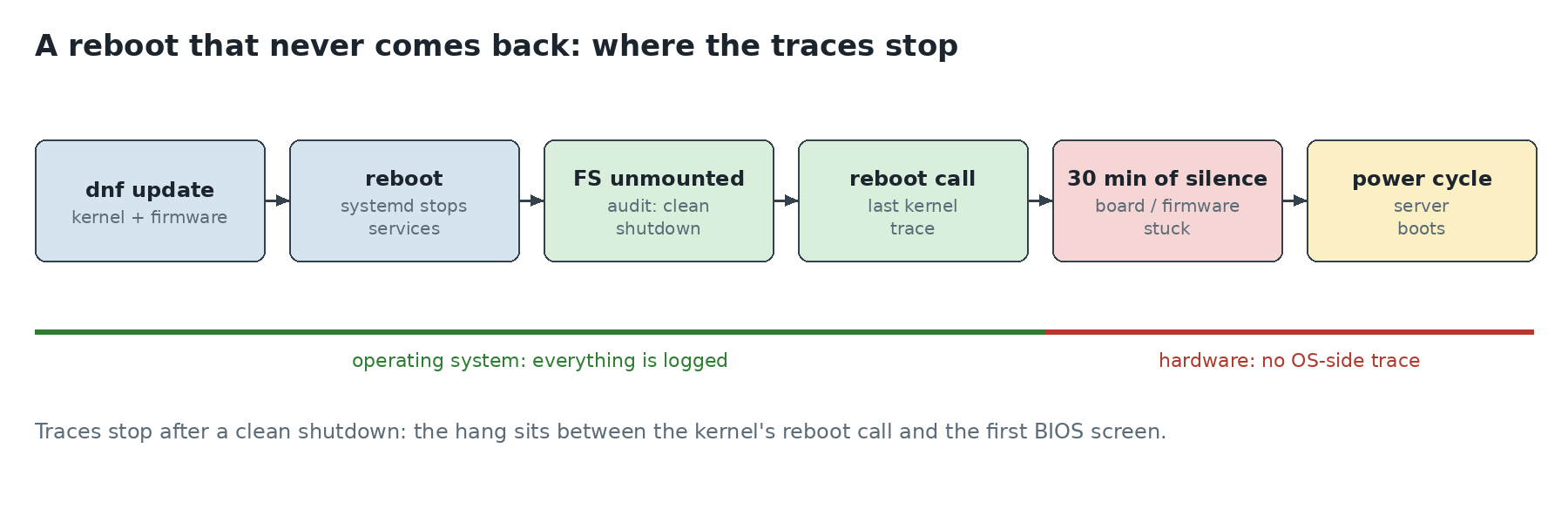
- the systemd shutdown completed (
shutdownentry in wtmp); - the disks were unmounted cleanly (“clean” mount afterwards);
- the machine then did nothing for thirty minutes, until it was restarted by hand.
So the hang happened after the kernel asked the motherboard to restart, somewhere between that call and the BIOS. It’s not a package, not a service, not a filesystem.
For next time: a persistent journal
Making the journal persistent makes this kind of investigation much easier. It’s one line:
mkdir -p /var/log/journal && systemd-tmpfiles --create --prefix /var/log/journal
journalctl --list-boots      # previous boots now show up
Even persistent, the journal will never see what happens after the kernel stops. The wtmp and mount clues remain the most reliable way to tell whether a shutdown completed cleanly.
The motherboard did it
Let’s recap the evidence: the systemd shutdown finished, the filesystems were unmounted cleanly, then the machine did nothing for thirty minutes. So the culprit lies between the kernel’s reboot call and the first BIOS screen. In other words, the motherboard never performed its reset.
How Linux reboots a machine
At the end of shutdown, the kernel calls reboot(), which has to trigger a real hardware reset. On x86 the kernel tries several methods, in a default order that depends on the machine:
acpi: write to the reset register declared by the firmware (ACPI FADT table);kbd: the historical method, a pulse through the keyboard controller;pci: write to port 0xCF9, the chipset’s reset register;efi: ask the UEFI firmware to reboot;triple: cause a processor “triple fault”, as a last resort.
If the chosen method doesn’t work on a given board, the kernel has stopped everything and waits for a reset that never comes. That’s exactly the picture we saw: black screen, fans spinning, no more network activity.
Why that time and not the others?
The next reboot, on the new kernel, took 34 seconds with no trouble. Several factors may have played a part on the night of the hang: the old kernel with 35 days of uptime, and a firmware update (linux-firmware) in the same transaction. These reset hangs are known to be intermittent on some consumer motherboards. I couldn’t reproduce it, so I changed nothing for now.
If it happens again
The thing to try is forcing another reset method with the reboot= kernel parameter, then testing several reboots:
grubby --update-kernel=ALL --args="reboot=pci"     # or reboot=efi, reboot=acpi
grubby --info=DEFAULT | grep args                  # check
reboot                                             # test, several times
grubby --update-kernel=ALL --remove-args="reboot"  # to revert
reboot=pci (the chipset’s 0xCF9 register) is often the most reliable on consumer Intel hardware, and reboot=efi on recent UEFI firmware. The parameter applies to every installed kernel, including future ones.
What I take away
- before blaming an update, check whether the shutdown completed: wtmp and “clean” mounts tell you unambiguously;
- a hang after a clean shutdown is hardware or firmware, not the OS: no package rollback would have fixed it;
- if the machine hosts a service everything depends on, write down the recovery procedure. Here, the secrets vault has to be unsealed by hand after every reboot: that’s the subject of another series.