How-to: install, configure and check a mail server with mox
Install and check a self-hosted mox mail server: network identity, firewall, then the A, MX, SPF, DKIM, DMARC, MTA-STS and TLS-RPT records one by one.
Self-hosting mail has a bad reputation, rightly: a badly configured server sees its messages land in spam or get rejected, and a badly protected one becomes a relay for spammers. Yet with modern software and a strict checklist, it’s perfectly doable for a personal domain or a small organisation. This tutorial uses mox, a complete mail server written in Go and shipped as a single binary: inbound and outbound SMTP, IMAP, webmail, SPF, DKIM, DMARC, MTA-STS, TLS-RPT, reputation-based spam filtering, and its own Let’s Encrypt certificates.
Example used: the domain example.org, the server mail.example.org at 203.0.113.25. Allow half a day, much of it waiting for DNS propagation.
Why mox rather than Postfix and Dovecot
The classic stack (Postfix, Dovecot, a filter like Rspamd, OpenDKIM, a webmail, certbot) works very well, but means assembling and maintaining six pieces of software that must agree with each other. mox does all of it in one block, with safe defaults and built-in checking tools. The downside: a younger project whose configuration sometimes changes between versions. Read the release notes before each upgrade.
Prerequisites: what can’t be fixed later
- a fixed, clean IP address: check it isn’t on a blocklist (Spamhaus, Barracuda…) before starting; an address inherited from a former spammer is a millstone;
- outbound port 25 open: many providers block it by default on VPSes. Test it first:
nc -vz gmail-smtp-in.l.google.com 25. If it’s closed, ask support; - reverse DNS (PTR) editable at the provider;
- a server dedicated to mail, preferably: there’s then no other service to watch on that machine, and a compromised web application doesn’t reach your mailboxes.
Step 1: network identity, before anything else
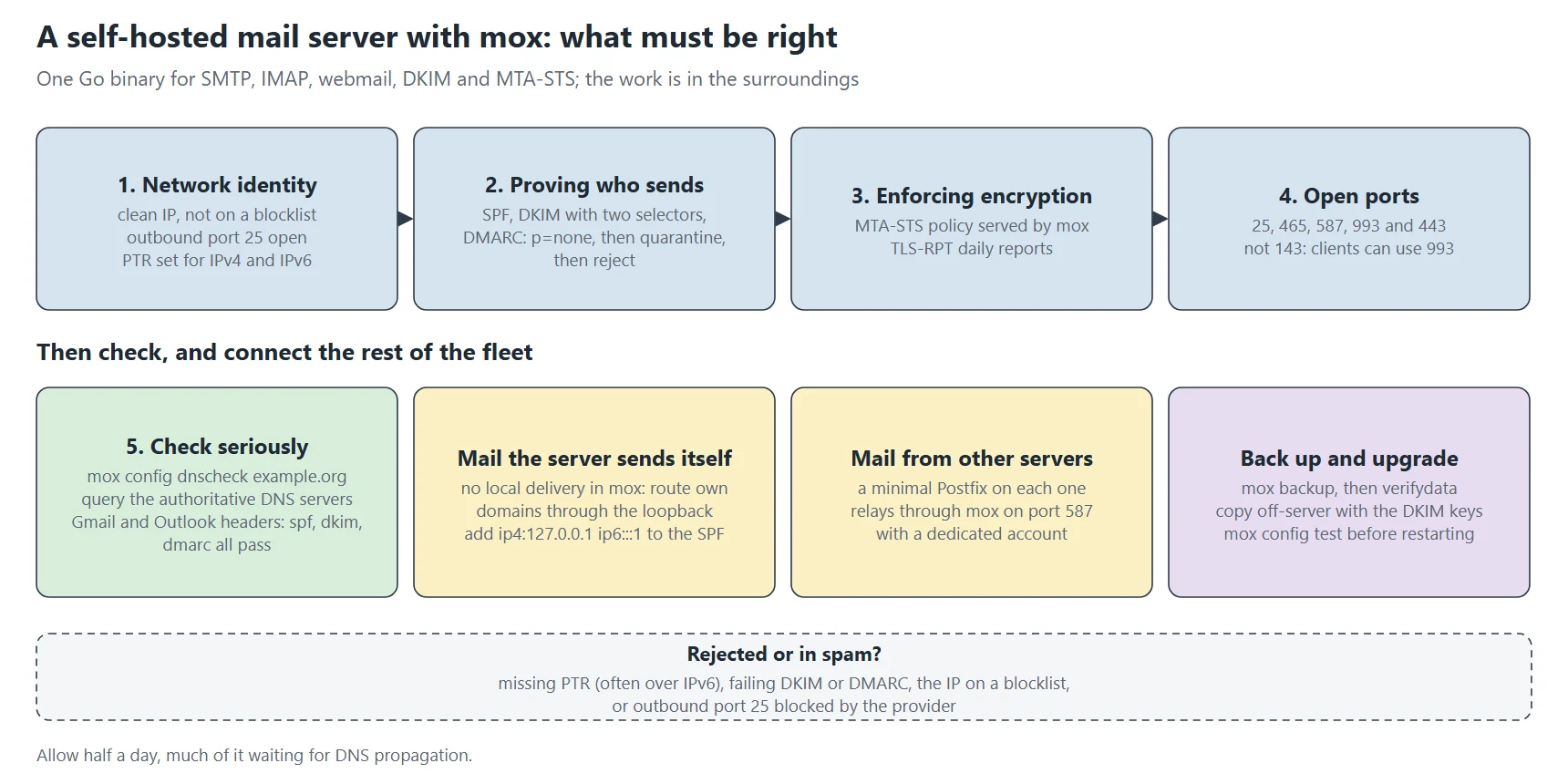
The big mail providers check that the IP address presenting itself matches, both ways, the announced name. Set the PTR at the VPS provider (not in the domain’s DNS zone), for IPv4 and for IPv6 if the server has one:
dig +short -x 203.0.113.25          # mail.example.org.
dig +short mail.example.org A       # 203.0.113.25
dig +short -x 2001:db8::25          # mail.example.org. (otherwise, disable outbound IPv6 for mail)
A missing IPv6 PTR is a common trap: if the server has an IPv6 address, it uses it to reach Gmail, and Gmail rejects the message for lack of a PTR on that address. Either set it, or keep mox from sending over IPv6.
Step 2: install
useradd -m -d /home/mox -s /sbin/nologin mox
cd /home/mox
# download the latest released mox binary, check its checksum
install -o root -g root -m 0755 mox-vX.Y.Z-linux-amd64 /home/mox/mox
./mox quickstart postmaster@example.org
quickstart does a lot in one command:
- it writes
config/mox.conf(the server: hostname, listen addresses, ACME) andconfig/domains.conf(domains, accounts, addresses); - it generates two DKIM keys per domain (one RSA, one Ed25519);
- it creates the
postmasteraccount and prints its password, plus the admin interface’s; - it prints the exact list of DNS records to create, and a ready-to-use systemd unit.
Keep that output somewhere safe: it holds passwords and the DNS values. mox runs under the mox account, without root rights, and only gets from systemd the capability to listen on ports below 1024.
Step 3: the firewall
| Port | Use | Open to |
|---|---|---|
| 25/tcp | SMTP: receiving from other servers, and sending to them | everyone |
| 465/tcp | encrypted submission (implicit TLS) for your mail clients | everyone |
| 587/tcp | submission with STARTTLS (older clients, relaying from your other servers) | everyone or your servers |
| 993/tcp | encrypted IMAP | everyone |
| 80, 443/tcp | ACME (certificates), MTA-STS, autoconfiguration, webmail, admin | everyone |
firewall-cmd --permanent --add-service={smtp,smtps,smtp-submission,imaps,http,https}
firewall-cmd --reload
Port 143 (unencrypted IMAP) doesn’t need to be open: every modern client can use 993.
Step 4: the DNS records, one by one
mail.example.org.                 A      203.0.113.25
mail.example.org.                 AAAA   2001:db8::25
example.org.                      MX     10 mail.example.org.
example.org.                      TXT    "v=spf1 mx ip4:127.0.0.1 ip6:::1 ~all"
2026a._domainkey.example.org.     TXT    "v=DKIM1; k=ed25519; p=…"
2026b._domainkey.example.org.     TXT    "v=DKIM1; k=rsa; p=…"
_dmarc.example.org.               TXT    "v=DMARC1; p=quarantine; rua=mailto:dmarc-reports@example.org"
mta-sts.example.org.              CNAME  mail.example.org.
_mta-sts.example.org.             TXT    "v=STSv1; id=20261105T120000"
_smtp._tls.example.org.           TXT    "v=TLSRPTv1; rua=mailto:tlsrpt@example.org"
autoconfig.example.org.           CNAME  mail.example.org.
_autodiscover._tcp.example.org.   SRV    0 1 443 mail.example.org.
_submissions._tcp.example.org.    SRV    0 1 465 mail.example.org.
_imaps._tcp.example.org.          SRV    0 1 993 mail.example.org.
example.org.                      CAA    0 issue "letsencrypt.org"
Being found: A, AAAA, MX
The MX tells other servers where to deliver example.org‘s mail. It always points to a name, never an IP address, and that name needs its A (and AAAA) records. The priority (10) only matters with several MX records.
Proving who sends: SPF, DKIM, DMARC
- SPF lists the machines allowed to send for the domain.
mxallows the MX servers;ip4:127.0.0.1 ip6:::1is for mail the server sends itself (see below);~allflags the others as suspicious without rejecting them. Only use-allif you’re sure you know all your sending sources (newsletters, website forms…); - DKIM publishes the public keys used to verify the signature mox puts on every outgoing message. Two selectors (
2026a,2026b) let you change keys without an outage: publish the new one, sign with it, then withdraw the old one a few weeks later; - DMARC tells recipients what to do with a message whose SPF and DKIM are both not aligned with the sender’s domain, and where to send their reports. Start with
p=nonefor one or two weeks while reading the reports, move top=quarantine, then top=rejectonce you’re sure no legitimate sending fails.
Enforcing encryption: MTA-STS and TLS-RPT
Without MTA-STS, an attacker on the path can strip the STARTTLS offer from an SMTP connection and read the mail in clear text. With MTA-STS, the servers writing to you learn that your domain requires TLS with a valid certificate. mox serves the policy itself at https://mta-sts.example.org/.well-known/mta-sts.txt. TLS-RPT gets you daily reports of encryption failures. Change the id of _mta-sts whenever the policy changes.
Configuring clients: autoconfig and SRV
Thunderbird, Apple Mail and others find the right servers and ports on their own thanks to autoconfig, _autodiscover and the SRV records. The optional CAA record lets only Let’s Encrypt issue certificates for the domain.
One command prints the expected values at any time: ./mox config dnsrecords example.org.
Step 5: start, then create the accounts
systemctl enable --now mox
./mox config test
./mox config account add alice alice@example.org
./mox setaccountpassword alice
./mox config address add contact@example.org alice      # one more address for the same account
./mox config account list
In the mail client: IMAP on mail.example.org:993 (SSL/TLS), sending on mail.example.org:465 (SSL/TLS), with the full address as login. Webmail and admin are at https://mail.example.org/.
Step 6: check, seriously
./mox config dnscheck example.org     # SPF, DKIM, DMARC, MTA-STS, TLS-RPT, MX, PTR
./mox queue list                      # the outgoing queue: empty or nearly
journalctl -u mox -n 50 --no-pager
dig +short MX example.org @ns1.dns-provider.example   # ask the authoritative servers
Always query your zone’s authoritative DNS servers: some public resolvers return misleading empty answers during propagation, and you end up fixing a problem that doesn’t exist.
Then the test that counts: send a message to a Gmail mailbox and an Outlook mailbox. Open the full headers (“Show original” in Gmail) and look for spf=pass, dkim=pass and dmarc=pass. Reply from those mailboxes and check the reply arrives. In the first days a few messages may land in spam while your address builds a reputation: ask recipients to mark them as legitimate.
What these checks give on my mail server
My own mox server, checked on 2 November 2026. Domain names are rewritten to example.org, values are real.
# ./mox version
v0.0.17-go1.27.0
linux/amd64

# ./mox config test
config OK

# ss -ltn   (listening ports, mox only)
0.0.0.0:25  0.0.0.0:443  0.0.0.0:465  0.0.0.0:587  0.0.0.0:993   (and the same on [::])

# dig +short MX example.org
10 mail.example.org.
# dig +short TXT _dmarc.example.org
"v=DMARC1;p=reject;rua=mailto:dmarc-reports@example.org!10m"
# dig +short TXT _mta-sts.example.org
"v=STSv1; id=ansible20260915"
# dig +short TXT _smtp._tls.example.org
"v=TLSRPTv1; rua=mailto:tlsreports@example.org"

# openssl s_client -starttls smtp -connect mail.example.org:25 -servername mail.example.org
New, TLSv1.3, Cipher is TLS_AES_128_GCM_SHA256
Verify return code: 0 (ok)
- config OK: both files parse and are consistent. Run it before every restart; mox refuses to start on an invalid configuration, and a mail server that doesn’t restart is a mail server that loses messages to retries.
- Five ports, IPv4 and IPv6: 25 (receiving from other servers), 465 and 587 (submission by your clients), 993 (IMAP), 443 (webmail, administration, MTA-STS policy and automatic certificates). Port 80 isn’t open: certificates are obtained over 443 with the TLS-ALPN challenge.
- p=reject in DMARC: only switch to it once the aggregate reports show every legitimate source passing, otherwise your own messages get rejected. The
!10msuffix caps report size at 10 MB. - id=ansible20260915 in the MTA-STS record: the identifier tells senders the policy changed. Change it whenever the policy file changes, or they’ll keep the old one in cache for weeks.
- TLSv1.3, Verify return code: 0: STARTTLS on port 25 presents a valid certificate for the server’s name. It’s what a sending server checks when MTA-STS is in enforce mode.
Mail the server sends itself
Reports from cron, logwatch or backups are often addressed to root@example.org, hosted on this same server. mox has no internal local delivery: it looks up the MX, finds its own name, and goes back out through its public interface. That fails intermittently. The fix is to route that mail through the loopback:
# domains.conf: route our own domains' mail through the loopback
Routes:
	-
		ToDomain:
			- example.org
		Transport: loopback

# mox.conf
Transports:
	loopback:
		SMTP:
			Host: mail-loopback.example.org   # 127.0.0.1 in /etc/hosts
			Port: 25
			STARTTLSInsecureSkipVerify: true
Two consequences to handle. mox applies its checks to this mail like any other: you therefore need ip4:127.0.0.1 ip6:::1 in the SPF (harmless, no outsider connects from the loopback). And the account that only receives this internal mail needs NoFirstTimeSenderDelay: true: otherwise mox applies to these “unknown” senders a fifteen-second delay that the loopback client doesn’t wait for.
Making your other servers send through mox
Your other machines need to send mail (alerts, PHP forms, reports). Rather than turning each into a poorly regarded mail server, set up on each a minimal Postfix that hands everything to mox, authenticating on port 587 with a dedicated account:
# /etc/postfix/main.cf on ANOTHER server, which hands all its mail to mox
relayhost = [mail.example.org]:587
smtp_sasl_auth_enable = yes
smtp_sasl_password_maps = hash:/etc/postfix/sasl_passwd
smtp_sasl_security_options = noanonymous
smtp_tls_security_level = encrypt
inet_interfaces = loopback-only
inet_interfaces = loopback-only: this Postfix listens locally only and never receives mail from outside. On a SELinux machine, PHP needs the httpd_can_sendmail boolean to use mail().
Back up and restore
./mox backup /data/backup/mox/$(date +%Y%m%d)
./mox verifydata /data/backup/mox/20261105
mox backup makes a consistent copy of the account databases and messages without stopping the service; mox verifydata checks that it’s usable. Copy the backup off the server every night, together with the configuration files (which hold the DKIM keys). A mail server is also an identity: without the original DKIM keys you’d have to republish DNS. To restore, stop mox, replace the data directory with the backup, run verifydata, then restart.
Upgrading
An upgrade means replacing the binary and restarting. Read the release notes first: some versions rename configuration options. Take a backup just before, then run ./mox config test with the new binary before restarting the service.
Diagnosing a rejected message
- Gmail rejects with “PTR” or “reverse DNS” in the error: PTR missing or inconsistent, often over IPv6;
- messages in spam everywhere: check that DKIM and DMARC pass, and the IP address against blocklists;
- messages stuck in the queue:
./mox queue listshows each message’s last error; a timeout to every recipient means outbound port 25 is blocked; - rejections for
spf-policyon internal mail: the loopback is missing from the SPF; - DMARC reports arrive daily in the
dmarc-reportsmailbox: mox reads them and shows them in its interface. That’s where you find out a third-party service sends in your name without authorisation.
This post is part of a series of sysadmin tutorials (tag “how-to”).
Series “How-to”, tutorial 8/77. · ← Previous tutorial · Next tutorial → (coming 6 Nov) · Version française