How-to: Suricata as an IPS with NFQUEUE, without breaking your server
Install Suricata as an IPS on an Internet-facing server: suricata.yaml essentials, rules, NFQUEUE, and the loopback and network card traps to avoid.
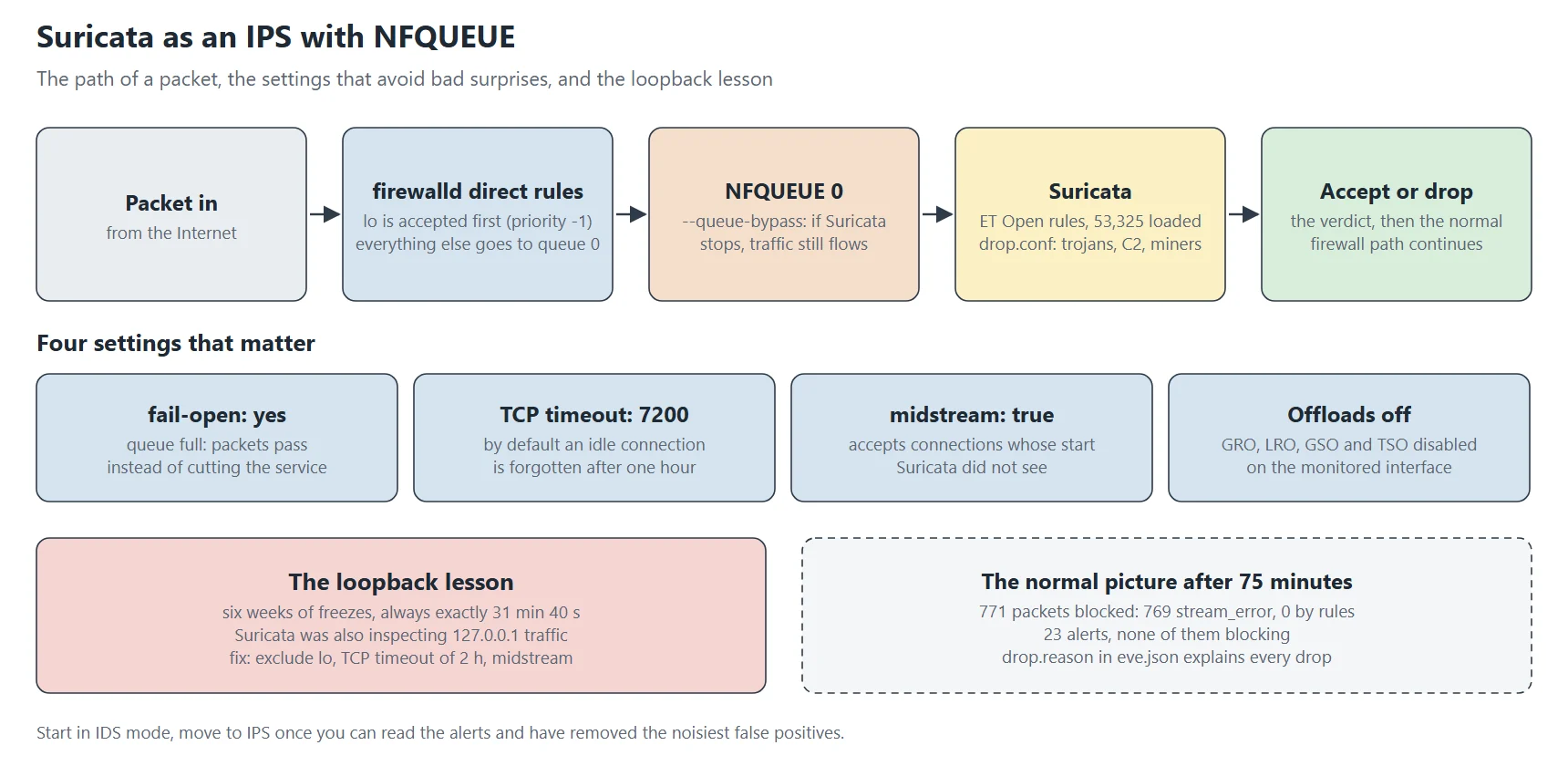
Start Suricata in IDS mode, and move to IPS with NFQUEUE only once you can read its alerts and have removed the noisiest false positives. In IPS mode Suricata sits in the path of every packet, and one of the failures described below silently blocked local connections for weeks. This tutorial installs it as an IPS on an Internet-facing Rocky Linux server.
Suricata is a network intrusion detection engine: it examines packets entering and leaving a machine, reassembles connections, understands protocols (HTTP, TLS, DNS, SSH…) and matches the whole against tens of thousands of rules describing known attacks. In IPS mode it can also block: a packet that matches a drop rule never reaches its destination.
NFQUEUE is the most useful mode on a standalone server, and also the most delicate, so I describe in detail the failures I ran into.
IDS or IPS
| Mode | How it works | Risk |
|---|---|---|
| IDS (af-packet) | Suricata gets a copy of packets and alerts | none for traffic: at worst, missed alerts |
| IPS (NFQUEUE) | the kernel hands each packet to Suricata, which accepts or drops it | Suricata is in the path: a mistake blocks traffic |
Step 1: install
dnf install epel-release
dnf install suricata
suricata --build-info | grep -E 'NFQueue|AF_PACKET'   # both must be "yes"
Two kernel modules are needed for NFQUEUE: nfnetlink_queue (the queue itself) and xt_NFQUEUE (the target used by the firewall rules). The second is often forgotten: the rule then fails with an unclear message about a missing module. Load them and make them permanent:
modprobe nfnetlink_queue
modprobe xt_NFQUEUE
printf 'nfnetlink_queue\nxt_NFQUEUE\n' > /etc/modules-load.d/nfqueue.conf
Step 2: suricata.yaml, the essentials
# /etc/suricata/suricata.yaml (excerpts)
vars:
  address-groups:
    HOME_NET: "[203.0.113.25/32,2001:db8::25/128]"
    EXTERNAL_NET: "!$HOME_NET"

nfq:
  mode: accept
  fail-open: yes

flow-timeouts:
  tcp:
    established: 7200

stream:
  memcap: 256mb
  midstream: true
  reassembly:
    memcap: 512mb
    depth: 1mb

outputs:
  - eve-log:
      enabled: yes
      filename: eve.json
      types: [alert, drop, anomaly, stats]
HOME_NET: the addresses you protect. Many rules depend on it (“traffic from outside to HOME_NET”); a wrong value gives both false positives and missed attacks;
nfq.mode: accept: Suricata gives its verdict (accept or drop) and the packet then continues its normal path through the firewall;
fail-open: yes: if the queue overflows because Suricata can’t keep up, packets pass instead of being dropped. On a standalone server, better to let a few packets through uninspected than cut the service;
flow-timeouts.tcp.established: 7200: the point that cost me the most, detailed below. By default Suricata forgets an idle TCP connection after an hour; a connection that stays open longer without traffic sees its next packets treated as “out of connection”, and sometimes dropped;
midstream: true: Suricata agrees to pick up a connection whose start it didn’t see, for example after its own restart. Without it, every connection established before startup is considered invalid;
memcap: memory ceilings for flow tracking and data reassembly. Too low, and Suricata gives up inspecting connections under load; watch the memcap counters in the statistics;
eve.json: the structured log, one JSON line per event. This is the file you ship to a SIEM.
Step 3: rules
suricata-update                      # downloads the ET Open set (free)
suricata-update list-sources
suricata-update enable-source et/open
ls -l /var/lib/suricata/rules/suricata.rules
suricata-update assembles every rule into one file, applying your modification files. Two of them are essential in IPS mode:
# /etc/suricata/drop.conf : these rule families block instead of alerting
re:classtype:trojan-activity
re:classtype:command-and-control
re:classtype:domain-c2
re:classtype:exploit-kit
re:classtype:coin-mining

# /etc/suricata/disable.conf : industrial protocols not present here
re:dnp3
re:modbus
By default every rule only alerts. drop.conf turns into blocks the rules whose category leaves no doubt: command-and-control traffic, trojans, cryptocurrency mining. Don’t turn everything into a block: a generic “suspicious traffic” rule triggered by a legitimate application cuts that application without warning. disable.conf removes useless rules, saving memory and CPU.
Schedule a daily update with a systemd timer that runs suricata-update, then asks Suricata to reload its rules without restarting (suricatasc -c reload-rules).
Step 4: sending traffic to Suricata
The service reads queue 0:
# /etc/systemd/system/suricata.service.d/ips.conf
[Service]
ExecStart=
ExecStart=/usr/sbin/suricata -c /etc/suricata/suricata.yaml -q 0 --pidfile /var/run/suricata.pid
Then the firewall rules, with firewalld in “direct” mode:
# 1. loopback never goes through Suricata (priority -1: before anything)
firewall-cmd --permanent --direct --add-rule ipv4 filter INPUT  -1 -i lo -j ACCEPT
firewall-cmd --permanent --direct --add-rule ipv4 filter OUTPUT -1 -o lo -j ACCEPT
# 2. everything else is handed to queue 0; --queue-bypass: if Suricata is stopped, traffic flows
firewall-cmd --permanent --direct --add-rule ipv4 filter INPUT   0 -j NFQUEUE --queue-num 0 --queue-bypass
firewall-cmd --permanent --direct --add-rule ipv4 filter OUTPUT  0 -j NFQUEUE --queue-num 0 --queue-bypass
firewall-cmd --permanent --direct --add-rule ipv4 filter FORWARD 0 -j NFQUEUE --queue-num 0 --queue-bypass
# same rules for ipv6
firewall-cmd --reload
–queue-bypass: without it, if Suricata is stopped or crashes, no packet passes at all, SSH included. With it, the kernel lets traffic through when nobody listens on the queue. That’s the line that saves you from calling the provider’s rescue console;
loopback excluded: the most expensive lesson of this tutorial, detailed below;
order: direct rules with priority -1 go before priority 0.
The loopback lesson
For six weeks, a service on my server (a task queue talking to Redis on 127.0.0.1) froze at irregular intervals, always for exactly 31 minutes and 40 seconds, then recovered. The application’s logs showed nothing, nor did Redis’s. The cause: Suricata was also inspecting loopback traffic. A long idle connection outlived the flow-tracking timeout; when it woke up, its packets belonged to no connection Suricata knew, so it dropped them, and you had to wait for TCP to give up and reconnect.
The diagnosis came from eve.json: every dropped packet appears there with its reason.
jq -c 'select(.event_type=="drop") | {timestamp, src_ip, dest_ip, dest_port, reason: .drop.reason}' /var/log/suricata/eve.json | tail
Three fixes, all needed: exclude loopback (traffic between processes on the same machine has no business in an IPS), raise the TCP timeout to two hours, and enable midstream. Remember the symptom: a long connection that freezes for a fixed, reproducible time with no error anywhere is almost always a middlebox (firewall, IPS, address translation) that forgot the connection.
The network card trap
Modern cards and drivers merge several packets into one “superpacket” before handing them to the kernel (GRO, LRO). Suricata then sees packets bigger than the network’s real size, which skews its connection reassembly. Turn these optimisations off on the monitored interface, permanently, through NetworkManager rather than a plain ethtool -K that would be undone at the next reconnect:
nmcli connection modify eth0 ethtool.feature-gro off ethtool.feature-lro off \
    ethtool.feature-gso off ethtool.feature-tso off
nmcli connection up eth0
ethtool -k eth0 | grep -E 'generic-receive|large-receive'
Step 5: start and check
suricata -T -c /etc/suricata/suricata.yaml        # test configuration and rules
systemctl enable --now suricata
tail -f /var/log/suricata/suricata.log            # "engine started"
curl -s http://testmynids.org/uid/index.html      # must fire alert 2100498
jq -c 'select(.event_type=="alert") | .alert.signature' /var/log/suricata/eve.json | tail -3
Also check that normal traffic still flows: new SSH connection, website, sending mail, DNS resolution. Then watch the statistics for a few days:
jq -c 'select(.event_type=="stats") | .stats | {drop: .ips.blocked, memcap: .tcp.ssn_memcap_drop, kernel: .capture}' /var/log/suricata/eve.json | tail -1
The same counters on a production server
Suricata 8.0.8 in IPS mode on my web server, read through the control socket on 2 November 2026 after 75 minutes of uptime. suricatasc gives the live counters without waiting for the next stats line in eve.json:
# suricatasc -c iface-list
{"message": {"count": 1, "ifaces": ["NFQ#0"]}, "return": "OK"}

# suricatasc -c ruleset-stats
[{"id": 0, "rules_loaded": 53325, "rules_failed": 0, "rules_skipped": 0}]

# suricatasc -c dump-counters | jq '.message | {uptime, ips, alerts: .detect.alert}'
uptime        4544 s
ips.accepted  2 076 277
ips.blocked   771
  drop_reason.stream_error    769
  drop_reason.applayer_error  2
  drop_reason.rules           0
alerts        23
NFQ#0: Suricata is attached to netfilter queue 0, so it sees packets inline and can drop them. In IDS mode this list would show a network interface instead.
53 325 rules loaded, 0 failed: a non-zero rules_failed usually means a rule needs a keyword your version doesn’t know, after an update of either the rules or the engine.
771 packets blocked, 769 for stream_error, 0 by rules: that’s the normal picture on a web server. Rule drops are rare; most drops are packets that make no sense for the TCP stream they claim to belong to (retransmissions after the connection closed, bad sequence numbers, invalid checksums). If this number climbs suddenly, look at the drop events in eve.json: the loopback lesson above started as exactly that kind of spike.
23 alerts in 75 minutes, none of them blocking: protocol anomalies (excessive SYNs on one handshake, mismatched application protocols, invalid timestamps) logged for the SIEM. Yet 23 665 of the loaded rules are set to drop, by class (trojans, command-and-control, exploit kits, miners…) through drop.conf: in this hour, none of them matched. A drop rule that never fires is the expected state, not a sign it’s broken.
Silencing a false positive
A rule that fires on legitimate traffic is neutralised from the most precise to the broadest: threshold or suppression for one address in threshold.config, then disabling the rule by its number in disable.conf. Never edit the rules file directly: the next update would overwrite it.
# /etc/suricata/threshold.config
suppress gen_id 1, sig_id 2210045, track by_src, ip 203.0.113.40
Sending alerts to the SIEM
eve.json can be read by Wazuh, Elastic, Graylog and most SIEMs. With a Wazuh agent, a few lines are enough (format json, file path) and Suricata’s alerts show up next to the system logs, so you can tie a network alert to an SSH login or a file change. Mind rotation: eve.json grows fast, and logrotate must signal Suricata to reopen the file.
Upgrading Suricata
After each package update, run suricata -T again before restarting: a renamed option or an incompatible rule prevents startup, and thanks to --queue-bypass traffic then flows uninspected, with nothing visibly broken. That’s the flip side of failing safe: monitor the service’s state, not just the traffic.
This post is part of a series of sysadmin tutorials (tag “how-to”).
Series “How-to”, tutorial 10/77. · ← Previous tutorial · Next tutorial → (coming 11 Nov) · Version française
Official documentation
Suricata, project site
Suricata documentation, configuration, rules, IPS mode