A relational database gives the illusion of tables, rows and columns. On disk there are only files cut into fixed-size blocks. Understanding how those blocks are organised explains a lot of behaviour that looks mysterious: why a file doesn’t shrink after a DELETE, why a UUID primary key slows inserts down, why a secondary index costs more than you’d think, or what the “doublewrite buffer” actually protects.
This three-part series opens the hood of three engines: InnoDB (the storage engine of MySQL and MariaDB), PostgreSQL and Oracle. The same thread runs through them: files, pages, rows, and where old versions of the data live. First stop: InnoDB.
The data directory
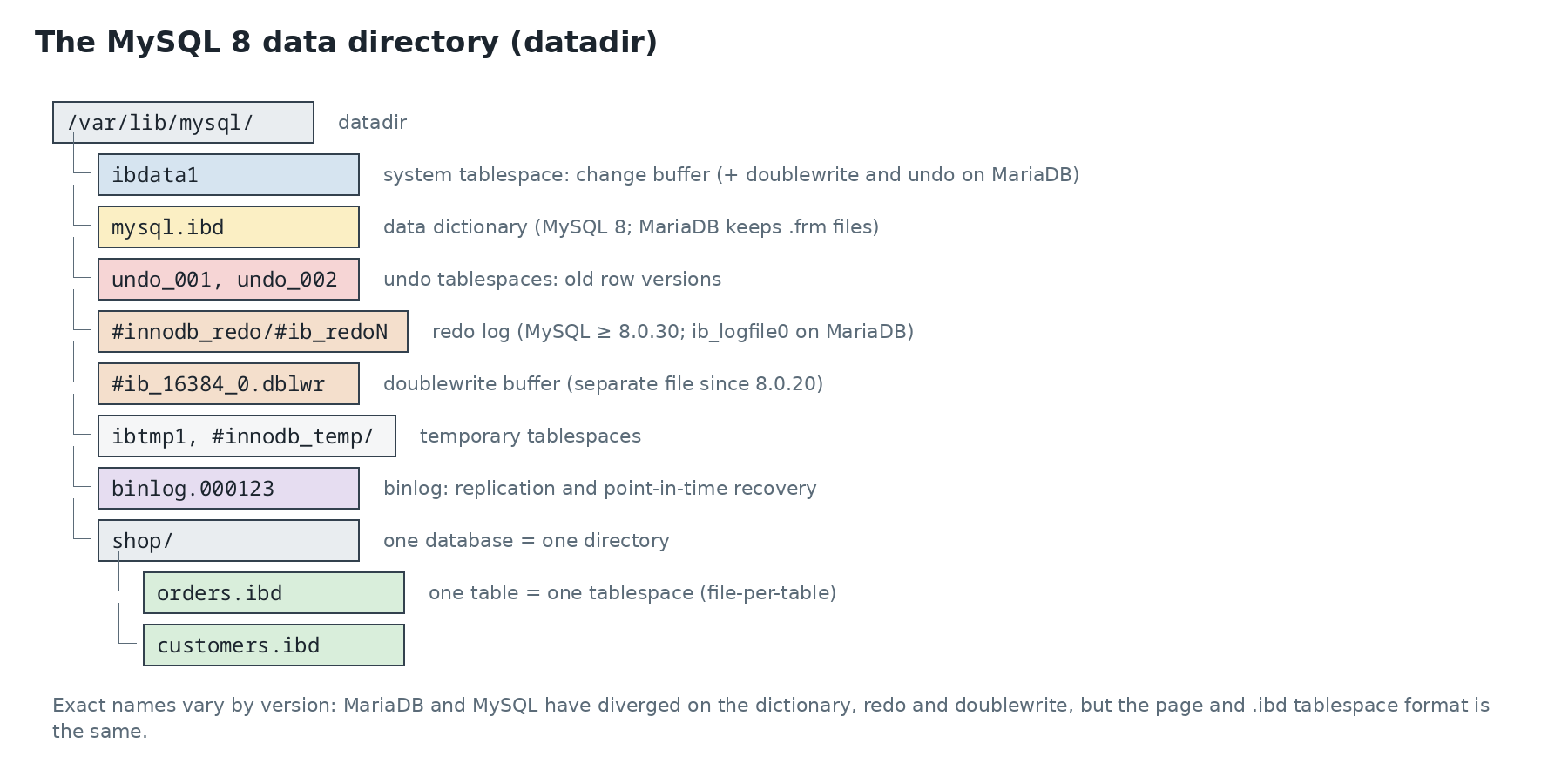
Each file has a specific job:
ibdata1, the system tablespace. Historically it held everything: tables, indexes, undo, dictionary. Today it only keeps the change buffer (on MySQL) and, on MariaDB, the doublewrite and sometimes undo. It never shrinks: a 50 GBibdata1bloated by an old transaction stays that way, and the only way to reduce it is a full export and re-import;- one
.ibdfile per table, thanks toinnodb_file_per_table=ON(the default since MySQL 5.6). That’s what lets you reclaim the space of a dropped or truncated table (DROP,TRUNCATE), move a single table, or restore a single tablespace; - undo tablespaces (
undo_001…): before-images of modified rows, forROLLBACKand for other transactions’ consistent reads; - the redo log: every page change is described there before the page itself is written to disk. After a crash, InnoDB replays it;
- the doublewrite buffer, explained below;
- binlogs, which belong to the server, not InnoDB: they describe changes at SQL level, for replication and point-in-time recovery.
An SQL database (CREATE DATABASE shop) is nothing but a directory. The exact global file names vary: MySQL and MariaDB diverged on the dictionary (MySQL 8 replaced .frm files with a transactional dictionary in mysql.ibd; MariaDB kept the .frm files), on redo and on doublewrite. The internal page format is shared. To see an instance’s tablespaces:
-- MySQL 8
SELECT name, file_size, allocated_size FROM information_schema.INNODB_TABLESPACES;
-- MariaDB
SELECT name, file_size, allocated_size FROM information_schema.INNODB_SYS_TABLESPACES;
Pages, extents, segments
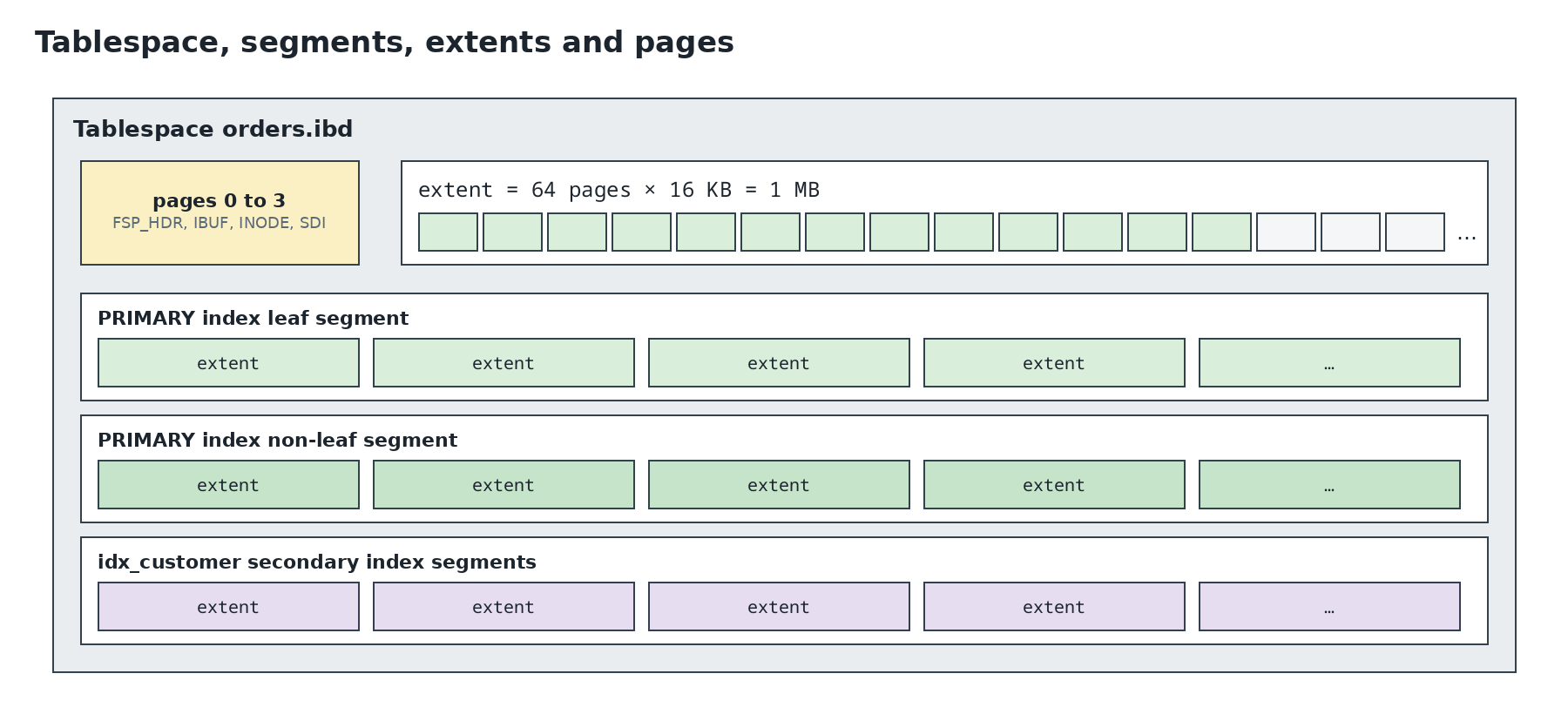
The basic unit is the page, 16 KB by default. Its size (innodb_page_size) is fixed when the instance is created and can’t change afterwards. Everything InnoDB reads or writes, it reads or writes as whole pages: reading a 100-byte row means loading 16 KB into memory, into the buffer pool.
Pages are grouped into extents of 64 pages, i.e. 1 MB. Allocating by extent rather than page by page keeps one index’s pages physically close, which makes sequential reads efficient.
Each index has two segments: one for its leaf pages, one for its internal pages. Separating them keeps the leaves (where the data is) contiguous, for range scans. So as not to reserve 1 MB for every small table, a segment first gets up to 32 individual pages, and only moves to full extents after that. That’s why an empty table takes a hundred kilobytes or so, not several megabytes.
The first pages of an .ibd are reserved for space management: page 0 (FSP_HDR) describes the state of extents, page 1 the change-buffer bitmap, page 2 the segment “inodes”. On MySQL 8, page 3 holds the table description as JSON (SDI) and the clustered index root is page 4. On MariaDB, which keeps .frm files, the root is page 3.
Anatomy of a page
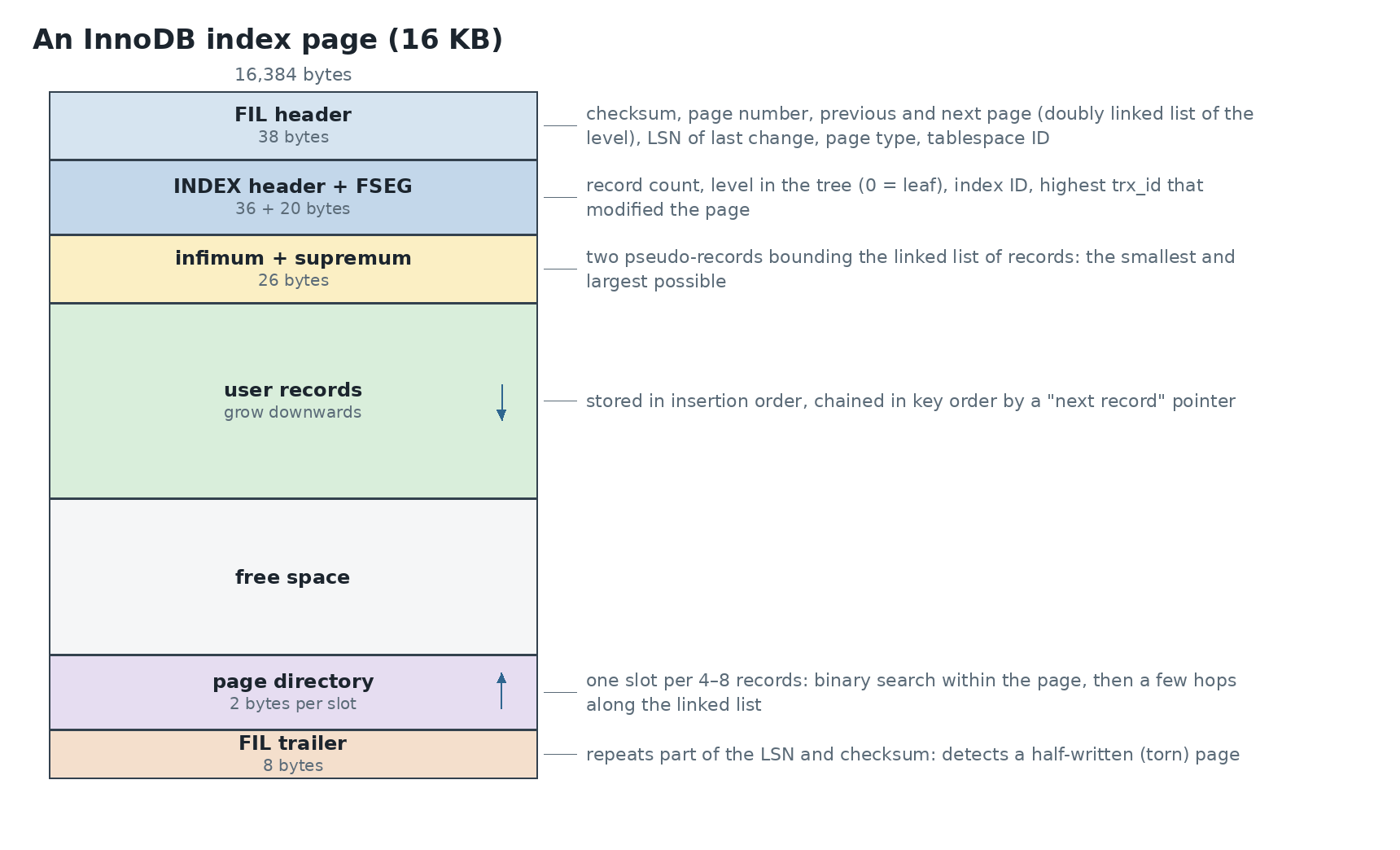
Each area has a reason to exist:
- The FIL header is shared by every page, whatever its type. It holds the checksum, which detects corruption on read, and the LSN (Log Sequence Number) of the last change. After a crash, InnoDB compares that LSN with each redo entry’s: it only replays what the page hasn’t received yet. The previous and next page pointers link every page of one tree level;
- the INDEX header gives the page’s level in the tree (0 for a leaf), the record count and the ID of the index it belongs to;
- infimum and supremum are two fake records, the smallest and largest possible. They act as start and end of the linked list of records, which simplifies insertion code;
- records are written in arrival order, but each points to the next in key order. Inserting in the middle moves nothing: two pointers change;
- the page directory starts at the end of the page and grows upwards. It holds one “slot” per 4–8 records. To find a key, InnoDB binary-searches the slots, then walks at most a few records along the linked list;
- the FIL trailer repeats part of the LSN and checksum. If the start and end of the page don’t match, the page was only half written.
When a page is full and a record must go in, InnoDB splits it in two (page split) and updates the parent page. When two neighbouring pages drop below half full, it can merge them. These operations are expensive and leave half-empty pages: that’s fragmentation.
The doublewrite buffer: why write twice
A disk guarantees atomic writes of 512 bytes or 4 KB, not 16 KB. If the server stops in the middle of writing a page, it can end up half old, half new: a torn page. Redo can’t fix it, because it describes changes to apply to a consistent page. So InnoDB writes each page first to the doublewrite buffer, then to its final location. After a crash, a torn page is replaced by its intact copy, then redo is applied. On a filesystem that itself guarantees atomic 16 KB writes (ZFS, some SSDs), it can be turned off.
A record
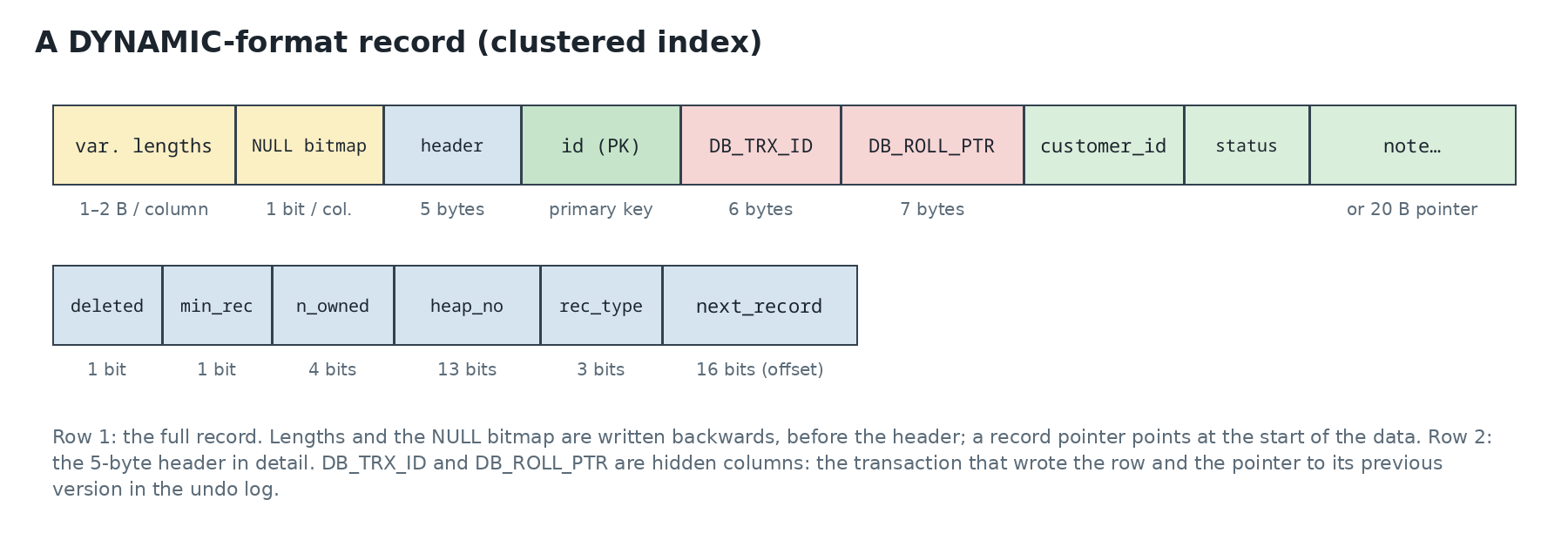
- Hidden columns:
DB_TRX_IDis the ID of the last transaction that modified the row,DB_ROLL_PTRpoints to the previous image in undo. A transaction that mustn’t see the change follows that pointer to rebuild the old version; - without a primary key, InnoDB uses the first non-null unique key, or failing that adds a hidden 6-byte
DB_ROW_IDcolumn, fed by a global counter shared by all such tables. Always define a primary key; - the “deleted” bit: a
DELETEonly marks the record. It’s actually removed later by the purge thread, once no transaction can see it any more; - NULLs cost only a bit in the bitmap: no room in the data;
- long columns (
TEXT,BLOB, largeVARCHAR): a record must fit in roughly half a page, so a page holds at least two records. InDYNAMICformat, a value that’s too long goes entirely to overflow pages, and the record keeps only a 20-byte pointer.
The clustered index: the table is a tree
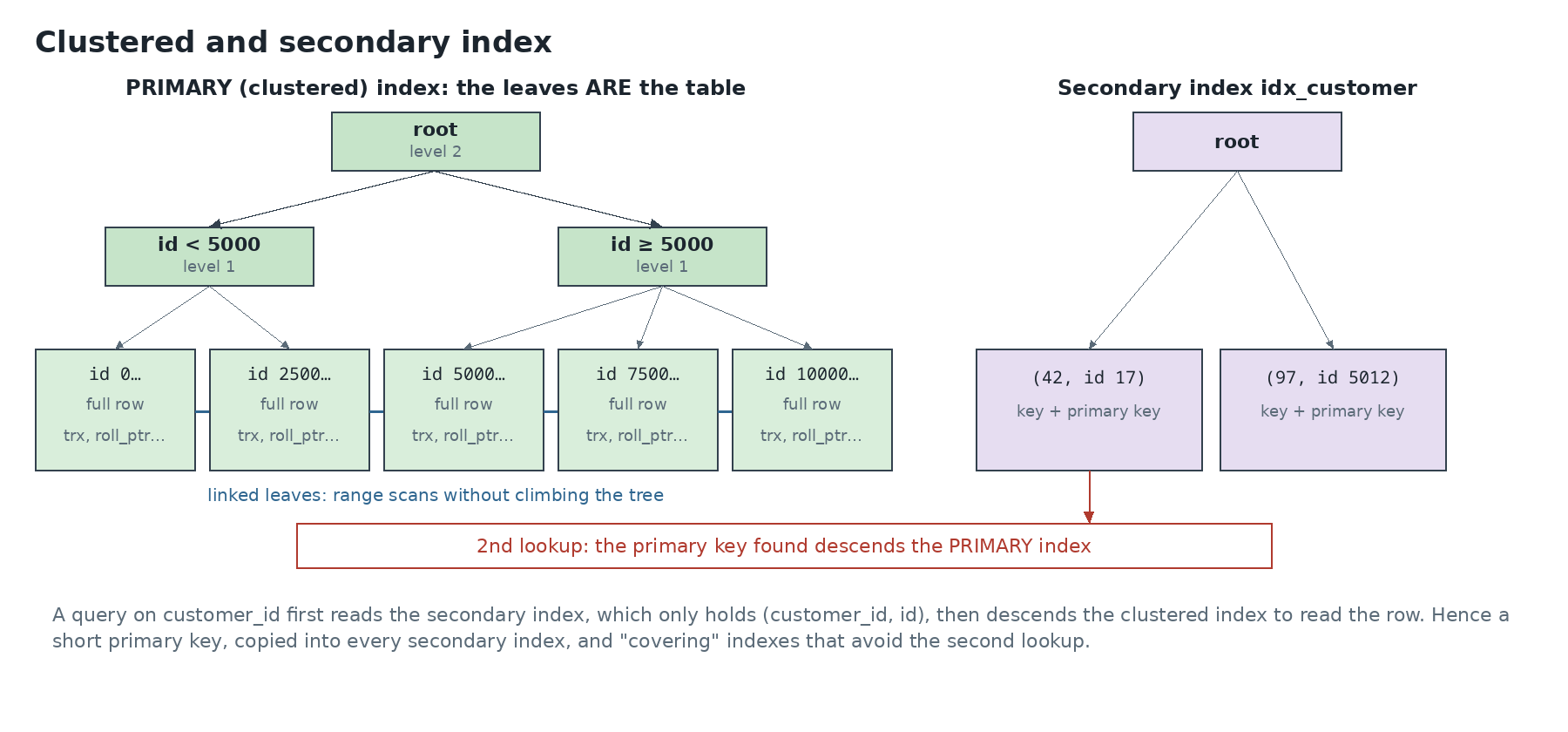
This is InnoDB’s most important design decision: the table is the primary key index. There’s no separate “heap” of rows: full rows are stored in the leaves of a B+tree sorted by primary key. Several practical consequences follow:
- a primary key lookup descends the tree and finds the row directly. With 16 KB pages and a
BIGINTkey, an internal page references over a thousand child pages: three levels are enough for hundreds of millions of rows; - an increasing primary key (
AUTO_INCREMENT) always appends at the right of the tree: pages fill cleanly, with no splits in the middle. A random key (UUID v4) inserts anywhere, causes splits everywhere and leaves half-full pages. Time-ordered UUIDs (UUID v7) avoid the problem; - a secondary index doesn’t hold the row’s physical address but its primary key. A secondary index lookup therefore costs two tree descents. In return, moving a row during a split doesn’t require updating the secondary indexes;
- a long primary key is copied into every secondary index: a 36-character key inflates every index;
- a covering index, holding every column the query needs, avoids the second descent:
EXPLAINthen showsUsing index.
Why the file doesn’t shrink
A massive DELETE frees room inside the pages, which later inserts will reuse, but gives nothing back to the filesystem. To reclaim space, rebuild the table:
OPTIMIZE TABLE shop.orders;          -- for InnoDB, equivalent to ALTER TABLE … FORCE
-- check how much space is actually reclaimable first
SELECT table_name, data_free/1024/1024 AS free_mb
FROM information_schema.tables WHERE table_schema='shop' ORDER BY data_free DESC;
The rebuild copies every row into a new, compact file, then replaces the old one. It runs online on recent versions, but temporarily needs room for a second copy of the table.
Next post: PostgreSQL, which made the opposite choice on almost every one of these points: a heap table, 8 KB pages, and old versions kept in the table itself.
This post is part of a series of sysadmin notes (tag “sysadmin notebook”).
Series “Inside database data files”, part 1/3. · Next post → · Version française