Systemd capabilities: from root to one single privilege, with a tested lab
Systemd capabilities explained with a tested lab: User=, NoNewPrivileges=, CapabilityBoundingSet= and AmbientCapabilities= with real outputs.
Systemd capabilities decide which privileges a service really keeps. Most services start as root, so they hold far more power than they need. This third part of the series “Systemd hardening, directive by directive” shows how to cut that power down, one directive at a time, with a lab you can rebuild in half an hour.
Every output below comes from a real run on a test machine, so you can compare it with your own results. When a result differs from what the manual leads you to expect, the text says so. The article covers User=, Group=, SupplementaryGroups=, DynamicUser=, NoNewPrivileges=, CapabilityBoundingSet=, AmbientCapabilities=, SecureBits= and RestrictSUIDSGID=. The directive PAMName= belongs to the same family, but it was not tested, so it only gets a short note.
Before you start
- Level: you can write a unit file and read a journal. You do not need to know systemd capabilities yet.
- Machine: a test machine or a virtual machine that runs systemd. Never run this lab on a production server.
- Rights: root access through
sudo. - Tools:
systemctl,journalctl,systemd-analyze,python3and the libcap tools (capsh,getpcaps,getcap,setcap). - Time: about 30 minutes for the whole lab, and about 5 minutes if you only read.
- Part 1 of the series explains how to measure a unit with
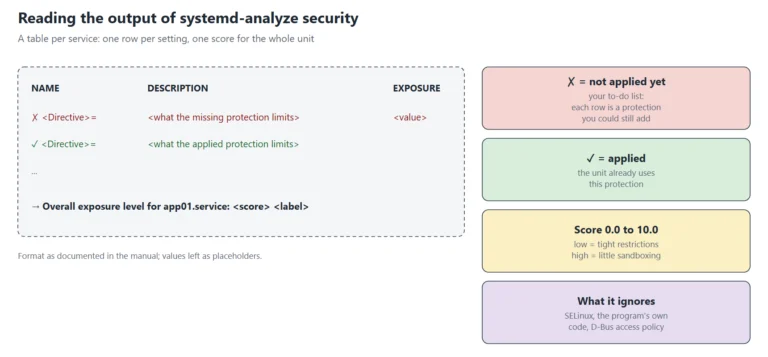
systemd-analyze security. Here, that score is only a thermometer.
Tested on Rocky Linux 10.2, systemd 257, WSL2 kernel 6.18.54.1-microsoft-standard-WSL2. SELinux is not available on that bench (the selinuxfs file system is absent), so no result below involves SELinux. On a native kernel with SELinux enforcing, some results can differ.
The words you need
Systemd capabilities have their own vocabulary, so a short glossary comes first. Read this table once. Then come back to it when a term feels unclear.
| Term | Plain meaning |
|---|---|
| UID 0 / root | The administrator account. Historically, the kernel gives it every privilege. |
| Capability | One slice of root’s power. For example CAP_NET_BIND_SERVICE allows ports below 1024, and CAP_CHOWN allows changing a file owner. The full list is in the capabilities(7) manual page. |
| Bounding set | The ceiling. A capability outside this set cannot be used by the process or by anything it starts. |
| Ambient set | Capabilities that a non-root process keeps when it runs another program. It is the way to give an unprivileged service one privilege. |
| Set-user-ID file | A program that runs with the identity of its owner, usually root (sudo and passwd are examples). |
| File capability | A capability stored on the program file itself, with setcap. |
| no_new_privs | A kernel flag. Once set, execve() can never give the process more privileges. NoNewPrivileges= sets it. |
| Drop-in | A small file named unit.service.d/something.conf that overrides part of a unit. It survives package updates. |
| Exposure level | The score of systemd-analyze security, from 0 to 10. A higher number means a more exposed service. |
How systemd capabilities fit together: who limits, who grants, who blocks
Nine directives look like a lot, but they play only four roles, and the picture below shows them side by side.
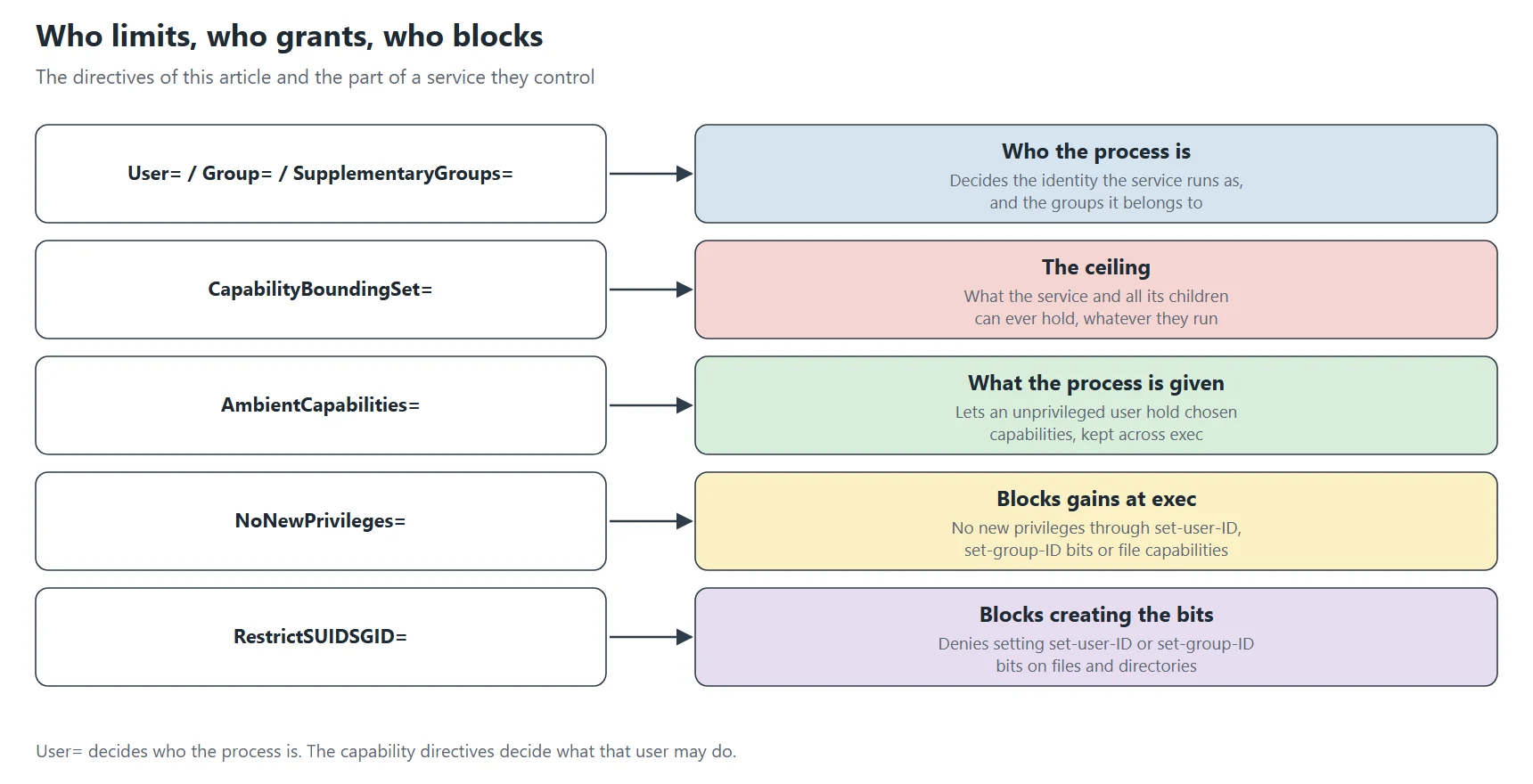
- Identity:
User=,Group=,SupplementaryGroups=andDynamicUser=choose who the service is. - Limit:
CapabilityBoundingSet=sets the ceiling of what the service can ever hold. - Grant:
AmbientCapabilities=gives a non-root service the few capabilities it needs. - Block:
NoNewPrivileges=andRestrictSUIDSGID=stop the service from climbing back up.SecureBits=fine-tunes how root and capabilities interact.
So the recipe is short: first pick an identity, then grant only what is needed, set the ceiling, and finally close the doors that lead back to root. The sections below test each step in that order.
Build the lab
The lab uses one harmless probe script that runs under different settings. The probe does four things. First, it tries to bind port 80 on the loopback address. Second, it tries to hand a file to another owner. Third, it tries to set the set-user-ID bit on its own file. Finally, it runs a root-owned set-user-ID helper. It also prints the capability masks of its own process. Nothing leaves the machine, because the probe only touches a private temporary directory.
Every name starts with demo-hardening-sd3-, and the account is called sd3demo. As a result, the cleanup at the end of the article removes exactly what the lab created. Save the script below as lab-setup.sh and run it as root.
#!/bin/bash
# Creates the harmless demo files and units of the lab (all named demo-hardening-*).
set -e

# A dedicated system account for the demo (removed by the cleanup script).
id sd3demo >/dev/null 2>&1 || useradd --system --no-create-home --shell /usr/sbin/nologin sd3demo

cat > /usr/local/bin/demo-hardening-sd3-probe.sh <<'EOF'
#!/bin/bash
# Harmless probe: binds only to loopback, touches only a private temporary directory.
echo "identity: uid=$(id -u) user=$(id -un) groups=$(id -G)"
grep -E '^(NoNewPrivs|CapInh|CapPrm|CapEff|CapBnd|CapAmb):' /proc/self/status
d=$(mktemp -d)
if python3 -c 'import socket; s=socket.socket(); s.bind(("127.0.0.1", 80)); s.close()' 2>/dev/null; then
  echo "probe bind-80: allowed"
else
  echo "probe bind-80: refused"
fi
if [ "$(id -u)" = 0 ]; then target=nobody; else target=root; fi
touch "$d/owned"
if chown "$target" "$d/owned" 2>/dev/null; then
  echo "probe chown-to-$target: allowed"
else
  echo "probe chown-to-$target: refused"
fi
touch "$d/suid"
if chmod u+s "$d/suid" 2>/dev/null; then
  echo "probe chmod-u+s: allowed"
else
  echo "probe chmod-u+s: refused"
fi
echo "probe setuid-helper effective uid: $(/usr/local/bin/demo-hardening-sd3-setuid-id -u)"
rm -rf "$d"
EOF
chmod 755 /usr/local/bin/demo-hardening-sd3-probe.sh

# A copy of id(1) owned by root with the set-user-ID bit: it only prints IDs.
cp /usr/bin/id /usr/local/bin/demo-hardening-sd3-setuid-id
chown root:root /usr/local/bin/demo-hardening-sd3-setuid-id
chmod u+s,a+rx /usr/local/bin/demo-hardening-sd3-setuid-id

cat > /etc/systemd/system/demo-hardening-sd3-caps.service <<'EOF'
[Unit]
Description=Demo hardening: what may an unprivileged service do?

[Service]
Type=oneshot
User=sd3demo
ExecStart=/usr/local/bin/demo-hardening-sd3-probe.sh
StandardOutput=journal
EOF

cat > /etc/systemd/system/demo-hardening-sd3-root.service <<'EOF'
[Unit]
Description=Demo hardening: what may a root service do?

[Service]
Type=oneshot
ExecStart=/usr/local/bin/demo-hardening-sd3-probe.sh
StandardOutput=journal
EOF

cat > /etc/systemd/system/demo-hardening-sd3-dynamic.service <<'EOF'
[Unit]
Description=Demo hardening: dynamic user

[Service]
Type=oneshot
DynamicUser=yes
StateDirectory=demo-hardening-sd3-dynamic
ExecStart=/usr/bin/id -u
ExecStart=/usr/bin/id -un
ExecStart=/usr/bin/touch /var/lib/demo-hardening-sd3-dynamic/created-by-the-service
StandardOutput=journal
EOF

# Helper used by the following scripts: restart a unit, then print its own journal lines.
cat > /usr/local/bin/demo-hardening-sd3-run <<'EOF'
#!/bin/bash
# Restart a unit, then print only the lines this run wrote to the journal.
unit="$1"
since=$(date '+%Y-%m-%d %H:%M:%S')
systemctl daemon-reload
systemctl restart "$unit" 2>&1 | sed 's/^/restart: /' || true
sleep 1
journalctl -u "$unit" -o cat --no-pager --since "$since" | grep -vE '^(Starting |Finished |.*: Deactivated successfully)'
EOF
chmod 755 /usr/local/bin/demo-hardening-sd3-run

systemctl daemon-reload
sudo bash lab-setup.sh
The helper demo-hardening-sd3-run reloads systemd, restarts one unit, and prints only the journal lines of that run. Because the units are one-shot, the probe output lands in the journal, and the helper shows it.
Baseline: a dedicated user and a root service, with no hardening
First, run the probe twice with no hardening at all. One unit uses the dedicated account. The other one uses the default identity, which is root.
sudo /usr/local/bin/demo-hardening-sd3-run demo-hardening-sd3-caps.service
sudo /usr/local/bin/demo-hardening-sd3-run demo-hardening-sd3-root.service
identity: uid=990 user=sd3demo groups=990
CapInh:	0000000000000000
CapPrm:	0000000000000000
CapEff:	0000000000000000
CapBnd:	000001ffffffffff
CapAmb:	0000000000000000
NoNewPrivs:	0
probe bind-80: refused
probe chown-to-root: refused
probe chmod-u+s: allowed
probe setuid-helper effective uid: 0

identity: uid=0 user=root groups=0
CapInh:	0000000000000000
CapPrm:	000001ffffffffff
CapEff:	000001ffffffffff
CapBnd:	000001ffffffffff
CapAmb:	0000000000000000
NoNewPrivs:	0
probe bind-80: allowed
probe chown-to-nobody: allowed
probe chmod-u+s: allowed
probe setuid-helper effective uid: 0
Read the output from top to bottom. First, CapBnd is the bounding set. The value 000001ffffffffff has 41 bits set, so the service may use any of the 41 capabilities of this kernel. Then CapEff is what the process can use right now. For root it equals the full set, while for the dedicated user it is empty.
The probes confirm it: the root service passes all four tests, while the dedicated user cannot bind port 80 and cannot give a file to root. However, look at the last two lines for that user. Setting the set-user-ID bit on its own file is allowed, because that is normal for a file owner. Worse, the root-owned helper reports an effective UID of 0. So a set-user-ID program hands root back to a service that was meant to be unprivileged. The systemd capabilities directives below exist to close that hole.
Choose the identity: User=, Group= and SupplementaryGroups=
The first hardening step costs nothing: do not run as root. User= names the account. Group= replaces its primary group. SupplementaryGroups= adds groups, for example to read a log directory. Then the next test starts from the dedicated account and changes the groups.
d=/etc/systemd/system/demo-hardening-sd3-caps.service.d
sudo mkdir -p $d
printf '[Service]\nSupplementaryGroups=adm\n' | sudo tee $d/10-groups.conf
sudo /usr/local/bin/demo-hardening-sd3-run demo-hardening-sd3-caps.service | head -1
printf '[Service]\nGroup=adm\n' | sudo tee $d/10-groups.conf
sudo /usr/local/bin/demo-hardening-sd3-run demo-hardening-sd3-caps.service | head -1
sudo rm -rf $d && sudo systemctl daemon-reload
identity: uid=990 user=sd3demo groups=990
identity: uid=990 user=sd3demo groups=990 4
identity: uid=990 user=sd3demo groups=4
These three lines come from three runs of the same unit. The first line is the baseline of the previous section, with no group directive. The second line comes from the first run above: SupplementaryGroups=adm added group 4 to the list. The third line comes from the second run above, where Group=adm replaced the primary group, so group 990 disappeared. The last command removes the drop-in, so the next tests start clean. The rule is simple: use SupplementaryGroups= to add access, and use Group= only when the service must own its files with another group.
Next, see what happens if the account does not exist. Because the user was never created, the unit below must fail.
[Service]
Type=oneshot
User=demo-hardening-sd3-nosuchuser
ExecStart=/usr/bin/true
Save it as /etc/systemd/system/demo-hardening-sd3-baduser.service, then run sudo systemctl daemon-reload, sudo systemctl start demo-hardening-sd3-baduser.service and journalctl -u demo-hardening-sd3-baduser.service -o cat --no-pager -n 6.
[...]
Result=exit-code
ExecMainStatus=217
Starting demo-hardening-sd3-baduser.service...
demo-hardening-sd3-baduser.service: Failed to determine user credentials: No such process
demo-hardening-sd3-baduser.service: Failed at step USER spawning /usr/bin/true: No such process
demo-hardening-sd3-baduser.service: Main process exited, code=exited, status=217/USER
demo-hardening-sd3-baduser.service: Failed with result 'exit-code'.
Failed to start demo-hardening-sd3-baduser.service.
The exit status is 217, and systemd names the step USER. Yet the message says No such process, which does not mention a missing account. So when you see status=217/USER, check that the account exists with getent passwd NAME.
DynamicUser=: an account that exists only while the service runs
DynamicUser=yes (since systemd 232) goes one step further. Systemd creates a throw-away account when the unit starts, and then releases it when the unit stops. The numeric ID comes from a reserved range, 61184 to 65519. The setting also switches on several protections, so it is a strong choice for small services. The unit below combines it with StateDirectory=, which gives the service one writable place.
[Service]
Type=oneshot
DynamicUser=yes
StateDirectory=demo-hardening-sd3-dynamic
ExecStart=/usr/bin/id -u
ExecStart=/usr/bin/id -un
ExecStart=/usr/bin/touch /var/lib/demo-hardening-sd3-dynamic/created-by-the-service
StandardOutput=journal
62604
demo-hardening-sd3-dynamic
--- state directory seen from the host
lrwxrwxrwx 1 root   root     34 Nov  2 14:57 /var/lib/demo-hardening-sd3-dynamic -> private/demo-hardening-sd3-dynamic
drwxr-xr-x 2 nobody nobody 4096 Nov  2 14:57 /var/lib/private/demo-hardening-sd3-dynamic
total 0
-rw-r--r-- 1 65534 65534 0 Nov  2 14:57 created-by-the-service
--- is the dynamic user in /etc/passwd after the run?
0
--- implied settings, as systemd reports them
DynamicUser=yes
RemoveIPC=yes
PrivateTmp=yes
ProtectHome=read-only
ProtectSystem=strict
NoNewPrivileges=yes
RestrictSUIDSGID=yes
The service ran as UID 62604, which sits inside the documented range. Also, the account is named after the unit, and the count of /etc/passwd lines is 0: the account never exists in the password file. The state directory lives under /var/lib/private, and /var/lib/demo-hardening-sd3-dynamic is a symbolic link to it.
The last block shows what DynamicUser=yes switches on: RemoveIPC, PrivateTmp, ProtectHome=read-only, ProtectSystem=strict, NoNewPrivileges and RestrictSUIDSGID. One detail surprised me: from the host, the files appear to belong to nobody (UID 65534), although the service ran as 62604. This bench does not explain why, and the article does not guess.
AmbientCapabilities=: give one privilege to a non-root service
An unprivileged service sometimes needs exactly one privilege, and the classic case is a web server on port 80. AmbientCapabilities= (since systemd 229) grants it. The first test grants CAP_NET_BIND_SERVICE to the dedicated account.
sudo mkdir -p /etc/systemd/system/demo-hardening-sd3-caps.service.d
sudo tee /etc/systemd/system/demo-hardening-sd3-caps.service.d/10-ambient.conf > /dev/null <<'EOF'
[Service]
AmbientCapabilities=CAP_NET_BIND_SERVICE
EOF
sudo /usr/local/bin/demo-hardening-sd3-run demo-hardening-sd3-caps.service
identity: uid=990 user=sd3demo groups=990
CapInh:	0000000000000400
CapPrm:	0000000000000400
CapEff:	0000000000000400
CapBnd:	000001ffffffffff
CapAmb:	0000000000000400
NoNewPrivs:	0
probe bind-80: allowed
probe chown-to-root: refused
probe chmod-u+s: allowed
probe setuid-helper effective uid: 0
The result matches the goal: port 80 is now allowed, while chown to root is still refused. The ambient capability shows up in four masks at once: CapInh, CapPrm, CapEff and CapAmb all read 0000000000000400. That value is bit 10, which is CAP_NET_BIND_SERVICE. But the last line did not change: the set-user-ID helper still returns 0. Granting one capability does not remove the way back to root.
Next, add a second capability by overwriting the same file. Because the list is separated by spaces, the new value is easy to read.
sudo mkdir -p /etc/systemd/system/demo-hardening-sd3-caps.service.d
sudo tee /etc/systemd/system/demo-hardening-sd3-caps.service.d/10-ambient.conf > /dev/null <<'EOF'
[Service]
AmbientCapabilities=CAP_NET_BIND_SERVICE CAP_CHOWN
EOF
sudo /usr/local/bin/demo-hardening-sd3-run demo-hardening-sd3-caps.service
[...]
CapAmb:	0000000000000401
[...]
probe bind-80: allowed
probe chown-to-root: allowed
[...]
The mask becomes 0000000000000401. Bit 0 is CAP_CHOWN, and the chown probe now succeeds. Therefore the mask is a direct image of your list, and you can decode it at any time (see the inspection section).
NoNewPrivileges=: close the way back to root
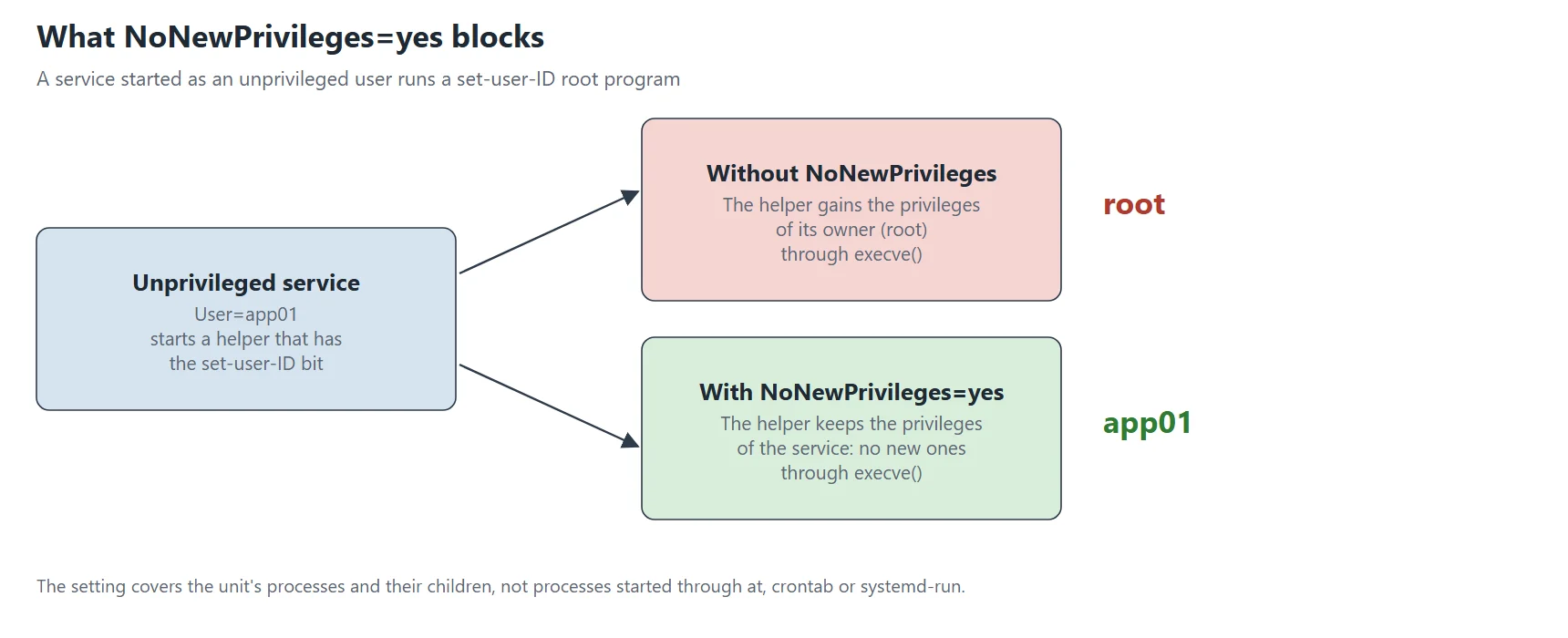
NoNewPrivileges=yes (since systemd 187) sets the kernel flag no_new_privs on the service process. From then on, the service and everything it starts can never gain privileges through execve(). Set-user-ID bits and file capabilities stop working. The manual adds that the flag only covers the unit’s own processes and their children, not programs started on its behalf by at, crontab or systemd-run.
sudo mkdir -p /etc/systemd/system/demo-hardening-sd3-caps.service.d
sudo tee /etc/systemd/system/demo-hardening-sd3-caps.service.d/20-nnp.conf > /dev/null <<'EOF'
[Service]
NoNewPrivileges=yes
EOF
sudo /usr/local/bin/demo-hardening-sd3-run demo-hardening-sd3-caps.service
identity: uid=990 user=sd3demo groups=990
CapInh:	0000000000000401
CapPrm:	0000000000000401
CapEff:	0000000000000401
CapBnd:	000001ffffffffff
CapAmb:	0000000000000401
NoNewPrivs:	1
probe bind-80: allowed
probe chown-to-root: allowed
probe chmod-u+s: allowed
probe setuid-helper effective uid: 990
Two things changed. First, NoNewPrivs now reads 1. Second, the helper reports an effective UID of 990 instead of 0, so the set-user-ID bit no longer works for this service. Meanwhile the ambient capabilities stay: bind and chown are still allowed. So the two directives work as a pair. AmbientCapabilities= grants the privilege, and NoNewPrivileges= keeps the grant from growing.
Note the cost, because a service that needs sudo or another set-user-ID helper stops working. In my earlier article on systemd hardening on real services (coming 17 Sep), the failsec case shows it: an empty bounding set blocked sudo even with NoNewPrivileges=false.
RestrictSUIDSGID=: forbid creating set-user-ID files
The helper is no longer dangerous, but the service can still create new set-user-ID files. A later process outside the unit could then use them. RestrictSUIDSGID=yes (since systemd 242) uses seccomp to refuse that. The default is off, so the directive is opt-in.
sudo mkdir -p /etc/systemd/system/demo-hardening-sd3-caps.service.d
sudo tee /etc/systemd/system/demo-hardening-sd3-caps.service.d/30-suid.conf > /dev/null <<'EOF'
[Service]
RestrictSUIDSGID=yes
EOF
sudo /usr/local/bin/demo-hardening-sd3-run demo-hardening-sd3-caps.service
identity: uid=990 user=sd3demo groups=990
CapInh:	0000000000200501
CapPrm:	0000000000000401
CapEff:	0000000000000401
CapBnd:	000001ffffffffff
CapAmb:	0000000000000401
NoNewPrivs:	1
probe bind-80: allowed
probe chown-to-root: allowed
probe chmod-u+s: refused
probe setuid-helper effective uid: 990
The probe chmod-u+s is now refused. Before this step it was allowed, even with the other directives in place, because a file owner can always set the bit on a file. Therefore only RestrictSUIDSGID= blocks it.
One line deserves attention, since CapInh changed from 0000000000000401 to 0000000000200501. Decoding the new value with capsh --decode gives cap_chown,cap_setpcap,cap_net_bind_service,cap_sys_admin, so two extra bits appeared: cap_setpcap and cap_sys_admin. The permitted, effective and ambient masks did not change. The documentation read for this article does not explain it. The article reports the observation and does not guess a cause.
CapabilityBoundingSet=: the ceiling for the whole service
The bounding set limits what a process can ever hold. Because a service that stays root has every capability by default, this directive matters most for root services among all the systemd capabilities settings. So the next tests use the root unit. First, a plain list names the capabilities that stay. Second, a list that starts with ~ names the capabilities to remove. Finally, an empty assignment removes everything.
Each test writes the shown content into 10-bounding.conf in the drop-in directory of the root unit, replaces the previous content, and runs the unit again. The first test spells out the commands.
d=/etc/systemd/system/demo-hardening-sd3-root.service.d
sudo mkdir -p $d
printf '[Service]\nCapabilityBoundingSet=\n' | sudo tee $d/10-bounding.conf
sudo /usr/local/bin/demo-hardening-sd3-run demo-hardening-sd3-root.service
identity: uid=0 user=root groups=0
CapInh:	0000000000000000
CapPrm:	0000000000000000
CapEff:	0000000000000000
CapBnd:	0000000000000000
CapAmb:	0000000000000000
NoNewPrivs:	0
probe bind-80: refused
probe chown-to-nobody: refused
probe chmod-u+s: allowed
probe setuid-helper effective uid: 0
With an empty set, the service runs as UID 0 but holds nothing. Bind and chown are both refused. The manual describes this behaviour for the empty assignment, and the output confirms it: all five masks that matter read zero. A bare ~ with no capability name means the full set, according to the manual, but that form was not tested here.
Now keep only the capability the service needs, then try the inverted form.
[Service]
CapabilityBoundingSet=CAP_NET_BIND_SERVICE
[...]
CapPrm:	0000000000000400
CapEff:	0000000000000400
CapBnd:	0000000000000400
[...]
probe bind-80: allowed
probe chown-to-nobody: refused
[...]
[Service]
CapabilityBoundingSet=~CAP_CHOWN
[...]
CapPrm:	000001fffffffffe
CapEff:	000001fffffffffe
CapBnd:	000001fffffffffe
[...]
probe bind-80: allowed
probe chown-to-nobody: refused
[...]
| Setting | CapBnd | Bind port 80 | Chown |
|---|---|---|---|
| (nothing) | 000001ffffffffff | allowed | allowed |
CapabilityBoundingSet= | 0000000000000000 | refused | refused |
CapabilityBoundingSet=CAP_NET_BIND_SERVICE | 0000000000000400 | allowed | refused |
CapabilityBoundingSet=~CAP_CHOWN | 000001fffffffffe | allowed | refused |
The allow-list form (CAP_NET_BIND_SERVICE) is the safest, because a future kernel can add capabilities, and an allow-list ignores them. The inverted form is shorter to read when you only want to remove a few. The tool systemd-analyze security prints its checks in the inverted form, for example CapabilityBoundingSet=~CAP_SYS_ADMIN.
Also look at what did not change in all these runs. The chmod probe stayed allowed, and the set-user-ID helper still reported UID 0. That is because a bounding set removes capabilities, but it does not remove the identity of root, and it does not stop a file owner from using file permissions.
The bounding set and file capabilities
A file capability is a capability stored on the program, with setcap. The bounding set interacts with it, so the test copies /usr/bin/true, gives the copy cap_net_bind_service=ep, and runs it as the dedicated user under three bounding sets.
sudo cp /usr/bin/true /usr/local/bin/demo-hardening-sd3-filecap
sudo setcap cap_net_bind_service=ep /usr/local/bin/demo-hardening-sd3-filecap
getcap /usr/local/bin/demo-hardening-sd3-filecap
/usr/local/bin/demo-hardening-sd3-filecap cap_net_bind_service=ep
[Service]
Type=oneshot
User=sd3demo
ExecStart=/usr/local/bin/demo-hardening-sd3-filecap
Save this as /etc/systemd/system/demo-hardening-sd3-filecap.service. Case A has no drop-in. For case B, write CapabilityBoundingSet= (empty) into a drop-in file demo-hardening-sd3-filecap.service.d/10.conf, and for case C write CapabilityBoundingSet=CAP_NET_BIND_SERVICE there. Each time, run sudo systemctl daemon-reload, then sudo systemctl start demo-hardening-sd3-filecap.service, then systemctl show -p Result -p ExecMainStatus demo-hardening-sd3-filecap.service.
--- A: no bounding set directive
Result=success
ExecMainStatus=0
--- B: CapabilityBoundingSet= (empty)
[...]
Result=exit-code
ExecMainStatus=203
demo-hardening-sd3-filecap.service: Failed at step EXEC spawning /usr/local/bin/demo-hardening-sd3-filecap: Operation not permitted
demo-hardening-sd3-filecap.service: Main process exited, code=exited, status=203/EXEC
demo-hardening-sd3-filecap.service: Failed with result 'exit-code'.
Failed to start demo-hardening-sd3-filecap.service.
--- C: CapabilityBoundingSet=CAP_NET_BIND_SERVICE
Result=success
ExecMainStatus=0
In case B, the program never starts: systemd reports 203/EXEC and Operation not permitted. The file asks for a capability that the ceiling forbids, so the kernel refuses to run it. In case C, however, the ceiling allows exactly that capability, and the program runs. Therefore, when a service ships a binary with file capabilities, run getcap on it before you write the bounding set. In my SFTPGo article, removing cap_net_bind_service from the bounding set produced a crash loop about every 40 seconds, and getcap found the cause.
SecureBits= and PAMName=
SecureBits= sets kernel flags that change how UID 0 and capabilities interact. The systemd.exec page lists the flag names, and the kernel meaning is in capabilities(7). The test below applies two of them to the root unit and then observes the result. It does not claim more than what the output shows.
d=/etc/systemd/system/demo-hardening-sd3-root.service.d
sudo rm -f $d/10-bounding.conf
printf '[Service]\nSecureBits=noroot\n' | sudo tee $d/20-securebits.conf
sudo /usr/local/bin/demo-hardening-sd3-run demo-hardening-sd3-root.service
printf '[Service]\nSecureBits=keep-caps\n' | sudo tee $d/20-securebits.conf
sudo /usr/local/bin/demo-hardening-sd3-run demo-hardening-sd3-root.service
sudo rm -rf $d && sudo systemctl daemon-reload
[...]
CapPrm:	0000000000000000
CapEff:	0000000000000000
CapBnd:	000001ffffffffff
[...]
probe bind-80: refused
[...]

[...]
CapPrm:	000001ffffffffff
CapEff:	000001ffffffffff
CapBnd:	000001ffffffffff
[...]
probe bind-80: allowed
[...]
With SecureBits=noroot, the root service starts with empty permitted and effective sets, although the bounding set stays full. The bind probe is refused. By contrast, with SecureBits=keep-caps, the output equals the baseline for a service that already runs as root. In short, the second flag shows no effect in this test, and the effect of the first flag is visible. For most services you will not need either one.
PAMName= was not tested. It attaches the service to a PAM session, and the lab has no PAM service to observe, so the article gives no result for it.
Open a low port without root: three designs
Binding a port below 1024 is the most common reason for running as root. Three designs solve it, and the picture below compares them. Among the systemd capabilities options, the middle design is the one to learn first.
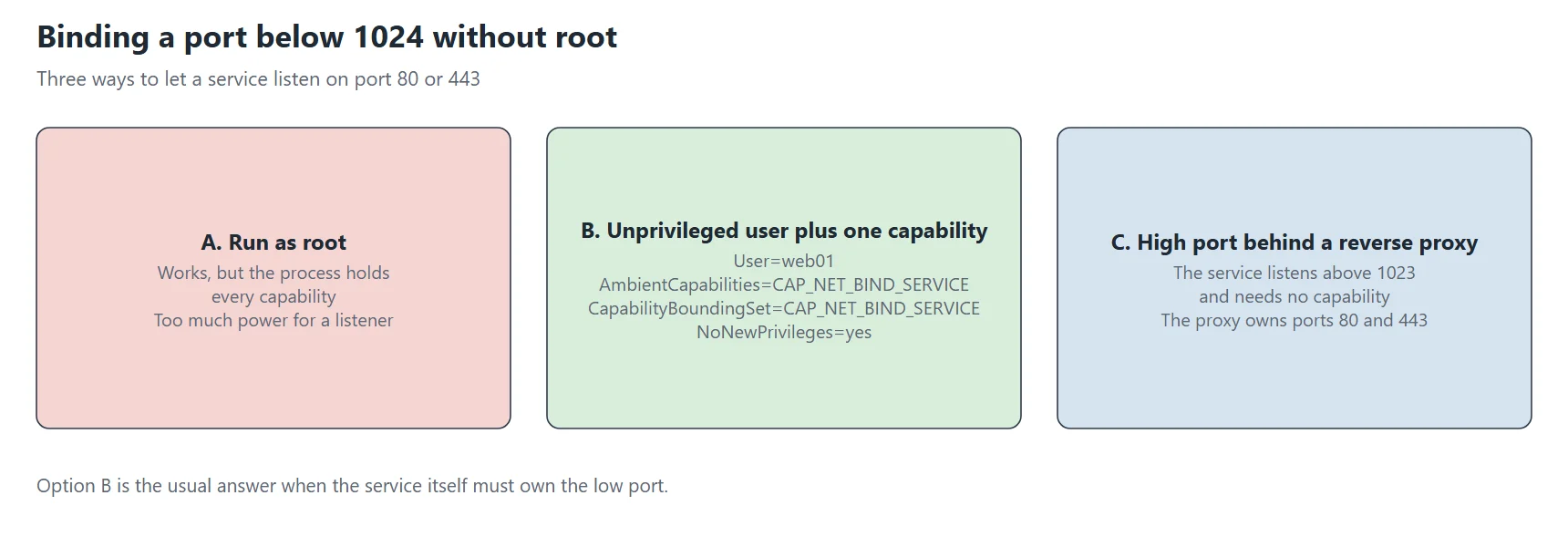
- Design A, root: simple, but the service holds every capability. This is the baseline of the lab.
- Design B, dedicated user with one capability:
User=,AmbientCapabilities=CAP_NET_BIND_SERVICE,CapabilityBoundingSet=CAP_NET_BIND_SERVICEandNoNewPrivileges=yes. This is the combination tested above. - Design C, high port behind a reverse proxy: the service listens on a port such as 8080, and the proxy owns port 80. The service needs no capability at all.
Design C removes the need for any capability, so choose it when a proxy already exists. If there is no proxy, design B fits. In my earlier article, the mox mail server follows design B: NoNewPrivileges=true with AmbientCapabilities=CAP_NET_BIND_SERVICE CAP_SETUID CAP_SETGID CAP_CHOWN. When I removed CAP_DAC_OVERRIDE, the service needed CAP_DAC_READ_SEARCH and SupplementaryGroups=mox to keep reading its files. Etherpad, finally, shows the minimal end: a dedicated user, no capability, and an exposure level of 1.5.
Read the result: five ways to inspect systemd capabilities
Never trust a drop-in until you have read what systemd loaded. Therefore these five checks work on any unit, and each one answers a different question.
1. systemctl show
The first check reads the properties that systemd holds for the unit. The manual page for systemctl does not promise that exec settings appear there, but in this test they do.
systemctl show -p User -p SupplementaryGroups -p CapabilityBoundingSet -p AmbientCapabilities -p NoNewPrivileges -p RestrictSUIDSGID -p SecureBits demo-hardening-sd3-caps.service
SecureBits=0
CapabilityBoundingSet=cap_net_bind_service
AmbientCapabilities=cap_net_bind_service
User=sd3demo
SupplementaryGroups=
NoNewPrivileges=yes
RestrictSUIDSGID=yes
Names come back in lower case, and an empty value means the setting is missing. Note that SecureBits=0 appears although AmbientCapabilities= is set. I did not look further into that.
2. systemd-analyze capability
The second check lists the capability names with their numbers, or filters them.
systemd-analyze capability cap_net_bind_service cap_chown

NAME                 NUMBER
cap_chown                 0
cap_net_bind_service     10
3. Decode a mask
To turn a mask from /proc into names, give it to systemd-analyze capability -m or to capsh --decode.
systemd-analyze capability -m 0000000000000401

NAME                 NUMBER
cap_chown                 0
cap_net_bind_service     10

capsh --decode=0000000000000401

0x0000000000000401=cap_chown,cap_net_bind_service
4. The process itself
The most reliable check reads the live process. First, a transient unit, started by systemd-run, sleeps for two minutes. Then the test reads its status file and runs getpcaps.
sudo systemd-run --unit=demo-hardening-sd3-sleep -p User=sd3demo -p AmbientCapabilities=CAP_NET_BIND_SERVICE -p NoNewPrivileges=yes /usr/bin/sleep 120
pid=$(systemctl show -p MainPID --value demo-hardening-sd3-sleep.service)
grep -E '^(CapInh|CapPrm|CapEff|CapBnd|CapAmb|NoNewPrivs):' /proc/$pid/status
getpcaps $pid
CapInh:	0000000000000400
CapPrm:	0000000000000400
CapEff:	0000000000000400
CapBnd:	000001ffffffffff
CapAmb:	0000000000000400
NoNewPrivs:	1
--- getpcaps
6192: cap_net_bind_service=eip
In getpcaps output, cap_net_bind_service=eip means the capability is effective, inherited and permitted at the same time.
5. systemd-analyze security
The last check is the score. Since the same unit scores differently with and without the four directives of this article, the numbers show their effect.
[without the drop-in]
→ Overall exposure level for demo-hardening-sd3-caps.service: 9.2 UNSAFE 😨

[with User=, AmbientCapabilities=CAP_NET_BIND_SERVICE, CapabilityBoundingSet=CAP_NET_BIND_SERVICE,
 NoNewPrivileges=yes and RestrictSUIDSGID=yes]
→ Overall exposure level for demo-hardening-sd3-caps.service: 6.5 MEDIUM 😐
The exposure level moves from 9.2 UNSAFE to 6.5 MEDIUM with these directives alone. The rest of the score depends on the file system, the kernel and the system calls, which parts 2, 4, 5, 6 and 7 cover. Here are some of the lines of the second report:
[...]
✓ User=/DynamicUser=                                          Service runs under a static non-root user identity
✓ NoNewPrivileges=                                            Service processes cannot acquire new privileges
✗ AmbientCapabilities=                                        Service process receives ambient capabilities                           0.1
✓ SupplementaryGroups=                                        Service has no supplementary groups
✓ CapabilityBoundingSet=~CAP_SYS_ADMIN                        Service has no administrator privileges
✗ CapabilityBoundingSet=~CAP_NET_(BIND_SERVICE|BROADCAST|RAW) Service has elevated networking privileges                              0.1
✓ CapabilityBoundingSet=~CAP_SET(UID|GID|PCAP)                Service cannot change UID/GID identities/capabilities
✓ RestrictSUIDSGID=                                           SUID/SGID file creation by service is restricted
[...]
→ Overall exposure level for demo-hardening-sd3-caps.service: 6.5 MEDIUM 😐
Two lines cost 0.1 each: AmbientCapabilities= and the networking capabilities. They are the price of the one privilege that the service really needs, and that price is small.
Complete drop-ins to copy
Use these drop-ins for systemd capabilities as a starting point. First, replace app01 and appuser with your own names. The first drop-in is the combination measured above. Also keep the comments, because they help the next person who reads the file.
Drop-in 1: a dedicated user with one privilege
sudo useradd --system --no-create-home --shell /usr/sbin/nologin appuser

sudo mkdir -p /etc/systemd/system/app01.service.d
sudo tee /etc/systemd/system/app01.service.d/10-privileges.conf > /dev/null <<'EOF'
[Service]
# Identity: never root.
User=appuser
# Grant: the only privilege this service needs (bind ports below 1024).
AmbientCapabilities=CAP_NET_BIND_SERVICE
# Limit: nothing else can ever be held, even through a file capability.
CapabilityBoundingSet=CAP_NET_BIND_SERVICE
# Block: no gain through set-user-ID bits or file capabilities.
NoNewPrivileges=yes
# Block: the service cannot create set-user-ID or set-group-ID files.
RestrictSUIDSGID=yes
EOF

sudo systemctl daemon-reload
sudo systemctl restart app01.service
systemd-analyze security app01.service | tail -1
Drop-in 2: no fixed account at all
sudo mkdir -p /etc/systemd/system/app01.service.d
sudo tee /etc/systemd/system/app01.service.d/10-privileges.conf > /dev/null <<'EOF'
[Service]
# Identity: a temporary account, created at start and released at stop.
DynamicUser=yes
# The only place the service may write (becomes /var/lib/app01).
StateDirectory=app01
# DynamicUser=yes already implies NoNewPrivileges and RestrictSUIDSGID.
EOF

sudo systemctl daemon-reload
sudo systemctl restart app01.service
Drop-in 3: a service that must stay root
sudo mkdir -p /etc/systemd/system/app01.service.d
sudo tee /etc/systemd/system/app01.service.d/10-privileges.conf > /dev/null <<'EOF'
[Service]
# The service still runs as root, but it keeps only one capability.
CapabilityBoundingSet=CAP_NET_BIND_SERVICE
NoNewPrivileges=yes
EOF

sudo systemctl daemon-reload
sudo systemctl restart app01.service
Of these three, the lab measured the first one in full. The second was tested for the account, the state directory and the implied settings. The third one was tested for the bounding set only, without NoNewPrivileges=yes. Always read systemctl show after a change, then test the real service.
Common mistakes with systemd capabilities
These mistakes come from the lab itself, so each one has a real output.
A typo in a capability name is silent
The unit below misspells the name with an extra S.
[Service]
AmbientCapabilities=CAP_NET_BIND_SERVICES
AmbientCapabilities=
Result=success
ExecMainStatus=0
--- journal search for the misspelled name (whole boot)
(end of journal search)
--- systemd-analyze verify
verify exit code: 0
Systemd loads the unit without any message. Instead, the property is simply empty, and the unit starts with Result=success. A search of the whole boot journal for the wrong name finds nothing, and systemd-analyze verify prints nothing and exits with code 0. The only visible sign is the empty property. Therefore, always run systemctl show -p AmbientCapabilities UNIT after an edit. On the other hand, the lower-case form cap_net_bind_service is accepted.
A drop-in without the [Service] header
AmbientCapabilities=
/etc/systemd/system/demo-hardening-sd3-caps.service.d/10-noheader.conf:1: Assignment outside of section. Ignoring.
/etc/systemd/system/demo-hardening-sd3-caps.service.d/10-noheader.conf:1: Assignment outside of section. Ignoring.
The warning is clear: Assignment outside of section. Ignoring. It appeared twice in the journal. It only showed up after daemon-reload and after the unit was loaded by a systemctl show, so run a command that loads the unit before you search the journal.
A drop-in file that does not end in .conf
The file 10-ambient.txt was ignored, because AmbientCapabilities= stayed empty. However, the journal was not searched for a message in this case.
Other mistakes with clear symptoms
- Missing account:
status=217/USERand the odd textNo such process(shown earlier). - Empty bounding set with a file-capability binary:
status=203/EXECandOperation not permitted(shown earlier). - Ambient capability without
NoNewPrivileges=yes: the set-user-ID helper still returns UID 0 (step A). - Too much hardening on a service that calls
sudo: it fails withNoNewPrivileges=yesor an empty bounding set. - Forgotten
systemctl daemon-reload: systemd keeps the old unit, and the new file seems to do nothing.
Final checklist for systemd capabilities
- Does the service need root? If not, set
User=(orDynamicUser=yes). - Does it need a privilege? Name exactly one capability in
AmbientCapabilities=. - Is the ceiling set? Write the same list in
CapabilityBoundingSet=. - Is
NoNewPrivileges=yesset, and does the service run withoutsudo? - Is
RestrictSUIDSGID=yesset, unless the service creates set-user-ID files on purpose? - Does a binary of the service carry file capabilities? Run
getcapbefore you set the ceiling. - After every edit, run
systemctl daemon-reload, thensystemctl show -pfor each directive. - Read the live process:
/proc/PID/statusandgetpcaps. - Measure with
systemd-analyze securityand keep the number in the change record.
What this lab did not test
PAMName=was not tested.- SELinux is not available on the bench, so the interaction between systemd capabilities and SELinux policy is outside this article.
- A bare
CapabilityBoundingSet=~(the full set, according to the manual) was not tested. SecureBits=was only observed on a root service. Its flags were not tested withUser=.- The extra bits in
CapInhafterRestrictSUIDSGID=yesare an observation without an explanation. - The ownership of the dynamic user’s state directory (UID 65534 from the host) is an observation without an explanation.
- The results come from a WSL2 kernel, so a native kernel can differ.
Clean up the lab
Run the script below as root. It removes only the units, drop-ins, files and the account that the lab created.
for u in demo-hardening-sd3-caps demo-hardening-sd3-root demo-hardening-sd3-dynamic demo-hardening-sd3-baduser demo-hardening-sd3-filecap demo-hardening-sd3-sleep; do
  systemctl stop "$u.service" 2>/dev/null
  systemctl reset-failed "$u.service" 2>/dev/null
  rm -rf "/etc/systemd/system/$u.service" "/etc/systemd/system/$u.service.d"
done
rm -f /usr/local/bin/demo-hardening-sd3-probe.sh /usr/local/bin/demo-hardening-sd3-setuid-id /usr/local/bin/demo-hardening-sd3-run /usr/local/bin/demo-hardening-sd3-filecap
rm -rf /var/lib/demo-hardening-sd3-dynamic /var/lib/private/demo-hardening-sd3-dynamic
id sd3demo >/dev/null 2>&1 && userdel sd3demo
systemctl daemon-reload
ls -d /etc/systemd/system/*sd3* /usr/local/bin/*sd3* /var/lib/*sd3* 2>/dev/null; getent passwd sd3demo
The two last commands must print nothing, and that was the case on the test bench after cleanup.
Sources
- systemd.exec(5): the directives
User=,DynamicUser=,NoNewPrivileges=,CapabilityBoundingSet=,AmbientCapabilities=,SecureBits=,RestrictSUIDSGID=. - capabilities(7): the list of capabilities and the rules for each set.
- systemd-analyze(1): the
securityandcapabilitycommands.
Earlier in this series
- Systemd hardening, directive by directive: measuring with systemd-analyze security
- Systemd filesystem protection: hardening part 2, directive by directive
Related articles
- Systemd sandboxing in practice: the drop-ins I use and what each one broke (coming 17 Sep)
- How-to: a well-tuned fail2ban, with progressive bans
- How-to: install a Wazuh agent and get something out of it (coming 25 Nov)