VPN up, internal names dead: Android Private DNS, a profile with no DNS and the Pi-hole firewall
I was at a conference, phone in hand, and needed my Git forge, the one that runs at home and is only reachable from the local network. That’s exactly why I have a WireGuard tunnel on the phone: I switch it on, I’m “at home”, and I type https://forge.example.net. That day, the browser told me…
I was at a conference, phone in hand, and needed my Git forge, the one that runs at home and is only reachable from the local network. That’s exactly why I have a WireGuard tunnel on the phone: I switch it on, I’m “at home”, and I type https://forge.example.net. That day, the browser told me the site couldn’t be found. Yet the tunnel was connected, the key icon right there at the top of the screen.
The story is worth telling because there were three causes, each hidden behind the one before, and none was where I expected it. Two were on the phone: an Android setting I had forgotten, and a WireGuard profile with no DNS server. The third was a firewall, on my own server, doing exactly what I had asked it to do months earlier.
A name that only exists at home
First, what the phone is asking for. forge.example.net has no record in public DNS. That’s on purpose: the service is only reachable from inside, and publishing its name, even pointing to a private address, would tell anyone looking that it exists. The name only exists in the home Pi-hole, which serves DNS to the local network and answers 192.168.10.17, the address of the server hosting the forge.
That’s split-horizon DNS in its simplest form: inside, the name has an answer; outside, it has none. It works perfectly as long as the question reaches the right server. The whole problem that day was right there: the question never reached the Pi-hole.
Separating the tunnel from DNS
Faced with “site not found over the VPN”, there are two suspects, and they need separating before touching anything. Either the tunnel doesn’t carry traffic, and nothing reaches home. Or the tunnel works, but the name doesn’t resolve. The deciding test is simple: open a home IP address through the tunnel, with no name at all. If it answers, the tunnel is fine and everything happens in DNS.
On the conference Wi-Fi, even the IP address didn’t answer. On mobile data, it came up immediately. Event Wi-Fi very often blocks outbound UDP to unusual ports, and WireGuard only speaks UDP; I couldn’t verify it on that particular network, but the behaviour fits. I already had a plan B for places like that, an SSH tunnel carried over HTTPS on port 443, but it only serves SSH, not browsing a forge. That left DNS, on mobile data.
I didn’t want to trust my phone, so I looked for proof on the server side. The home web server’s log does show the phone’s requests, with its tunnel address:
# on the home server: did anything from the phone's tunnel address ever arrive?
grep -h '^10\.99\.0\.' /var/log/nginx/*.log | tail
10.99.0.10 - - [17/Nov/2026:12:42:56 +0100] "GET / HTTP/1.1" 301 166 "-" "Mozilla/5.0 (Android 16; Mobile ...)"
10.99.0.10 - - [17/Nov/2026:12:43:07 +0100] "GET /api/v2/receivers HTTP/2.0" 200 37 "https://192.168.10.17/" ...So the tunnel was cleared. And looking further back, no request from 10.99.0.x had ever reached the forge, or any other home site, before that IP test. The phone had never managed to find the forge’s address.
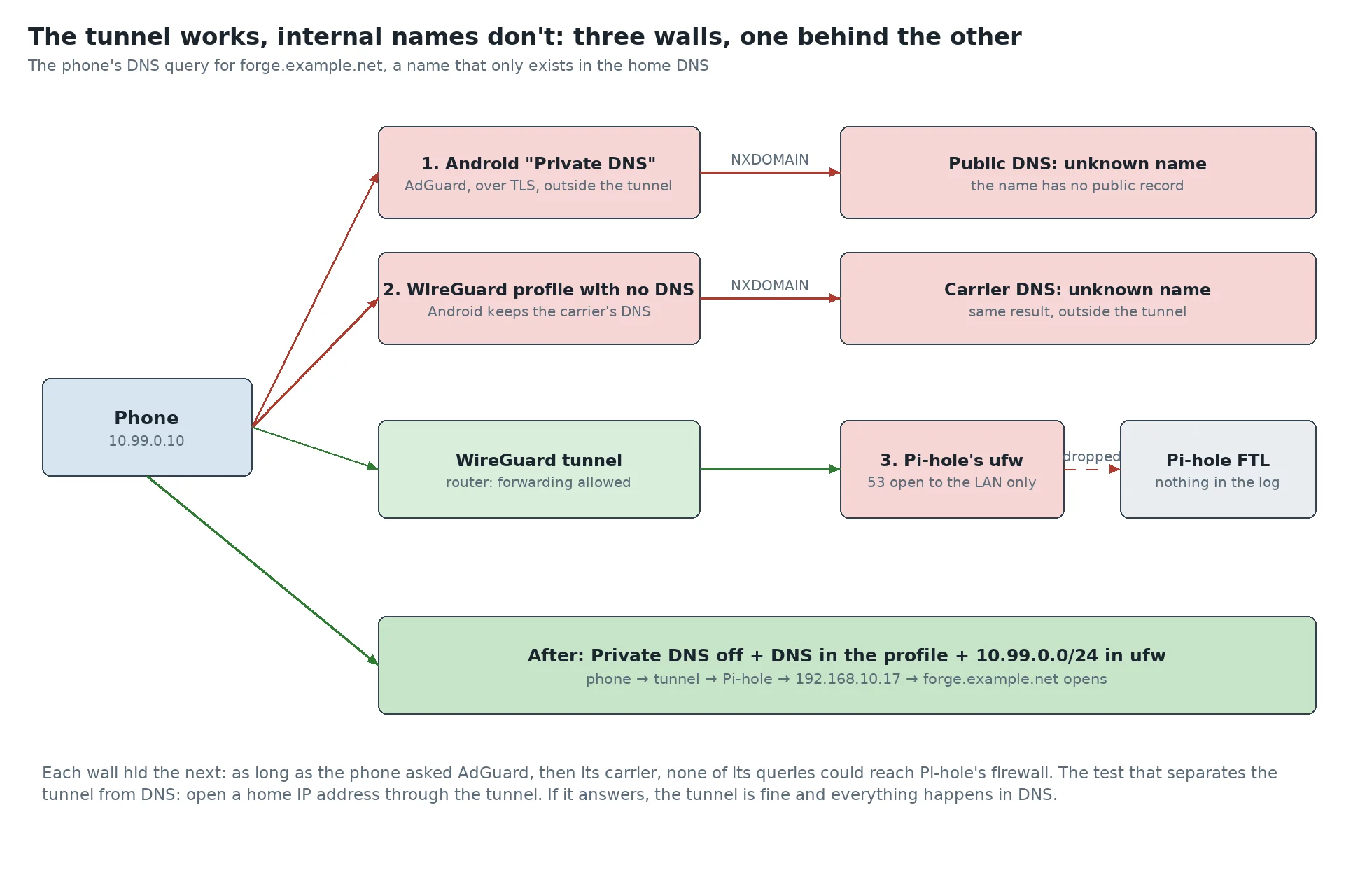
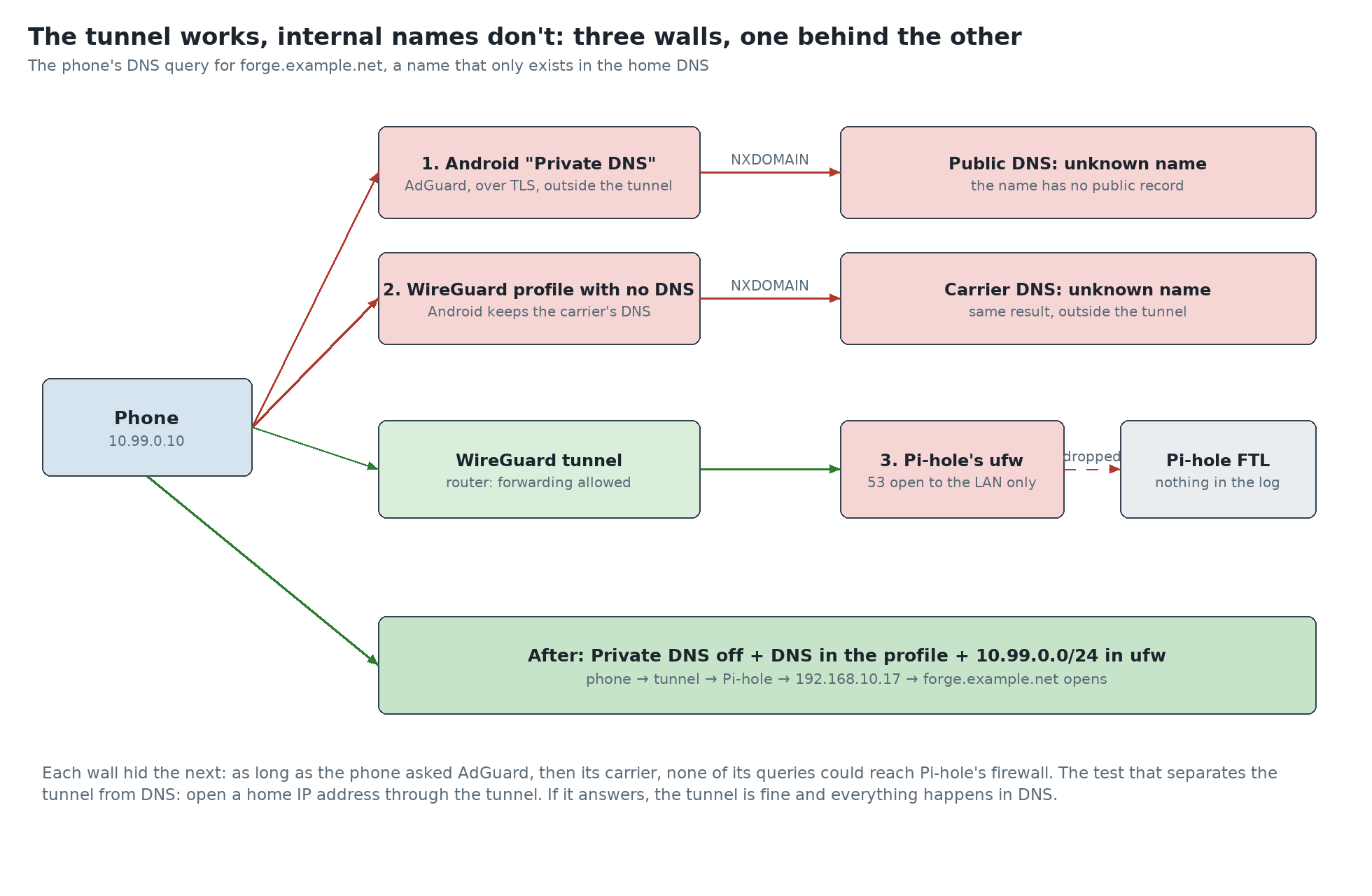
First wall: Android’s “Private DNS”
Since version 9, Android has a “Private DNS” setting. It encrypts DNS queries with DNS-over-TLS to a chosen provider. I had set AdGuard there long ago, to filter ads everywhere, and forgotten about it. The setting has three positions. Off, the phone uses the DNS the network announces. Automatic, it first tries TLS to that announced DNS, and falls back to classic DNS if it can’t. With a provider hostname, it sends all its queries to that provider, and only to it.
That last mode is the problem: it takes priority over the DNS announced by the VPN. The WireGuard profile can name the home Pi-hole all it likes; Android ignores it and keeps asking AdGuard. And AdGuard, which only knows public DNS, honestly answers that forge.example.net doesn’t exist. The browser doesn’t even try to connect.
The proof, again, is on the server side. Pi-hole keeps every query in an SQLite database. Debian doesn’t ship the sqlite3 client on that machine, but FTL, Pi-hole’s DNS engine, embeds one:
# on the Pi-hole (Debian ships no sqlite3: FTL embeds one)
pihole-FTL sqlite3 /etc/pihole/pihole-FTL.db \
  "SELECT client, COUNT(*) FROM queries
   WHERE client LIKE '10.99.0.%' AND timestamp > strftime('%s','now','-30 days')
   GROUP BY client;"
# -> nothing at all
In thirty days, not a single query from the phone’s tunnel. The only clients that had asked for the forge’s name were my PC and the home server itself. So I switched Private DNS off and tried again. The name still didn’t resolve, and the Pi-hole’s log stayed empty.
Second wall, on the server: the Pi-hole’s firewall
An empty log reads two ways: either the question doesn’t leave for home, or it arrives and something stops it before the DNS server. A query that reaches FTL, even a refused one, leaves a trace in its log. Rather than guess on the phone side, I re-read the path on the server side, and that’s where I found a wall nobody had hit yet.
Pi-hole filters its clients in two places, and both must agree. The first is FTL itself, with its dns.listeningMode setting. By default, LOCAL, it only answers machines on subnets directly attached to its interfaces, and ignores anything arriving routed, such as a VPN client. Mine was already on ALL:
pihole-FTL --config dns.listeningMode
ALL
The second is the machine’s firewall. The Pi-hole runs on Debian, protected by ufw, and port 53 is only open to a list of sources. That list held the local network and my servers’ tunnel, but not the phone’s:
ufw status | grep '^53/'
53/tcp                     ALLOW       192.168.10.0/24
53/udp                     ALLOW       192.168.10.0/24
53/tcp                     ALLOW       10.98.0.0/24
53/udp                     ALLOW       10.98.0.0/24
So a packet from 10.99.0.10 would have been dropped by the kernel before reaching FTL, and FTL would never have known. It’s the worst kind of network failure: no error, no log, just a timeout on the client side. The most annoying part is that I had fallen into exactly the same trap three months earlier, with the servers’ tunnel. I had even left a comment in the configuration warning that both filters must allow a source. The phone had simply never been added.
The fix, in Ansible and not by hand
The list of allowed sources is a variable of the Pi-hole’s Ansible role, and the task that opens the firewall loops over it, for TCP and for UDP. Fixing it means adding one line:
# roles/pihole/defaults/main.yml
pihole_dns_allowed_sources:
  - "192.168.10.0/24"
  - "10.98.0.0/24"      # servers' tunnel
  - "10.99.0.0/24"      # phone's tunnel   <- the missing line

# roles/pihole/tasks/firewall.yml
- name: Allow DNS from the allowed sources
  community.general.ufw:
    rule: allow
    port: "53"
    proto: "{{ item.1 }}"
    src: "{{ item.0 }}"
  loop: "{{ pihole_dns_allowed_sources | product(['tcp', 'udp']) | list }}"
Before applying, I always do a dry run limited to that part of the role. It must show that only the two new rules change, and that the others are already in place. A rule added by hand on the machine would have worked at once, but would have vanished or drifted at the next Ansible run; the configuration has to carry the fix, not the machine.
ansible-playbook -i hosts.ini playbooks/pihole.yml --tags pihole-firewall --check --diff
# ok:      10.98.0.0/24/tcp, 10.98.0.0/24/udp
# changed: 10.99.0.0/24/tcp, 10.99.0.0/24/udp      <- only these two
ansible-playbook -i hosts.ini playbooks/pihole.yml --tags pihole-firewall
There was a workaround without touching the server: give the phone the router as DNS instead of the Pi-hole. The router answers DNS on its tunnel address and forwards the question to the Pi-hole from its own local-network address, which the firewall accepts. That’s handy to get unstuck in five minutes from a conference room, but it only hides the problem.
Another fix is tempting and I rejected it: publishing the forge’s name in public DNS, pointing to its private address. It would have worked even with AdGuard. But it announces the name of an internal service to the world, to work around a phone setting.
Third wall: the WireGuard profile had no DNS
With the firewall fixed, the forge still didn’t open, and the new rule’s counter stayed at zero packets: nothing reached it. So the question still wasn’t leaving for home. Opening the phone’s WireGuard profile gave the answer: the interface’s DNS servers field was empty. Without it, the app pushes no DNS to Android, which keeps the network’s, here the mobile carrier’s. Which, like AdGuard, doesn’t know my internal name.
It’s the simplest of the three traps, and the one AdGuard hid best: as long as Private DNS sent everything elsewhere, that field made no difference. The tunnel then has to be turned off and on, because the DNS is only applied when it connects.
Checking
With 192.168.10.19 in the profile and the tunnel restarted, the forge opened on the phone. Both logs confirm it, twelve seconds apart: the Pi-hole answered the question coming from the tunnel, then the forge served the dashboard to the same address.
# Pi-hole, 12:56:19: the phone's query, answered from the home DNS
query[A] forge.example.net from 10.99.0.10
config forge.example.net is <CNAME>
/etc/pihole/hosts/custom.list homeserver.example.lan is 192.168.10.17
# the ufw rule added at 12:50, counter on the UDP line
counter packets 79 ... accept
# the home server, 12:56:31: the forge serves the phone's dashboard
10.99.0.10 - - [17/Nov/2026:12:56:31 +0100] "GET /repo/search?sort=updated&order=desc&uid=1 ... HTTP/2.0" 200 ...The counter on the ufw rule added at 12:50 had already let 79 packets through. Without that fix, those queries would have been dropped silently, and removing the third wall would have changed nothing: all three fixes were needed, and none was enough on its own. I then ran the counter-test: Private DNS switched back to AdGuard, the Pi-hole still set as DNS in the WireGuard profile. The forge became unreachable again. Android’s setting really does win over the VPN’s DNS, even when the profile names one.
What I take away
When something doesn’t work “over the VPN”, the first question isn’t “is the VPN connected?”, but “what actually goes through it?”. Opening an IP address through the tunnel separates transport from DNS in ten seconds, and the server’s logs tell the truth when the phone says nothing.
An encrypted DNS resolver set on the phone wins over the VPN’s DNS: with a provider hostname in “Private DNS”, internal names will never work through the tunnel. And a VPN profile with no DNS server leaves the phone on the carrier’s DNS. And on the server, the absence of any trace in Pi-hole’s log is a clue in itself: it means the packet never arrived, so a firewall stopped it first. Every new VPN subnet must be added to the list of allowed DNS sources, in both filters. This time I wrote the procedure down, so as not to fall into the same hole a third time.