Inside database data files (6/3+3): SQL Server
SQL Server data files read byte by byte on a real database: pages, extents, ghost records, row versions and the log, measured on Rocky Linux.
SQL Server data files look simple from the outside: a few files ending in .mdf, .ndf and .ldf. Inside, they follow the same logic as the engines of the first parts: fixed-size pages, a map of the free space and a log that is written before the data. This article extends InnoDB, PostgreSQL, Oracle, SQLite and Cassandra with a sixth engine, and it uses the same method: read the real bytes.
Everything below comes from a lab: tested on SQL Server 2025 (17.0.5035.5, Developer edition) on Rocky Linux 10.2, WSL2. I accepted the licence on a disposable bench, because the Developer edition is meant for development and tests only. I tested the Linux build, so I say nothing about Windows. I also set a 3 GB memory limit with mssql-conf to keep the bench small.
export PATH=$PATH:/opt/mssql-tools18/bin
sqlcmd -S localhost -U sa -P "$PW" -C -W -s "|" -Q "SELECT 1"      # -C trusts the lab's self-signed certificate
Note that DBCC PAGE and fn_dblog are not documented by Microsoft, but they are the usual tools to look inside a page or a log. Do not use them as a base for a script that has to keep working after an upgrade.
The SQL Server data files on disk
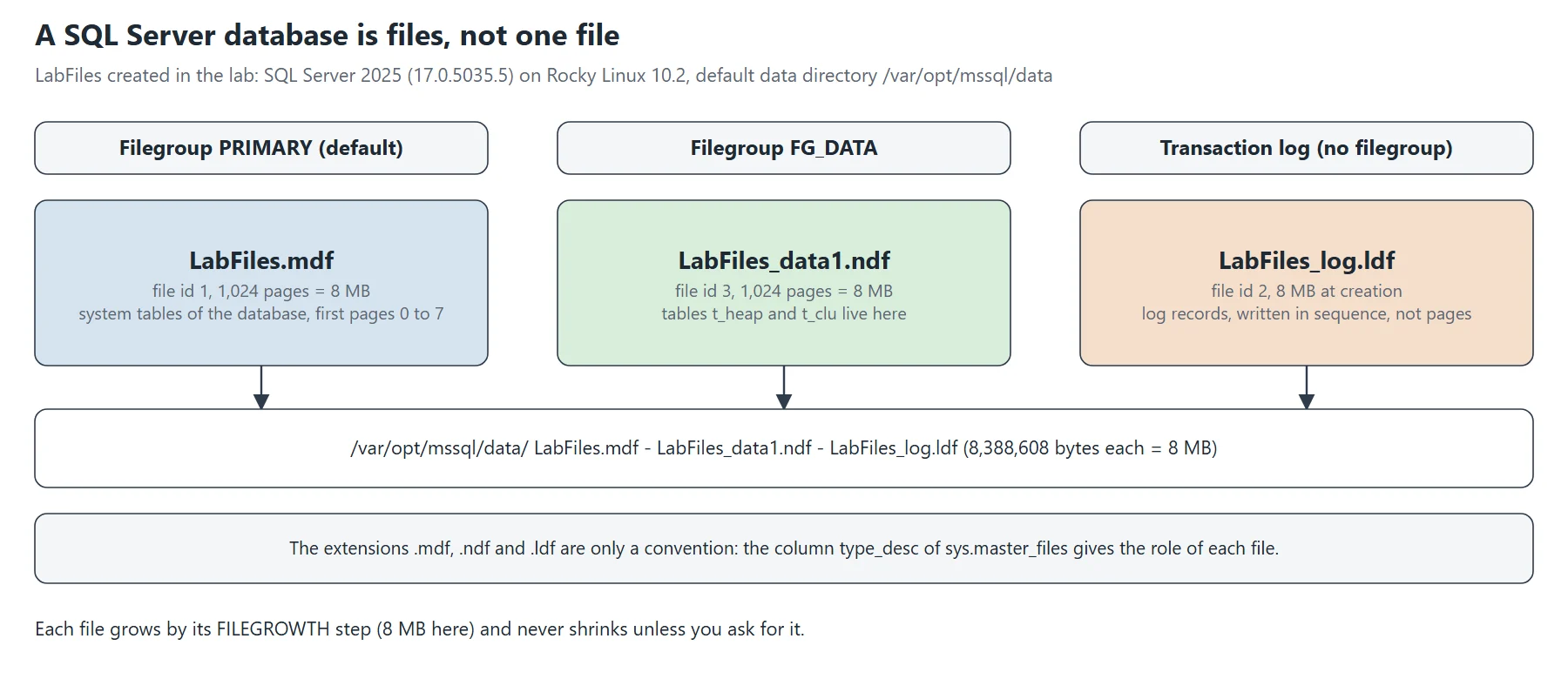
A SQL Server instance holds several databases, and each database is a set of files. The catalog view sys.master_files lists all of them. On Linux they live in /var/opt/mssql/data by default.
SELECT DB_NAME(database_id) AS db, name, type_desc, physical_name, size AS pages_8k
FROM sys.master_files ORDER BY database_id, file_id;
version|edition|engine_edition
-------|-------|--------------
17.0.5035.5|Enterprise Developer Edition (64-bit)|3
db|name|type_desc|physical_name|pages_8k
--|----|---------|-------------|--------
master|master|ROWS|/var/opt/mssql/data/master.mdf|592
master|mastlog|LOG|/var/opt/mssql/data/mastlog.ldf|256
tempdb|tempdev|ROWS|/var/opt/mssql/data/tempdb.mdf|1024
tempdb|templog|LOG|/var/opt/mssql/data/templog.ldf|1024
[...]
Every database has at least one data file, the primary one, and one log file. The tempdb database has six data files here. The extensions are only a convention: the column type_desc of the catalog, not the name, tells the role of each file.
To see the files grow, I created my own database with a second filegroup. A filegroup is a named set of data files, and a table lives in exactly one filegroup. The log file belongs to no filegroup.
CREATE DATABASE LabFiles
ON PRIMARY (NAME = lab_primary, FILENAME = '/var/opt/mssql/data/LabFiles.mdf', SIZE = 8MB, FILEGROWTH = 8MB),
FILEGROUP FG_DATA (NAME = lab_data1, FILENAME = '/var/opt/mssql/data/LabFiles_data1.ndf', SIZE = 8MB, FILEGROWTH = 8MB)
LOG ON (NAME = lab_log, FILENAME = '/var/opt/mssql/data/LabFiles_log.ldf', SIZE = 8MB, FILEGROWTH = 8MB);
GO
USE LabFiles;
CREATE TABLE dbo.t_heap (id int NOT NULL, name varchar(40) NOT NULL, note varchar(2000) NULL) ON FG_DATA;
CREATE TABLE dbo.t_clu  (id int NOT NULL CONSTRAINT pk_t_clu PRIMARY KEY CLUSTERED,
                         name varchar(40) NOT NULL, note varchar(2000) NULL) ON FG_DATA;
GO
-- 600 rows in each table: (i, 'row-' + i)
name|type_desc|physical_name|pages_8k|size_mb|growth
----|---------|-------------|--------|-------|------
lab_primary|ROWS|/var/opt/mssql/data/LabFiles.mdf|1024|8|1024
lab_log|LOG|/var/opt/mssql/data/LabFiles_log.ldf|1024|8|1024
lab_data1|ROWS|/var/opt/mssql/data/LabFiles_data1.ndf|1024|8|1024
filegroup|type_desc|is_default
---------|---------|----------
PRIMARY|ROWS_FILEGROUP|1
FG_DATA|ROWS_FILEGROUP|0
The sizes in pages match the files on disk. 1,024 pages of 8 KB make 8,388,608 bytes, which is exactly what ls reports.
$ ls -l /var/opt/mssql/data/LabFiles*
-rw-rw----. 1 mssql mssql 8388608 Nov  2 21:41 /var/opt/mssql/data/LabFiles_data1.ndf
-rw-rw----. 1 mssql mssql 8388608 Nov  2 21:41 /var/opt/mssql/data/LabFiles_log.ldf
-rw-rw----. 1 mssql mssql 8388608 Nov  2 21:41 /var/opt/mssql/data/LabFiles.mdf
Pages and extents inside the SQL Server data files
In the SQL Server data files, the unit of I/O is the 8 KB page. Eight pages that follow each other form a 64 KB extent, and the engine allocates space by extent. Each page has a number inside its file, and the pair (file id, page id) identifies it everywhere: (3:24) means page 24 of file 3, here LabFiles_data1.ndf.
The first pages of every file are not data. I asked sys.dm_db_page_info, which is documented, for the pages 0 to 3, 6 and 7 of the file 3.
SELECT page_id, page_type_desc, slot_count, ghost_rec_count, free_bytes, page_header_version
FROM (SELECT 0 AS pid UNION ALL SELECT 1 UNION ALL SELECT 2 UNION ALL SELECT 3 UNION ALL SELECT 6 UNION ALL SELECT 7) x
CROSS APPLY sys.dm_db_page_info(DB_ID(), 3, x.pid, 'DETAILED') ORDER BY page_id;
page_id|page_type_desc|slot_count|ghost_rec_count|free_bytes|page_header_version
-------|--------------|----------|---------------|----------|-------------------
0|FILEHEADER_PAGE|1|0|6889|1
1|PFS_PAGE|1|0|2|1
2|GAM_PAGE|2|0|6|1
3|SGAM_PAGE|2|0|6|1
6|DIFF_MAP_PAGE|2|0|6|1
7|ML_MAP_PAGE|2|0|6|1
Page 0 is the file header, page 1 is the PFS page (it tracks how full each page is), page 2 is the GAM (which extents are in use) and page 3 is the SGAM (which mixed extents have room). Page 6 is the DIFF map that the differential backups read, and page 7 is the ML map for minimally logged operations. I did not query pages 4 and 5.
Then I listed the pages that belong to my two tables and the extent that holds each of them.
SELECT name, is_mixed_page_allocation_on AS mixed_on FROM sys.databases WHERE name = 'LabFiles';
SELECT OBJECT_NAME(object_id) AS tbl, extent_page_id AS ext_first, allocated_page_page_id AS pg,
       page_type_desc, is_mixed_page_allocation AS mixed
FROM sys.dm_db_database_page_allocations(DB_ID(), NULL, NULL, NULL, 'DETAILED')
WHERE is_allocated = 1 AND object_id IN (OBJECT_ID('dbo.t_heap'), OBJECT_ID('dbo.t_clu'))
ORDER BY allocated_page_page_id;
name|mixed_on
----|--------
LabFiles|0
tbl|ext_first|pg|page_type_desc|mixed
---|---------|--|--------------|-----
t_heap|8|8|DATA_PAGE|0
[...]
t_heap|16|16|IAM_PAGE|1
t_clu|16|17|IAM_PAGE|1
t_clu|24|24|DATA_PAGE|0
t_clu|32|32|INDEX_PAGE|0
t_clu|40|40|DATA_PAGE|0
The extent numbers are multiples of 8, as expected. The heap t_heap owns the whole extent 8, pages 8 to 15. However, the two IAM pages, which list the extents of a table, sit in the shared extent 16 (mixed = 1). The database flag says that mixed extents are off, so among my tables only these allocation pages use one.
One data page, byte by byte
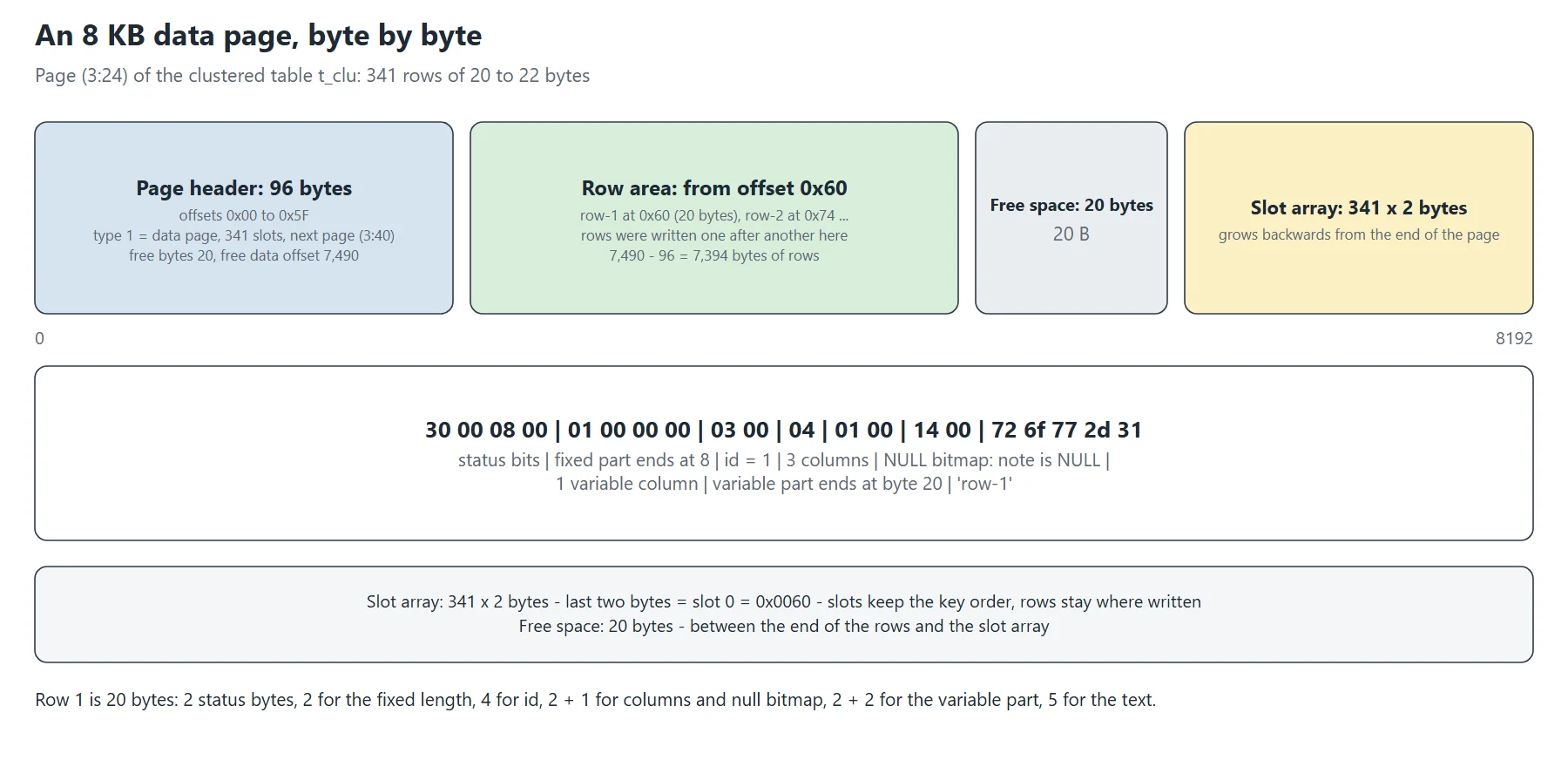
Now the real bytes. DBCC PAGE decodes a page, and xxd reads the same page straight from the file at the offset page × 8,192. I ran a CHECKPOINT first, because a dirty page lives only in memory until the checkpoint writes it.
DBCC TRACEON(3604) WITH NO_INFOMSGS;          -- send DBCC output to the client
DBCC PAGE (LabFiles, 3, 24, 0) WITH NO_INFOMSGS;   -- database, file id, page id, print option 0 = header only
DBCC PAGE (LabFiles, 3, 24, 3) WITH NO_INFOMSGS;   -- option 3 = header, then every row decoded
PAGE HEADER:
m_pageId = (3:24)                   m_headerVersion = 1                 m_type = 1
m_typeFlagBits = 0x0                m_level = 0                         m_flagBits = 0x200
m_objId (AllocUnitId.idObj) = 246   m_indexId (AllocUnitId.idInd) = 256 Metadata: AllocUnitId = 72057594054049792
Metadata: PartitionId = 72057594047299584                                Metadata: IndexId = 1
Metadata: ObjectId = 1237579447     m_prevPage = (0:0)                  m_nextPage = (3:40)
pminlen = 8                         m_slotCnt = 341                     m_freeCnt = 20
m_freeData = 7490                   m_reservedCnt = 0                   m_lsn = (44:539:75)
m_xactReserved = 0                  m_xdesId = (0:0)                    m_ghostRecCnt = 0
m_tornBits = 355658843              DB Frag ID = 1
sqlcmd ... -d LabFiles -Q "CHECKPOINT"        # write the dirty pages to the file first
xxd -s $((24*8192))      -l 160 /var/opt/mssql/data/LabFiles_data1.ndf    # the first 160 bytes of page 24
xxd -s $((24*8192+8192-48)) -l 48 /var/opt/mssql/data/LabFiles_data1.ndf  # the last 48 bytes
== xxd first 160 bytes of page 24 (file 3 = LabFiles_data1.ndf)
00030000: 0101 0000 0002 0001 0000 0000 0000 0800  ................
00030010: 2800 0000 0300 5501 f600 0000 1400 421d  (.....U.......B.
00030020: 1800 0000 0300 0000 2c00 0000 1b02 0000  ........,.......
00030030: 4b00 0000 0000 0000 0000 0000 5bec 3215  K...........[.2.
00030040: 0000 0000 0000 0000 0000 0000 0000 0000  ................
00030050: 0000 0000 0000 0000 0000 0000 0000 0000  ................
00030060: 3000 0800 0100 0000 0300 0401 0014 0072  0..............r
00030070: 6f77 2d31 3000 0800 0200 0000 0300 0401  ow-10...........
00030080: 0014 0072 6f77 2d32 3000 0800 0300 0000  ...row-20.......
00030090: 0300 0401 0014 0072 6f77 2d33 3000 0800  .......row-30...
== xxd last 48 bytes of page 24
00031fd0: 3a02 2502 1002 fb01 e601 d101 bc01 a701  :.%.............
00031fe0: 9201 7d01 6801 5301 3e01 2901 1401 0001  ..}.h.S.>.).....
00031ff0: ec00 d800 c400 b000 9c00 8800 7400 6000  ............t.`.
The two views agree. The first 96 bytes are the page header, and the table below maps the bytes to the fields printed by DBCC PAGE. All numbers are little-endian.
| Offset | Bytes | Field | Value |
|---|---|---|---|
| 0x00 | 01 | m_headerVersion | 1 |
| 0x01 | 01 | m_type | 1 (data page) |
| 0x04 | 00 02 | m_flagBits | 0x0200 |
| 0x06 | 00 01 | m_indexId | 256 |
| 0x0E | 08 00 | pminlen | 8 (the fixed part of a row) |
| 0x10 | 28 00 00 00 03 00 | m_nextPage | (3:40) |
| 0x16 | 55 01 | m_slotCnt | 341 rows |
| 0x18 | f6 00 00 00 | m_objId | 246 |
| 0x1C | 14 00 | m_freeCnt | 20 free bytes |
| 0x1E | 42 1d | m_freeData | 7,490: the end of the rows |
| 0x20 | 18 00 00 00 03 00 | m_pageId | (3:24) |
| 0x28 | 2c 00 00 00 1b 02 00 00 4b 00 | m_lsn | (44:539:75) |
| 0x3C | 5b ec 32 15 | m_tornBits | 355658843 |
The arithmetic closes. The rows start at 0x60 = 96 and end at 7,490, which leaves 7,394 bytes for 341 rows. The slot array takes 341 × 2 = 682 bytes at the end of the page, and 8,192 − 7,490 − 682 leaves exactly the 20 free bytes of the header.
The rows themselves look like this. The first row is 20 bytes long, and I decoded each byte from the dump above: 30 00 are two status bytes, 08 00 is the end of the fixed part, 01 00 00 00 is id = 1, 03 00 counts three columns, 04 is the NULL bitmap (the third column, note, is NULL), 01 00 counts one variable column, 14 00 is the end of the variable part (byte 20) and 72 6f 77 2d 31 is the text row-1.
Slot 0 Offset 0x60 Length 20
Record Type = PRIMARY_RECORD        Record Attributes =  NULL_BITMAP VARIABLE_COLUMNS
Record Size = 20
Memory Dump @0x00000004E5E98060
0000000000000000:   30000800 01000000 03000401 00140072 6f772d31
Slot 0 Column 1 Offset 0x4 Length 4 Length (physical) 4
id = 1
Slot 0 Column 2 Offset 0xf Length 5 Length (physical) 5
name = row-1
Slot 0 Column 3 Offset 0x0 Length 0 Length (physical) 0
note = [NULL]
The slot array holds the position of every row. Its last two bytes in the xxd output read 60 00, so slot 0 is at 0x0060, and the slot before it reads 74 00, so slot 1 is at 0x0074. A row is found by the page number and the slot number. That pair is the row address, and the next sections rely on it.
The clustered index is the table
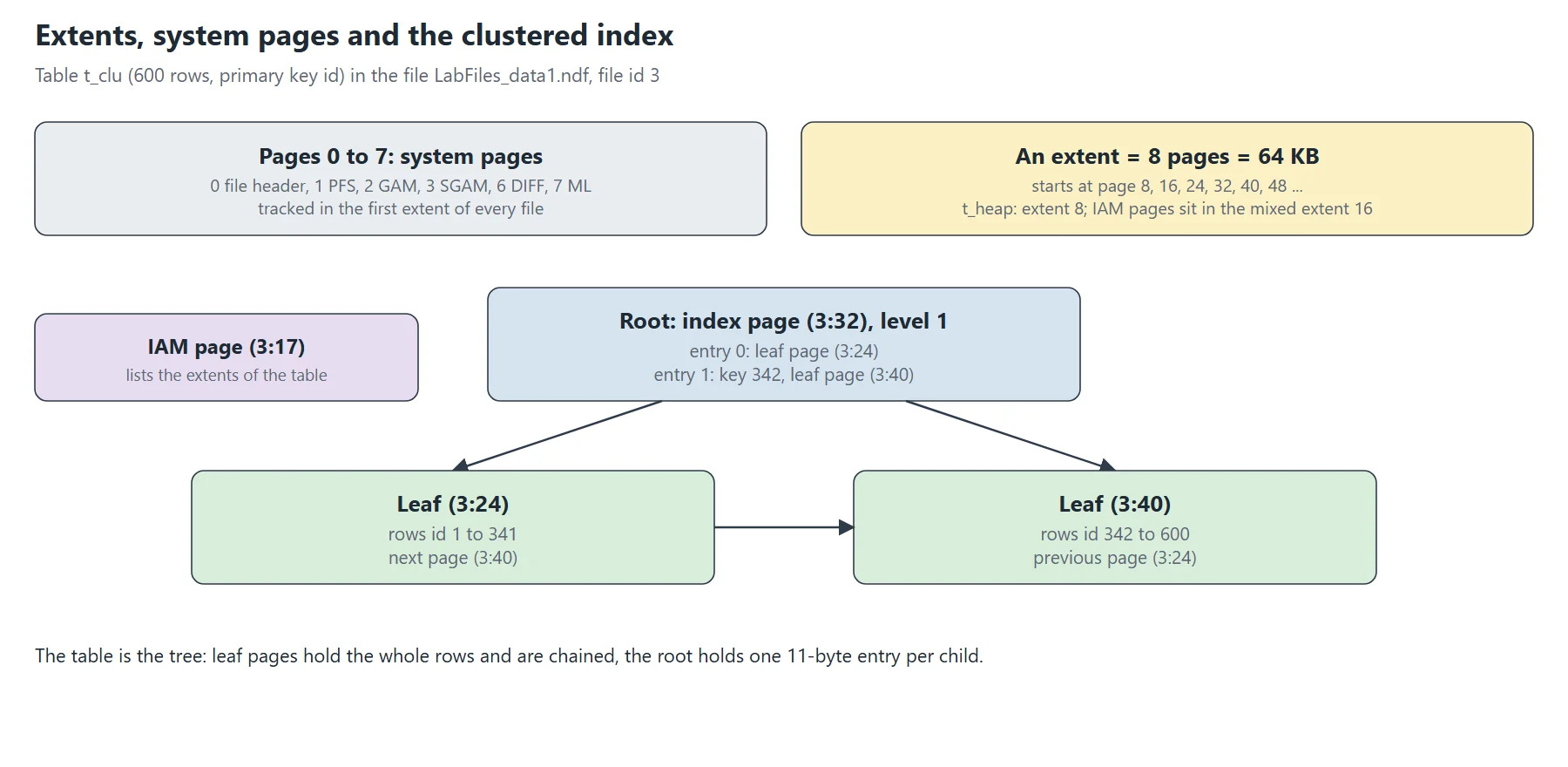
In the SQL Server data files, a table with a clustered index is stored as a B-tree, and its leaf pages hold the whole rows. The table t_clu has a primary key, which is clustered by default. Here is its allocation.
SELECT OBJECT_NAME(object_id) AS tbl, index_id AS idx, allocation_unit_type_desc AS au,
       extent_file_id AS ext_file, extent_page_id AS ext_first_page,
       allocated_page_file_id AS fl, allocated_page_page_id AS pg, page_type_desc,
       page_level AS lvl, previous_page_page_id AS prev, next_page_page_id AS nxt
FROM sys.dm_db_database_page_allocations(DB_ID(), OBJECT_ID('dbo.t_clu'), NULL, NULL, 'DETAILED')
ORDER BY allocated_page_page_id;
tbl|idx|au|ext_file|ext_first_page|fl|pg|page_type_desc|lvl|prev|nxt
---|---|--|--------|--------------|--|--|--------------|---|----|---
t_clu|1|IN_ROW_DATA|3|16|3|17|IAM_PAGE|0|NULL|NULL
t_clu|1|IN_ROW_DATA|3|24|3|24|DATA_PAGE|0|NULL|40
t_clu|1|IN_ROW_DATA|3|32|3|32|INDEX_PAGE|1|NULL|NULL
t_clu|1|IN_ROW_DATA|3|40|3|40|DATA_PAGE|0|24|NULL
Page 17 is the IAM page. Page 24 is the first leaf, and its nxt column points to page 40, the second leaf. Page 32 is an index page of level 1, the root. Meanwhile the heap t_heap has only data pages and no index page, which is the whole difference between the two layouts.
The root page holds two entries of 11 bytes each. I read them with DBCC PAGE option 3.
Slot 0 Offset 0x60 Length 11
Record Type = INDEX_RECORD          Record Attributes =                 Record Size = 11
Memory Dump @0x00000004E1FD8060
0000000000000000:   06000000 04180000 000300
Slot 1 Offset 0x6b Length 11
Record Type = INDEX_RECORD          Record Attributes =                 Record Size = 11
Memory Dump @0x00000004E1FD806B
0000000000000000:   06560100 00280000 000300
The second entry decodes as follows: 06 is the record type, 56 01 00 00 is the key 0x156 = 342, 28 00 00 00 is page 40 and 03 00 is file 3. So the leaf 24 holds the ids 1 to 341, which matches its 341 slots, and the leaf 40 starts at id 342. The key bytes of the first entry (00 00 00 04) are not a real id: the first child simply covers everything below the second key.
Heaps, forwarded records and ghosts
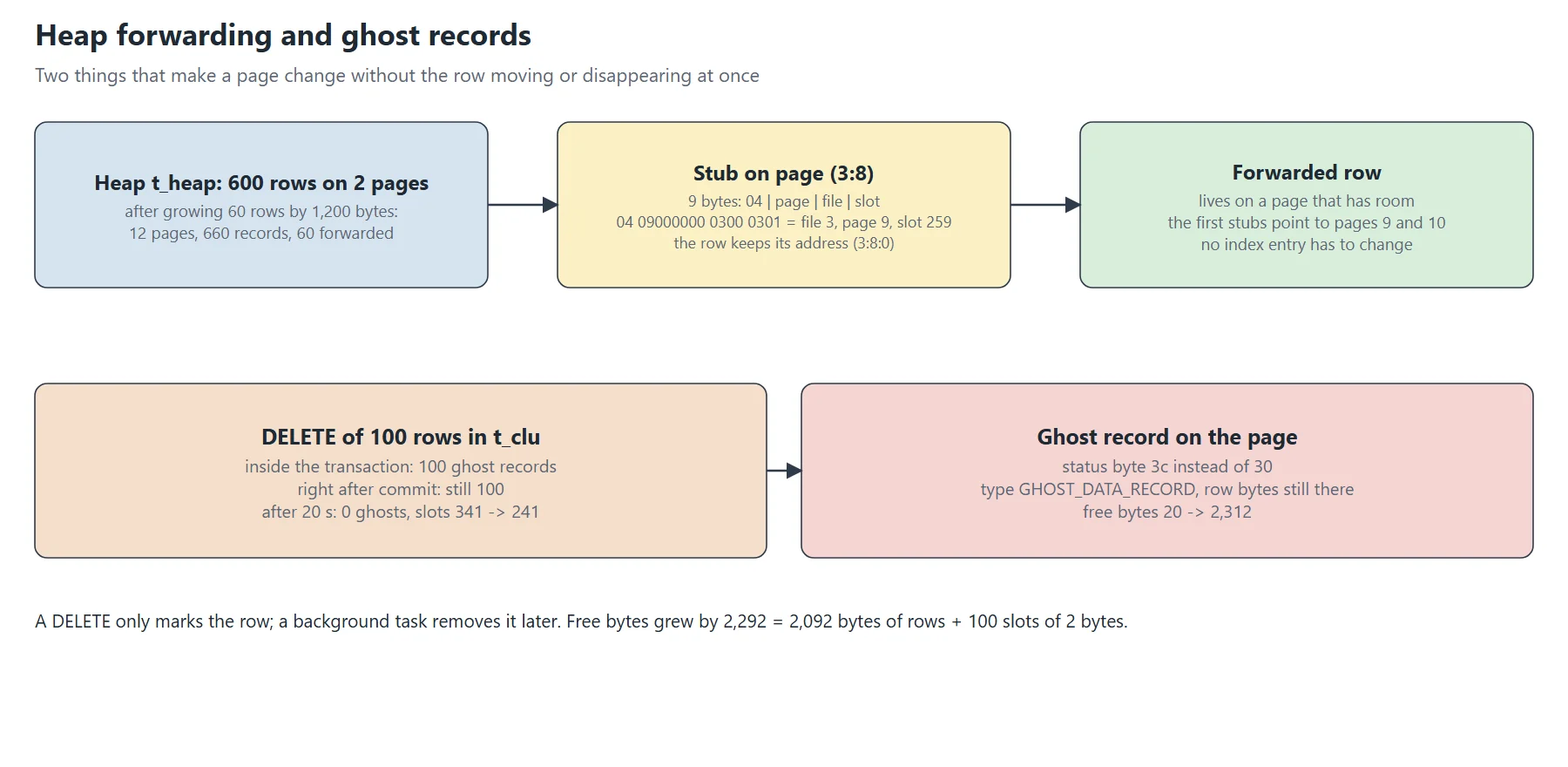
A heap has no order, so an index finds a row by its address. What happens when a row grows and no longer fits on its page? I updated 60 rows of t_heap so that each one grew by 1,200 bytes.
UPDATE dbo.t_heap SET note = REPLICATE('x', 1200) WHERE id <= 60;
SELECT index_id, alloc_unit_type_desc AS au, page_count, record_count, forwarded_record_count,
       avg_page_space_used_in_percent AS pct_used
FROM sys.dm_db_index_physical_stats(DB_ID(), OBJECT_ID('dbo.t_heap'), 0, NULL, 'DETAILED');
SELECT id, sys.fn_PhysLocFormatter(%%physloc%%) AS physloc FROM dbo.t_heap WHERE id IN (1,2,3,61,62);
index_id|au|page_count|record_count|forwarded_record_count|pct_used
--------|--|----------|------------|----------------------|--------
0|IN_ROW_DATA|2|600|0|88.262910798122064
--- update 60 rows of the heap so that they grow by 1200 bytes
index_id|au|page_count|record_count|forwarded_record_count|pct_used
--------|--|----------|------------|----------------------|--------
0|IN_ROW_DATA|12|660|60|90.363232023721281
id|physloc
--|-------
1|(3:8:0)
2|(3:8:1)
3|(3:8:2)
61|(3:8:60)
62|(3:8:61)
The heap went from 2 to 12 pages, and the 60 rows that moved are counted as forwarded records. Their address did not change: the row with id 1 is still at (3:8:0). The reason is a 9-byte stub left in the old slot.
Slot 0 Offset 0x60 Length 9
Record Type = FORWARDING_STUB       Record Attributes =                 Record Size = 9
Memory Dump @0x00000004E5E98060
0000000000000000:   04090000 00030003 01
Forwarding to  =  file 3 page 9 slot 259
Slot 1 Offset 0x74 Length 9
Record Type = FORWARDING_STUB       Record Attributes =                 Record Size = 9
Memory Dump @0x00000004E5E98074
0000000000000000:   040a0000 00030000 00
Forwarding to  =  file 3 page 10 slot 0
A stub holds a type byte, 04, then the page (4 bytes), the file (2 bytes) and the slot (2 bytes) of the real row. The first one reads 09 00 00 00, 03 00, 03 01, which is file 3, page 9, slot 259, exactly what DBCC PAGE prints under it. The cost is that every read of a forwarded row needs a second page. Indexes keep pointing to the old address, so they never need an update.
A DELETE leaves a trace too. SQL Server does not remove the row at once. It marks it as a ghost, and a background task removes the row later. I deleted 100 rows of t_clu and watched page 24.
BEGIN TRAN;
DELETE FROM dbo.t_clu WHERE id BETWEEN 1 AND 100;
SELECT 'inside transaction' AS step, slot_count, ghost_rec_count, free_bytes FROM sys.dm_db_page_info(DB_ID(), 3, 24, 'DETAILED');
COMMIT;
-- the same SELECT right after the COMMIT, then again after WAITFOR DELAY '00:00:20'
step|slot_count|ghost_rec_count|free_bytes
----|----------|---------------|----------
before|341|0|20
step|slot_count|ghost_rec_count|free_bytes
----|----------|---------------|----------
inside transaction|341|100|20
step|slot_count|ghost_rec_count|free_bytes
----|----------|---------------|----------
right after commit|341|100|20
step|slot_count|ghost_rec_count|free_bytes
----|----------|---------------|----------
after 20 s|241|0|2312
The 100 ghosts stayed on the page during the transaction and right after the commit. Within 20 seconds, the cleanup task removed them: the slots went from 341 to 241, and the free bytes from 20 to 2,312. The gain of 2,292 bytes is 2,092 bytes of rows plus 100 slots of 2 bytes. To see a ghost, I deleted ten more rows and dumped the page before the commit.
pminlen = 8                         m_slotCnt = 241                     m_freeCnt = 2312
m_xactReserved = 0                  m_xdesId = (0:1034)                 m_ghostRecCnt = 10
[...]
Slot 0 Offset 0x88c Length 22
Record Type = GHOST_DATA_RECORD     Record Attributes =  NULL_BITMAP VARIABLE_COLUMNS
Record Size = 22
Memory Dump @0x00000004E1FD888C
0000000000000000:   3c000800 65000000 03000401 00160072 6f772d31
0000000000000014:   3031
Slot 0 Column 1 Offset 0x4 Length 4 Length (physical) 4
id = 101
The status byte reads 3c instead of 30, and the dump calls the record GHOST_DATA_RECORD. The bytes of the row are still there, including the text row-101. The page header counts ten ghosts. Also, the page keeps 241 slots because the ghosts still occupy theirs. My reading of the status byte comes from comparing the dumps, since the format is not documented.
Row versions: where the old image goes
When a database uses row versioning, a reader does not wait for a writer. Instead, it reads the last committed image of the row, and that image lives in the version store. I turned on READ_COMMITTED_SNAPSHOT to see it.
ALTER DATABASE LabFiles SET READ_COMMITTED_SNAPSHOT ON WITH ROLLBACK IMMEDIATE;
SELECT name, is_read_committed_snapshot_on AS rcsi, snapshot_isolation_state_desc AS si,
       is_accelerated_database_recovery_on AS adr FROM sys.databases WHERE name = 'LabFiles';
name|rcsi|si|adr
----|----|--|---
LabFiles|1|OFF|0
Then I opened two sessions. Session A updates the row 300 and waits for 35 seconds before it rolls back. Session B starts 10 seconds later.
-- session A
BEGIN TRAN;
UPDATE dbo.t_clu SET name = 'changed-by-A' WHERE id = 300;
WAITFOR DELAY '00:00:35';
ROLLBACK;
-- session B, started 10 seconds later
SELECT id, name FROM dbo.t_clu WHERE id = 300;
SELECT sys.fn_PhysLocFormatter(%%physloc%%) FROM dbo.t_clu WHERE id = 300;
SELECT COUNT(*) FROM sys.dm_tran_version_store;
SELECT SUM(version_store_reserved_page_count)*8 AS kb FROM tempdb.sys.dm_db_file_space_usage;
SELECT resource_type, request_mode, request_status FROM sys.dm_tran_locks
WHERE resource_database_id = DB_ID('LabFiles') AND request_session_id <> @@SPID AND resource_type IN ('KEY','RID');
DBCC PAGE (LabFiles, 3, 24, 3) WITH NO_INFOMSGS;
reader sees 300 row-300
physloc (3:24:189)
version store rows 2
version store in tempdb (KB) 64
writer lock KEY X GRANT
Session B did not wait. It still saw row-300, while the writer kept an exclusive lock on the key. The row sits at (3:24:189) and the version store held 2 rows, which used 64 KB of tempdb. The dump of the page shows what changed in the row itself.
Slot 189 Offset 0x1d6b Length 41
Record Type = PRIMARY_RECORD        Record Attributes =  NULL_BITMAP VARIABLE_COLUMNS VERSIONING_INFO
Record Size = 41
Memory Dump @0x00000004DAB59D6B
0000000000000000:   70000800 2c010000 03000401 001b0063 68616e67
0000000000000014:   65642d62 792d4108 00000004 0001001a 28000000
0000000000000028:   00
Version Information =
    Transaction Timestamp: 10266
    Version Pointer: (file 4 page 8 currentSlotId 1)
    Version Location: tempdb
The row is 41 bytes long. Without versioning it would be 27 bytes, because the new name has 12 characters. The 14 extra bytes are a version tag: a transaction timestamp and a pointer into tempdb (file 4, page 8, slot 1 in this run). The status byte is now 70, and the dump lists the attribute VERSIONING_INFO. After the rollback, the original row was back.
step|id|name
----|--|----
after rollback|300|row-300
version_store_rows
------------------
2
So the old image of a row does not sit in the data file at all. It sits in tempdb, which is why a long transaction under row versioning can fill that database. With accelerated database recovery the version store moves into the user database; the lab ran with that option off (adr = 0), and I did not test the other mode.
The transaction log file
Of all the SQL Server data files, the .ldf file is the only one that is not made of pages. It is a sequence of log records, split into virtual log files (VLFs). The documented function sys.dm_db_log_info lists them, and fn_dblog reads the records. I committed one INSERT after a checkpoint and looked at the end of the log.
SELECT COUNT(*) AS vlf_count, SUM(vlf_size_mb) AS total_mb FROM sys.dm_db_log_info(DB_ID());
SELECT TOP 6 vlf_sequence_number AS seq, vlf_size_mb AS size_mb, vlf_active AS active, vlf_status AS status,
       vlf_begin_offset AS begin_offset FROM sys.dm_db_log_info(DB_ID()) ORDER BY vlf_begin_offset;
CHECKPOINT;
BEGIN TRAN; INSERT dbo.t_clu (id, name) VALUES (9001, 'log-demo'); COMMIT;
SELECT TOP 5 [Current LSN] AS lsn, Operation AS op, Context AS ctx, [Transaction ID] AS xid,
       AllocUnitName AS alloc_unit, [Log Record Length] AS len
FROM fn_dblog(NULL, NULL) ORDER BY [Current LSN] DESC;
vlf_count|total_mb
---------|--------
4|7.96
seq|size_mb|active|status|begin_offset
---|-------|------|------|------------
44|1.9299999999999999|1|2|8192
45|1.9299999999999999|1|2|2039808
0|1.9299999999999999|0|0|4071424
0|2.1699999999999999|0|0|6103040
lsn|op|ctx|xid|alloc_unit|len
---|--|---|---|----------|---
0000002D:0000073C:0003|LOP_COMMIT_XACT|LCX_NULL|0000:0000147c|NULL|84
0000002D:0000073C:0002|LOP_INSERT_ROWS|LCX_CLUSTERED|0000:0000147c|dbo.t_clu.pk_t_clu|124
0000002D:0000073C:0001|LOP_BEGIN_XACT|LCX_NULL|0000:0000147c|NULL|120
0000002D:0000073B:0001|LOP_END_CKPT|LCX_NULL|0000:00000000|NULL|136
0000002D:0000073A:0001|LOP_XACT_CKPT|LCX_BOOT_PAGE_CKPT|0000:00000000|NULL|28
The log had 4 VLFs of about 2 MB. Two of them were active (status 2), with the sequence numbers 44 and 45, and two had never been used (sequence 0). The last records tell the story. The checkpoint wrote LOP_XACT_CKPT and LOP_END_CKPT. Then the transaction wrote LOP_BEGIN_XACT (120 bytes), LOP_INSERT_ROWS on the clustered index dbo.t_clu.pk_t_clu (124 bytes) and LOP_COMMIT_XACT (84 bytes). The documentation says that the log comes first: the engine flushes these records at the commit, and the data page can reach the file later, at a checkpoint. My test shows the records, not the order of the writes.
Growing and shrinking the files
The SQL Server data files change size in steps. I inserted 4,000 rows of 2 KB in a new table, which needed 8 MB of data, then dropped the table and shrank the file.
CREATE TABLE dbo.t_big (id int IDENTITY(1,1) PRIMARY KEY, pad char(2000) NOT NULL DEFAULT 'x') ON FG_DATA;
INSERT dbo.t_big DEFAULT VALUES;      -- repeated 4,000 times
DROP TABLE dbo.t_big;
DBCC SHRINKFILE (lab_data1, 8);       -- target size in MB
1. before
-rw-rw----. 1 mssql mssql 8388608 Nov  2 21:48 /var/opt/mssql/data/LabFiles_data1.ndf
2. after inserting 4000 rows of 2 KB (8 MB of data)
-rw-rw----. 1 mssql mssql 16777216 Nov  2 21:50 /var/opt/mssql/data/LabFiles_data1.ndf
3. after DROP TABLE
-rw-rw----. 1 mssql mssql 16777216 Nov  2 21:50 /var/opt/mssql/data/LabFiles_data1.ndf
4. after DBCC SHRINKFILE (lab_data1, 8)
-rw-rw----. 1 mssql mssql 8388608 Nov  2 21:50 /var/opt/mssql/data/LabFiles_data1.ndf
step|name|size_mb
----|----|-------
start|lab_data1|8
step|name|size_mb
----|----|-------
after 4000 rows of 2 KB|lab_data1|16
step|name|size_mb
----|----|-------
after DROP TABLE|lab_data1|16
step|name|size_mb
----|----|-------
after SHRINKFILE 8|lab_data1|8
The file doubled from 8 to 16 MB, because the autogrowth step was 8 MB. Dropping the table freed the pages inside the file, but the file kept its 16 MB. Only DBCC SHRINKFILE gave the space back to the file system, and ls and sys.database_files report the same sizes. In practice, a regular shrink is a bad habit, because the file grows again at the next load. A better habit is to size the file for the real need and to pick a fixed growth step.
SQL Server next to the other engines
Here is how the engine compares with three of the earlier parts, using defaults and what I measured.
| InnoDB | PostgreSQL | Oracle | SQL Server | |
|---|---|---|---|---|
| Where the data lives | tablespace files, one per table by default | one file per table or index, in segments | datafiles inside tablespaces | files in filegroups (.mdf, .ndf), plus a separate log file (.ldf) |
| Unit of I/O | 16 KB page | 8 KB page | block, 8 KB by default | 8 KB page, 64 KB extent |
| Row layout | clustered index: the table is the primary key tree | heap, indexes point to it | block with a row directory and a ROWID | heap, or clustered index where the table is the tree; slot array at the end of the page |
| Old versions | undo logs, separate | inside the table, cleaned by VACUUM | undo tablespace | version store in tempdb when row versioning is on |
| Crash safety | redo log and doublewrite buffer | WAL and full-page writes | redo logs | write-ahead transaction log, in virtual log files |
| Reclaiming space | rebuild the table | VACUUM, VACUUM FULL | shrink, move | ghost cleanup in the background, DBCC SHRINKFILE on demand |
The SQL Server data files look like InnoDB for the tree, since the clustered index is the table, and like PostgreSQL for the heap and the 8 KB page. However, the old row images go to tempdb rather than to the data file or an undo tablespace, and the log is a single file of records, not a set of pages.
I did not test several features: columnstore storage, row and page compression, large values stored off the page, transparent data encryption, backups and Always On. Each one adds new page types or new files, so the picture above is the basic one.
Sources
- Microsoft Learn: database files and filegroups
- Microsoft Learn: pages and extents architecture guide
- Microsoft Learn: sys.dm_db_page_info
- Microsoft Learn: transaction log architecture and management guide
- Microsoft Learn: transaction locking and row versioning guide
- The recorded outputs come from my own lab: Rocky Linux 10.2, SQL Server 2025 (17.0.5035.5), WSL2.
This post is part of a series of sysadmin notes (tag “sysadmin notebook”).
Series “Inside database data files”, part 6/3+3. · ← Previous post