How-to: a blocking WAF with OpenResty and CrowdSec AppSec
Build a blocking WAF: swap nginx for OpenResty, add the CrowdSec AppSec engine, observe first, then switch to blocking mode and check it works.
The firewall and CrowdSec’s bans stop addresses that have already misbehaved. They can do nothing against the first malicious request from an unknown address: the one looking for a forgotten .env file, an exposed .git repository, or exploiting a vulnerability published yesterday in a WordPress plugin. That’s the job of a web application firewall (WAF): inspect every HTTP request and block those that look like an attack.
CrowdSec provides one, the AppSec engine, with “virtual patching” rules for known vulnerabilities, updated like the rest of the hub. To block, the web server must submit each request to it before serving it. With nginx, the official bouncer does that in Lua, hence OpenResty: an nginx distribution with LuaJIT built in. This tutorial covers migrating from nginx to OpenResty without changing any site configuration, wiring in the engine, an observation period, then switching to blocking.
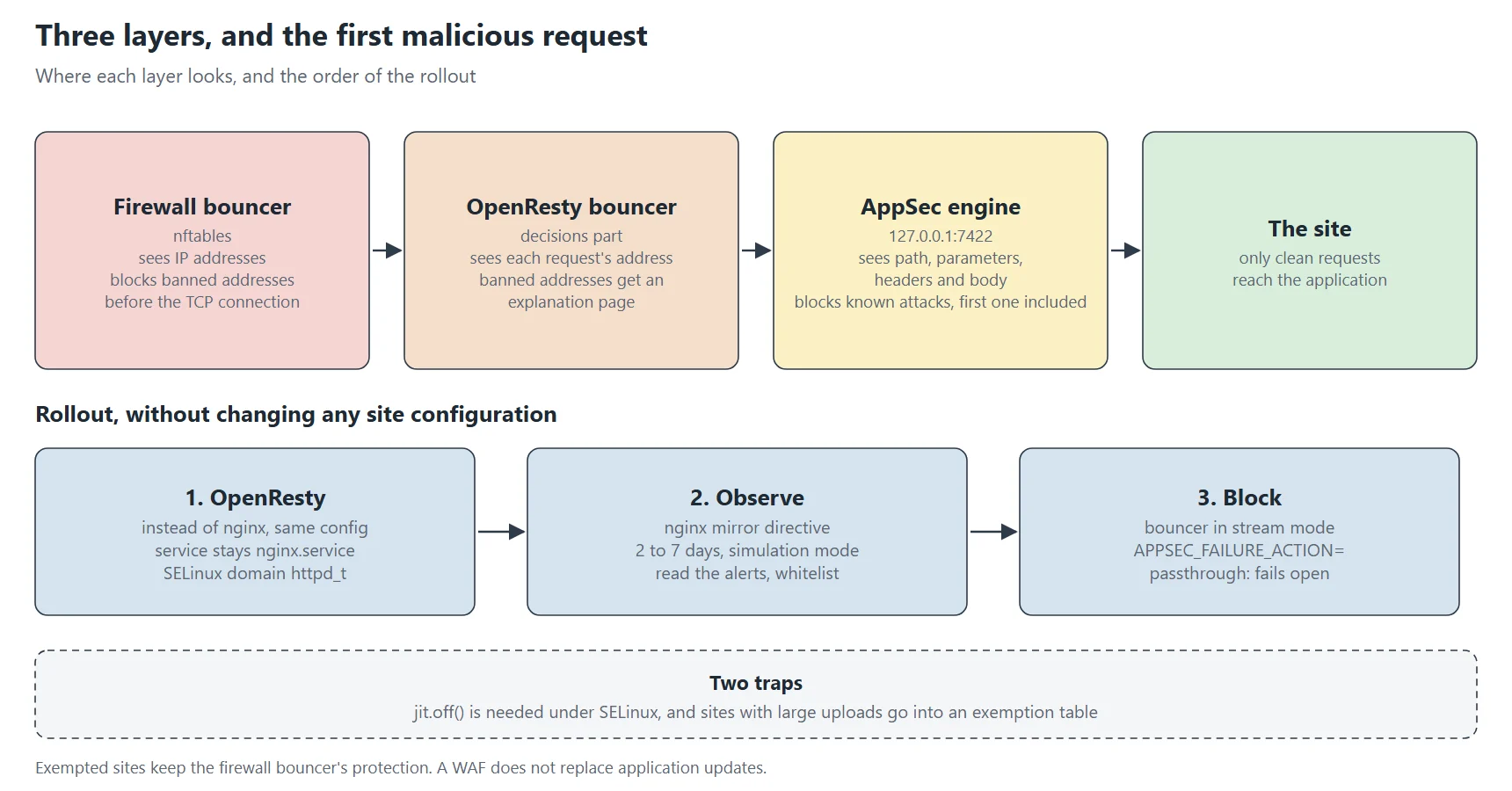
The three layers
| Layer | What it sees | What it blocks |
|---|---|---|
| firewall bouncer (nftables) | IP addresses | already banned addresses, before the TCP connection |
| OpenResty bouncer, decisions part | each HTTP request’s address | banned addresses, with an explanation page |
| AppSec engine | each request’s contents (path, parameters, headers, body) | requests matching a known attack, from the very first one |
An address that triggers the AppSec engine several times ends up banned by a scenario, and then moves to the earlier, cheaper layers.
Step 1: OpenResty instead of nginx, same configuration
OpenResty publishes EL9 packages; there are none for EL10 as I write, but the EL9 ones work on Rocky Linux 10. Install them next to nginx, removing nothing:
dnf install openresty openresty-opm
opm get ledgetech/lua-resty-http=0.17.1
/usr/local/openresty/nginx/sbin/nginx -V 2>&1 | head -3
The lua-resty-http library, which the bouncer needs, is normally installed by the bouncer package’s script, but silently and not always. Install it explicitly, pinning the version.
Keeping the “nginx” identity
The safest way not to break anything is to change only the binary. The service stays nginx.service (monitoring, scripts, logrotate, fail2ban and CrowdSec keep working), the configuration stays in /etc/nginx, the logs in /var/log/nginx, and the process runs as the nginx user. A systemd override replaces the commands:
# /etc/systemd/system/nginx.service.d/openresty.conf
[Service]
ExecStartPre=
ExecStartPre=/usr/local/openresty/nginx/sbin/nginx -p /etc/nginx/ -c /etc/nginx/nginx.conf -t
ExecStart=
ExecStart=/usr/local/openresty/nginx/sbin/nginx -p /etc/nginx/ -c /etc/nginx/nginx.conf
ExecReload=
ExecReload=/usr/local/openresty/nginx/sbin/nginx -p /etc/nginx/ -c /etc/nginx/nginx.conf -s reload
-p /etc/nginx/ sets the prefix: relative paths in the configuration (include mime.types;, for example) resolve as with the original nginx. Also check that the dynamic modules your configuration loads (load_module) exist in OpenResty too: otherwise remove them or find their equivalent.
SELinux
The OpenResty binary must run in the same domain as nginx (httpd_t), or it won’t have access to site files, certificates or PHP-FPM sockets:
semanage fcontext -a -t httpd_exec_t '/usr/local/openresty/nginx/sbin/nginx'
restorecon -v /usr/local/openresty/nginx/sbin/nginx
Testing before switching
Before touching the service, run OpenResty side by side with a copy of the configuration listening on other ports, and compare each site’s HTTP code between the two servers. When everything matches, apply the override and restart. Keep the nginx package installed for a few days: rolling back is then just removing the override.
Step 2: the AppSec engine
cscli collections install crowdsecurity/appsec-virtual-patching crowdsecurity/appsec-generic-rules
# /etc/crowdsec/acquis.d/appsec.yaml
source: appsec
listen_addr: 127.0.0.1:7422
appsec_configs:
  - crowdsecurity/appsec-default
labels:
  type: appsec
- listen_addr: the engine listens locally only; only the web server talks to it;
- appsec-default: the shipped configuration, which loads the virtual patching rules in blocking mode;
- appsec-generic-rules: broader rules (directory traversal, common injections). More useful, but more prone to false positives: that’s where observation matters most.
systemctl restart crowdsec
ss -ltnp | grep 7422
Step 3: observe before blocking
Plugging a WAF straight into blocking means risking breaking a site without noticing: an application sending unusual JSON, an editor posting HTML, a form containing a file path. Start with an observation period using nginx’s mirror directive, which sends a copy of each request to the engine and ignores its answer:
# /etc/nginx/snippets/server.d/crowdsec-appsec-mirror.conf (in each server)
mirror /_crowdsec_appsec_mirror;
mirror_request_body on;
location = /_crowdsec_appsec_mirror {
    internal;
    proxy_pass http://127.0.0.1:7422/;
    proxy_connect_timeout 200ms;
    proxy_send_timeout 1s;
    proxy_read_timeout 1s;
    proxy_set_header X-Crowdsec-Appsec-Ip         $remote_addr;
    proxy_set_header X-Crowdsec-Appsec-Uri        $request_uri;
    proxy_set_header X-Crowdsec-Appsec-Host       $host;
    proxy_set_header X-Crowdsec-Appsec-Verb       $request_method;
    proxy_set_header X-Crowdsec-Appsec-User-Agent $http_user_agent;
    proxy_set_header X-Crowdsec-Appsec-Api-Key    <bouncer key>;
}
By construction, this mode can neither block nor alter real traffic: nginx doesn’t wait for the mirror’s answer to reply to the client. The short timeouts keep a slow engine from holding connections. At the same time, put the AppSec scenarios in simulation (cscli simulation enable) so no address gets banned during this phase.
Let it run for two to seven days, then read what the engine would have blocked:
cscli alerts list --since 72h | grep -i appsec
cscli alerts inspect <id> -d       # the request, the rule, the address
cscli metrics show appsec
For each match, ask two questions: is the address mine or a legitimate user’s? Is the path a normal function of an application? Fix before blocking: whitelist addresses (your own servers), exempt a whole site, or disable one specific rule.
Step 4: switching to blocking
Create a key for the bouncer (cscli bouncers add openresty-bouncer), then configure it:
# /etc/crowdsec/bouncers/crowdsec-openresty-bouncer.conf (excerpt)
API_URL=http://127.0.0.1:8081
API_KEY=<key generated by cscli bouncers add>
MODE=stream
UPDATE_FREQUENCY=10
FALLBACK_REMEDIATION=ban
BAN_TEMPLATE_PATH=/var/lib/crowdsec/lua/templates/ban.html
APPSEC_URL=http://127.0.0.1:7422
APPSEC_FAILURE_ACTION=passthrough
APPSEC_CONNECT_TIMEOUT=100
APPSEC_SEND_TIMEOUT=200
APPSEC_PROCESS_TIMEOUT=500
ALWAYS_SEND_TO_APPSEC=false
- MODE=stream: the bouncer fetches all decisions every 10 seconds and keeps them in shared memory, instead of asking the local API on every request;
- FALLBACK_REMEDIATION=ban: a decision of an unknown type is treated as a ban;
- APPSEC_FAILURE_ACTION=passthrough: if the engine doesn’t answer, the request goes through. A deliberate choice: a WAF that takes every site offline when it fails is worse than no WAF. The trade-off is that you must monitor the engine;
- timeouts (in milliseconds): 100 to connect, 200 to send, 500 for the answer. A local engine answers in a few milliseconds; these values only bound the worst case;
- ALWAYS_SEND_TO_APPSEC=false: an already banned address is rejected directly, without calling the engine.
Then the nginx wiring, at http level:
# /etc/nginx/conf.d/crowdsec-openresty.conf (http level)
lua_package_path '/usr/local/openresty/lualib/plugins/crowdsec/?.lua;;';
lua_shared_dict crowdsec_cache 50m;
lua_ssl_trusted_certificate /etc/pki/tls/certs/ca-bundle.crt;

init_by_lua_block {
    jit.off()
    cs = require "crowdsec"
    local ok, err = cs.init("/etc/crowdsec/bouncers/crowdsec-openresty-bouncer.conf",
                            "crowdsec-openresty-bouncer/v1.2.3")
    if ok == nil then
        ngx.log(ngx.ERR, "[Crowdsec] " .. err)
        error()
    end
}

map $host $crowdsec_appsec_bypass {
    default              0;
    cloud.example.org    1;   # large uploads, WebDAV
    audio.example.org    1;   # audio file uploads
    vault.example.org    1;   # secrets store
}

access_by_lua_block {
    if ngx.var.crowdsec_appsec_bypass == "1" then return end
    require("crowdsec").Allow(ngx.var.remote_addr)
}
The two traps
jit.off(). LuaJIT’s just-in-time compiler needs memory pages that are both writable and executable. SELinux denies them to the httpd_t domain (the httpd_execmem boolean is off, and it’s better left off). Without this line, nginx dies at startup with “runtime code generation failed”. And nginx -t doesn’t see it, because the configuration test doesn’t run init_by_lua: the test passes, the restart fails. The interpreter is plenty for the bouncer’s few calls per request.
Large uploads. The engine caps the size of request bodies it inspects. Sites that receive large files (online storage, WebDAV, audio transcription) then see every upload refused with a 403, with no explanation for the user. Those sites go into the map $host exemption table. Same for streaming applications (websockets) and a secrets store, whose requests are encrypted and look like nothing. Exempted sites keep the firewall bouncer’s protection.
nginx -t && systemctl restart nginx
journalctl -u nginx -n 20 --no-pager | grep -i crowdsec    # "Initialisation done"
Step 5: check
curl -s -o /dev/null -w '%{http_code}\n' https://www.example.org/.env          # 403
curl -s -o /dev/null -w '%{http_code}\n' https://www.example.org/.git/config    # 403
curl -s -o /dev/null -w '%{http_code}\n' https://www.example.org/               # 200
curl -s -o /dev/null -w '%{http_code}\n' https://cloud.example.org/.env        # not 403: exempted site
cscli metrics show appsec
Then test each application’s sensitive functions: login, file upload, publishing an article, saving an admin form. An unexpected 403 is diagnosed with cscli alerts list: the alert gives the rule and the request.
Four hours of a real WAF
On my web server, 2 November 2026 (OpenResty 1.31.8.1, CrowdSec AppSec), four hours after a reboot. First the quick tests:
GET /.env                      -> 403
GET /wp-config.php.bak         -> 404
GET /?id=1' OR 1=1--           -> 200
GET /                          -> 200
The 403 on /.env is a virtual patch blocking. The 404 is the application: no rule needed to fire, the file doesn’t exist. The 200 on a textbook SQL injection is the honest part: the virtual patches block known exploits, not attack families. Generic SQL injection is the job of the OWASP Core Rule Set, which on this server only logs for now (the subject of a later post). Then what the engine saw:
# cscli metrics show appsec        (excerpt)
| Appsec Engine       | Processed | Blocked |
| nginx-appsec-mirror | 69.85k    | 434     |

| Rule ID                                     | Triggered |
| crowdsecurity/vpatch-CVE-2025-29927         | 283       |
| crowdsecurity/experimental-no-user-agent    | 148       |
| crowdsecurity/vpatch-env-access             | 142       |
| crowdsecurity/vpatch-symfony-profiler       | 3         |
| crowdsecurity/vpatch-git-config             | 1         |
| 949110                                      | 733       |
| 901340                                      | 876       |
- vpatch-CVE-2025-29927: 283: probes for a Next.js authorisation bypass, on a server that runs no Next.js at all. Scanners don’t check what you run; they try everything everywhere. That’s why blocking them costs nothing.
- vpatch-env-access: 142: requests for
.envfiles, the most common secret hunt on the web. - Rule numbers in 9xxxxx are the Core Rule Set.
949110(“inbound anomaly score exceeded”) is the line that says “CRS would have blocked this request”: 733 times in four hours. Those are the requests to review before ever switching CRS to blocking, because some are legitimate. - 901340: 876 isn’t an attack: it’s a CRS setup rule that turns on request body inspection, and it fires on many requests that have a body. Counters per rule only make sense once you know what each rule does.
Operating it
- monitor the engine: since it fails open, a stopped engine breaks nothing visible. A probe checking that
/.envreally returns 403 detects that it no longer protects; - document every exemption: for each exempted site, note why. In six months, the question “why isn’t this site protected?” will have an answer;
- hub updates bring new virtual patches: schedule
cscli hub update && cscli hub upgradedaily, followed by a CrowdSec reload; - OpenResty upgrades: run
nginx -t, then a real restart, and check for the “Initialisation done” line in the log.
What a WAF doesn’t do
A WAF blocks known, crude attacks. It doesn’t replace application updates, removing unused plugins, strong passwords or two-factor authentication. It buys time between a vulnerability’s publication and the patch being installed, and it clears most bot noise from the logs. That’s already a lot.
This post is part of a series of sysadmin tutorials (tag “how-to”).
Series “How-to”, tutorial 14/77. · ← Previous tutorial · Next tutorial → (coming 25 Nov) · Version française