How-to: manage Pi-hole settings key by key, and its lists through the API
Manage Pi-hole settings key by key with pihole-FTL –config, keep adlists in sync through the API, and avoid wiping the admin login.
When I manage Pi-hole settings from code, I never push a whole configuration file. In this how-to, I manage Pi-hole settings key by key with pihole-FTL --config, and I keep adlists and allow or deny domains in sync through the API.
Quick answer — read, change and check one Pi-hole setting without touching the rest.
pihole-FTL --config database.maxDBdays       # read one setting
pihole-FTL --config database.maxDBdays 7     # write one setting (key value form)
pihole -g                                    # force a gravity (adlist) update
Details, explanations and checks follow below.
Everything here comes from the Ansible role that configures my Pi-hole. The same ideas work with any tool, or by hand.
Before you start
- Pi-hole v6. Its configuration lives in
/etc/pihole/pihole.toml. - A root shell on the Pi-hole host.
- For the lists only: the admin password of the web interface, because the API asks for a session.
Why I never template the whole file
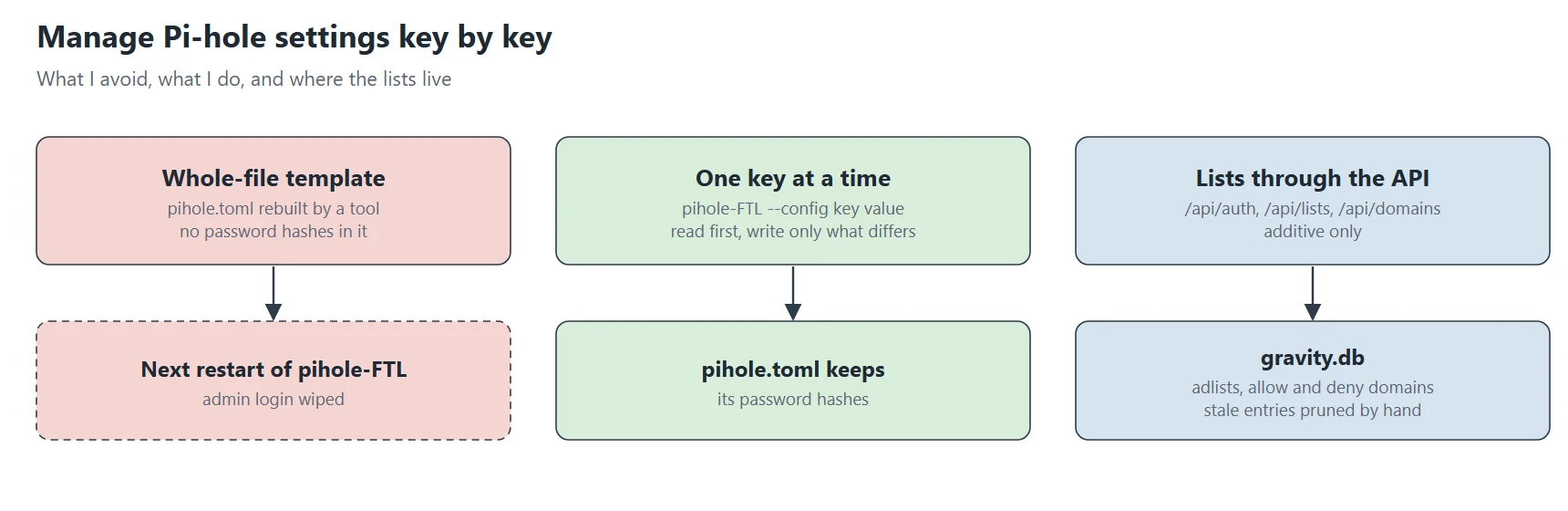
The file /etc/pihole/pihole.toml holds the password hashes of the web interface. They come from pihole setpassword, so a template cannot rebuild them. If my role wrote a whole file without them, the next restart of pihole-FTL would wipe the admin login.
So the role sets each setting on its own with pihole-FTL --config <key> <value>. Pi-hole’s documentation gives the same form, --config key.name value, and says the command can do error checking for you.
How to manage Pi-hole settings with pihole-FTL –config
Step 1: read the current value
First, I read the key. This is also the safest command to run on a live system.
pihole-FTL --config database.maxDBdays
Step 2: write only what differs
Then I write the key, but only when the value differs. My role does this check for me. By hand, you read, compare, and write.
pihole-FTL --config database.maxDBdays 7
Step 3: read it back
Finally, I spot-check the key after a real run. When I wrote the role, I verified the read path on my live Pi-hole, but I had not exercised the write path against production yet. So I run the role in check mode first, and I read the key back afterwards.
pihole-FTL --config database.maxDBdays
Manage adlists and allow or deny domains
The lists do not live in pihole.toml. Adlists and allow or deny domains live in the gravity database, gravity.db. So my role manages them through the local REST API: it opens a session on /api/auth, then works on /api/lists and /api/domains.
The role is additive only. It creates the entries that gravity.db lacks, but it leaves alone the entries that my variables do not list. I built most of my allowlist and denylist by hand with Query Log, then Allow or Deny, in the web interface. A role cannot tell an entry I removed on purpose from one I never declared, so deleting automatically could unblock or reblock something. Instead, I prune stale entries by hand in the web interface and update my variables to match.
Your Pi-hole serves the API documentation at /api/docs, matching your installed version.
To force a refresh of the adlists, run pihole -g. The official installer already adds a weekly cron job for it, on Sundays around 03:57 with a random delay.
Passwords: the trap I hit
pihole setpassword is not idempotent. It builds a new BALLOON-SHA256 hash with a fresh salt every time, so a tool cannot tell the same password from a new one.
On 20 August 2026, I changed the password by hand and forgot to copy it to my secrets manager. The next day, the list management got a 401 on every real run. Because Pi-hole is the only host of that first play, the failure aborted all three plays, and I saw nothing in the dry runs.
Since 28 September 2026, the read-only API calls also run in check mode, so a stale password now fails the dry run with a 401. The rule I follow: after a manual password change, I update the secrets manager the same day.
Check that it worked
pihole-FTL --config <key>prints the value you wrote.- In check mode, the report lists exactly the list entries that a real run would add, because only the POST calls stay simulated.
- The admin login still works after a restart of
pihole-FTL.
If something goes wrong
- A 401 on every API call: the stored password and the live password diverged. Set the live password from your secrets manager again.
pihole deny --regex -lshows zero entries while the database has some: on FTL v6.7, I saw this display quirk. I checked directly againstgravity.dband the three regex entries blocked correctly.- Your admin login disappeared: a tool probably overwrote
pihole.tomlwithout the hashes. Set the password again withpihole setpassword.
What I take away
- I manage Pi-hole settings key by key, because the file holds hashes that no template can rebuild.
- I keep the lists additive, because my tool cannot know what I removed on purpose.
- I sync every manual password change the same day, because the failure stays invisible until a real run.
Sources
- Pi-hole documentation: FTL configuration (pihole-FTL –config, pihole.toml)
- Pi-hole documentation: API (served on your own Pi-hole at /api/docs)
- My own notes on the Ansible role that configures my Pi-hole.